Cost Optimization
Reduce AI spend through intelligent routing, request batching, automated model selection, and live traffic analysis that identifies when lower-cost models can handle workloads effectively.

Reduce runaway LLM spend with intelligent routing, batch processing, usage analytics, and governance controls designed for production AI teams. LLM Token Optimization to Lower API Costs helps engineering and finance leaders understand where tokens are going, route requests to cost-efficient models, prevent budget spikes, and keep quality consistent across OpenAI, Anthropic, Gemini, Grok, and other providers.
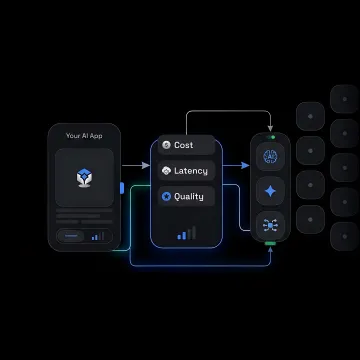
Practical tools to measure, route, govern, and reduce LLM token spend across production AI applications.
Reduce AI spend through intelligent routing, request batching, automated model selection, and live traffic analysis that identifies when lower-cost models can handle workloads effectively.
Automatically route every request to the best available model based on cost, latency, quality, or throughput priorities across 100+ models and providers.
Run high-volume, non-urgent inference jobs more efficiently by batching requests and routing them across providers for lower per-token costs and higher throughput.
Track token usage, request volume, and spend by model, provider, project, and team in one unified dashboard for clearer budget decisions.
Set project-level and API-key-level spend limits, assign roles, and control model access to prevent surprise bill spikes across production AI workloads.
Analyze live API traffic to compare cost, quality, reliability, and latency, then receive a detailed report showing practical optimization opportunities.
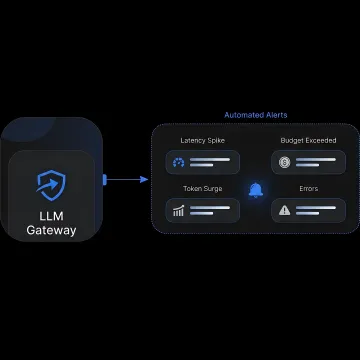
Start by routing live requests through FastRouter’s unified OpenAI-compatible gateway or Audit Service. This captures token counts, cost, latency, provider performance, and model usage patterns needed to identify where API spend is concentrated.
See how production AI teams can control spend while preserving reliability, latency, and output quality.
"Amazing product. Have had a great experience using FastRouter. Reliable access to models across providers helps removes the worry about outages or vendor lock-in."

FastRouter combines cost control, routing intelligence, and observability in one production-ready LLMOps platform.
Route requests to cost-efficient models automatically instead of hard-coding expensive defaults.
Track spend, token usage, latency, and errors across providers in one dashboard.
Set project and API-key limits that prevent runaway usage and surprise invoices.
Use live traffic audits and evaluations to validate savings without guessing.
A focused platform team building production-ready LLM operations.
FastRouter is built as an LLMOps control plane for teams running AI in production across multiple models and providers. Instead of managing separate integrations, dashboards, invoices, guardrails, and routing logic, teams can centralize operations through one OpenAI-compatible API. The platform brings together intelligent model routing, observability, experiment tracking, evaluations, governance, guardrails, consolidated billing, and cost controls so engineering leaders can optimize usage without slowing product development. Its vision is to make production AI infrastructure more reliable, transparent, and financially predictable, giving teams the foundation to scale LLM applications while keeping API spend accountable and performance measurable.
LLM token optimization lowers API costs by matching each request to the most cost-efficient model that still meets your quality, latency, and reliability requirements. FastRouter supports this with intelligent model routing, batch processing, usage analytics, spend limits, and audits that compare real traffic across providers to identify unnecessary premium-model usage.
Get practical guidance on lowering LLM spend without slowing teams down.

Compatible with existing OpenAI SDK workflows.
Unified access across major AI providers.
Spend limits, roles, logging, and controls.
Share your current LLM usage patterns, providers, and cost goals. We’ll help you evaluate routing, governance, analytics, and batch processing options for lowering API spend.
To help us assist you faster, please include the reason for your message so the relevant team can reach out as soon as possible.
To help us assist you faster, please include the reason for your message so the relevant team can reach out as soon as possible.