A unified AI API cuts through that fragmentation and is the foundation of any LLMOps platform — the operational discipline of running LLMs reliably in production. Instead of maintaining separate integrations for each provider, teams use a single endpoint, one API key, and a standardized request format to access all of them.
That said, flipping a switch and calling it done is a mistake. How you configure routing rules, fallback chains, spend caps, and credential access before the first production request hits matters considerably. Get those wrong and you'll end up with unexpected bills, silent authentication failures, or degraded response quality after a model switch.
This guide covers what a unified AI API is, when it makes sense to use one, exactly how to get started, and the variables that determine whether the setup actually delivers.
For teams operationalizing this, FastRouter is the LLMOps platform — one OpenAI-compatible API across 150+ models, sub-10ms overhead, zero markup, with built-in observability and cost governance.
Key Takeaways
- A unified AI API routes requests to multiple LLM providers through one standardized endpoint — no separate SDKs or auth flows required
- Teams with multi-model needs, reliability requirements, or cost control goals benefit most — single-provider deployments likely don't
- Getting started takes three steps: pick a platform, load credentials or credits, and make one OpenAI-compatible API call with the model as a parameter
- Routing strategy, fallback chains, spend limits, and caching policy drive performance and cost in production
- Most failures trace back to skipping credential validation, hardcoding model names, and launching without spend caps
How to Access Multiple LLMs from a Unified AI API Platform
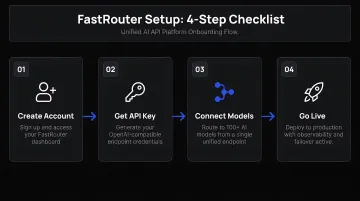
Step 1: Choose and Set Up Your Platform
Not all unified AI API platforms are equivalent. Before signing up, evaluate:
- Model coverage — Does the platform support the providers you need? FastRouter, for example, offers access to 150+ models across OpenAI (GPT-5.5, GPT-5.5), Anthropic (Claude 4 Opus), Google (Gemini 3.1 Pro, Gemini 3.1 Pro), xAI (Grok 4.3), Meta (LLaMA 4), DeepSeek, and others — plus infrastructure providers like Groq, Fireworks AI, and DeepInfra
- Request format — Look for OpenAI-compatible endpoints; this lets you reuse existing SDK code without rewriting integrations
- Pricing model — Usage-based (pay-per-token) versus subscription. FastRouter operates on a usage-based model with no setup fees, no monthly minimums, and free credits for new users — no credit card required
- Documentation depth — Thin docs slow onboarding and create debugging debt
Pre-start checklist:
- Create an account and complete any organization verification steps
- Note the platform's base URL (FastRouter uses
https://go.fastrouter.ai/api/v1) - Confirm the authentication method — FastRouter uses standard API key auth passed as a bearer token
- Verify the platform uses an OpenAI-compatible request format for portability
Step 2: Load Credentials and Configure Provider Access
Two main credential models exist — choose based on your billing and access preferences:
Bring Your Own Keys (BYOK): Paste existing provider API keys into the platform's credential vault. FastRouter supports BYOK, letting teams maintain direct control over their provider relationships and billing while routing through the unified endpoint.
Unified billing credits: Load credits into the platform, which then authenticates with providers using platform-managed keys. FastRouter's pre-paid credits system supports this model, with credits carrying forward up to 12 months.
At this stage, also configure:
- Which providers to enable for routing
- Spend caps and API key limits by project to prevent unexpected billing spikes
- Access scoping by team member or project — FastRouter includes member roles and access controls for this
Step 3: Make Your First Standardized API Call
The request structure is identical regardless of provider. Set the base URL to the platform's endpoint, include your platform API key as the bearer token, and specify the provider and model together in the model parameter.
FastRouter example (Python):
from openai import OpenAI

client = OpenAI(
    base_url="https://go.fastrouter.ai/api/v1",
    api_key="<FASTROUTER_API_KEY>"
)

response = client.chat.completions.create(
    model="anthropic/claude-opus-4-20250514",
    messages=[{"role": "user", "content": "Explain fallback routing in one paragraph."}]
)
To route the same call to a different provider, change only the model parameter — openai/GPT-5.5, google/gemini-3-flash-preview, or xai/grok-4. Nothing else in the code changes. Write the integration once, then switch or combine models through configuration — no code rewrites required.
After the call, verify:
- Which provider and model handled the request (check response metadata or the platform's Activity Log)
- Token counts and latency for baseline benchmarking
- Response format matches your application's expectations
Step 4: Configure Routing Rules, Fallbacks, and Usage Monitoring
Routing configuration is where production systems succeed or break down. Get this right and your application handles provider outages, rate limits, and cost spikes automatically.
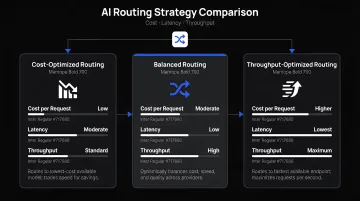
Routing strategy: FastRouter offers three distinct modes:
- Cost Optimized — routes to the model delivering the best accuracy at the lowest cost
- Low Latency — selects the fastest available model for real-time user-facing tasks
- High Throughput — prioritizes models that handle high request volumes at scale
The fastrouter/auto meta-model handles dynamic selection automatically. Teams can also create Virtual Model Lists — unified aliases that mix providers with policy-driven selection — so routing decisions stay outside application code entirely.
Fallback chains: Define a prioritized list of fallback models per use case. Datadog's telemetry found that in March 2026, rate-limit errors alone accounted for nearly 8.4 million LLM call failures. Without fallback configuration, each of those is a hard failure. FastRouter's fallback lists reroute requests instantly to a healthy provider when the primary hits rate limits, returns errors, or goes down.
Spend controls and monitoring: FastRouter provides project and API key level spend limits alongside real-time alerts that fire when AI spend, latency, or error rates breach defined thresholds. The unified dashboard tracks token consumption, latency distributions, error rates, and cost across all connected models and providers in one place.
When Should You Use a Unified AI API?
A unified AI API is not the right fit for every project. Here's how to tell whether your situation actually warrants one.
Strong fit — use it when:
- Your SaaS product embeds AI features and needs flexibility to swap or combine models as the market evolves
- Different teams or workflows within your organization route to different LLMs with separate budget accountability
- You're running model comparison experiments or A/B tests across providers
- Your application requires automatic failover during provider outages — outages do occur, and the gap matters at scale (OpenAI: 99.98% uptime Feb–May 2026; Anthropic: 98.97% over the same period)
- Your team already uses three or more models in production — over 70% of organizations do, per Datadog telemetry, and unified routing saves meaningful setup and debugging time at that scale
Poor fit — reconsider when:
- You have a single, well-matched provider for a stable use case with no plans to change
- Compliance requirements mandate that all inference traffic stays within your own VPC or on-premises infrastructure with no third-party routing layer (a self-hosted gateway is more appropriate here)
- Request volumes are low enough that the added configuration overhead outweighs the routing and observability benefits
Key Parameters That Affect Results
Platform-level configuration affects performance and cost as much as model selection does. Poor defaults are behind most production incidents.
Model Routing Strategy
Three routing modes cover most use cases:
| Mode | Best For | Trade-off |
|---|---|---|
| Static | Predictable workloads, compliance-sensitive tasks | No cost or latency optimization |
| Weighted | A/B testing, gradual model rollouts | Requires manual tuning |
| Dynamic/Intelligent | Mixed workloads, cost-sensitive production apps | Requires clear optimization signal |
FastRouter's Auto Router handles dynamic selection without manual tuning, but teams with specific latency or cost targets should configure explicit routing strategy preferences per project.
Fallback Configuration
Without a fallback chain, a single 429 rate limit error or provider outage produces a hard failure. With one, the request reroutes automatically to the next model in the list.
Structure fallback order around business priorities: speed during peak hours, cost during off-peak. At minimum, configure at least one fallback provider for every model used in a user-facing context.
Spend Limits and Per-Team Cost Allocation
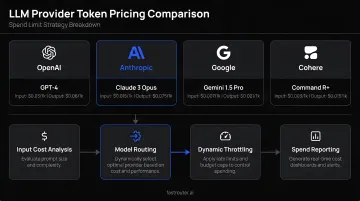
Token pricing varies meaningfully across providers. Anthropic's Claude Opus 4 costs $5 per million input tokens and $25 per million output tokens; Claude Haiku 4.5 runs $1 input and $5 output. Route traffic to the wrong model at scale without spend controls, and bills accumulate faster than dashboards refresh.
FastRouter supports project and API key level spend limits with real-time alerts for cost spikes. Set threshold alerts at 70–80% of your cap — that buffer gives teams time to investigate before hitting the ceiling.
Caching Policy
OpenAI reports that prompt caching can reduce latency by up to 80% and input token costs by up to 90% for eligible requests. Anthropic prices cache reads at 0.1x base input cost. For repetitive query patterns — FAQ-style support, templated summarization — caching is one of the most effective cost controls available.
The risk: overly aggressive caching serves stale responses in dynamic or personalized contexts. Define TTLs and cache scope deliberately rather than accepting platform defaults.
Common Mistakes and Troubleshooting
These are the mistakes most teams encounter when going from setup to production — and the fastest ways to fix them.
Skipping credential validation before routing live traffic
Teams frequently load provider API keys without testing them against their respective endpoints first. The result: silent authentication failures or unexpected 401 errors under production load. Run a lightweight test call for each provider credential during setup before enabling that provider for live routing.
Hardcoding model names in application logic
Hardcoding model strings in your codebase makes every model change a code change — slow, error-prone, and disruptive. Use environment variables or the platform's routing configuration layer instead. FastRouter's Virtual Model Lists and Custom Model Lists externalize model selection entirely, so swapping a model is a configuration update, not a deployment.
Ignoring per-provider rate limits
Anthropic's Tier 1 rate limit for Claude Sonnet 4.x is 50 RPM and 30,000 input tokens per minute. Tier 4 scales to 4,000 RPM and 2,000,000 input tokens per minute. OpenAI and Gemini direct users to their account dashboards for exact limits.
Provider rate limits are independent of the unified platform's own limits — exceeding them at the provider level returns 429 errors regardless of your platform-level configuration. Configure fallback models to handle these automatically.
Not setting spend limits before scaling
A traffic surge, runaway agent loop, or misconfigured retry policy can generate bills across multiple providers simultaneously before any alert fires. Configure project and API key limits before routing live traffic, and enable alerts at 70–80% of your spend cap.
Troubleshooting: 429 Too Many Requests Errors
Likely cause: Rate limit reached on an underlying provider.
What to check: The provider's usage dashboard and the platform's request log — identify which specific provider is throttling. FastRouter's Activity Log surfaces per-request provider details.
Resolution: Activate a fallback model for that provider, or implement request queuing with exponential backoff at the platform level.
Troubleshooting: Response Quality Degrades After Switching Models
Likely cause: Different LLMs respond differently to identical prompt structures. A prompt optimized for GPT-5.5 may produce weaker output from Claude or Gemini without adjustment.
Resolution: Use model-aware system prompts and structured prompt templates — define these per model or model family rather than sharing a single prompt template across all providers. Test output quality against each model independently before routing production traffic.
Alternatives to Using a Unified AI API Platform
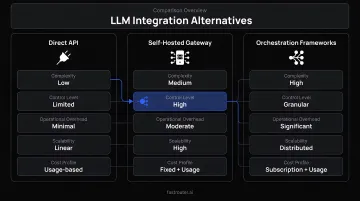
A unified API platform isn't the right fit for every situation. Three alternatives serve specific team profiles — each with real trade-offs worth understanding before you commit.
Direct Provider API Integration
Best for small teams with a single, stable use case tied to one provider — a coding assistant built exclusively on a specialized code model, or a deployment where compliance rules prohibit any third-party routing layer.
The initial setup is simpler and the provider relationship direct. The ceiling hits fast, though: each additional provider requires a separate SDK integration, authentication flow, and billing account, with no automatic fallback and fragmented cost visibility as needs grow.
Self-Hosted AI Gateway
Best for large enterprises in regulated industries — financial services, healthcare, government — where inference traffic must stay inside a private VPC or on-premises environment, with full data sovereignty and audit trails.
You own the routing logic, logs, and data residency entirely. The infrastructure cost is substantial. LiteLLM, a popular open-source option, specifies the following for production use:
- At least 4 CPU cores and 8 GB RAM
- PostgreSQL and Redis 7.0+
- Docker, Kubernetes, or Terraform for deployment
Teams then build and maintain observability, fallback logic, and cost tracking on top of that — without any managed support.
LLM Orchestration Frameworks (LangChain, LlamaIndex)
Best for teams building complex agentic workflows, RAG pipelines, or multi-step chains that need granular control over how models are sequenced and how outputs are processed between calls.
The flexibility ceiling is high. The engineering cost matches it — routing, fallback, cost tracking, and observability each require separate implementation. This path suits teams with dedicated ML engineering resources who need control no managed platform offers.
Frequently Asked Questions
Frequently Asked Questions
Which API is best for AI?
It depends on the workload. GPT-5.5 class models lead on general reasoning, Claude on long-context and nuanced tasks, Gemini on multimodal inputs. A unified AI API platform lets teams access and benchmark all of them through a single endpoint — no separate integrations required.
What is a unified AI API and how does it work?
A unified AI API is a single endpoint that routes requests to multiple LLM providers using a standardized request format. Provider-specific authentication, SDKs, and response formatting are abstracted behind that interface — the provider and model are selected as a parameter in the request rather than through separate integrations.
Can I use OpenAI and Anthropic simultaneously through one API?
Yes. Unified AI API platforms like FastRouter support multiple providers simultaneously. Specify which model handles each request in the model parameter (e.g., openai/GPT-5.5 or anthropic/claude-opus-4-20250514), or configure routing rules that automatically select the best-fit model based on task type, cost, or latency.
What is the difference between a unified AI API and an AI gateway?
An AI gateway is the infrastructure layer managing traffic, security, and observability between an application and AI providers. A unified AI API is the standardized developer interface for sending requests. In practice they overlap — most unified AI API platforms, including FastRouter, are implemented as AI gateways under the hood.
How do I switch LLM providers without rewriting my application code?
The provider and model are specified as a parameter in each API call. Swapping openai/GPT-5.5 for anthropic/claude-opus-4-20250514 in the model field requires no application logic changes. Alternatively, use a Virtual Model List alias so routing changes happen entirely through configuration — the model parameter never changes.
How does a unified AI API platform handle billing across multiple providers?
Instead of reconciling separate invoices from each provider, a unified AI API platform consolidates usage and billing into a single view. As the foundation of an LLMOps platform, FastRouter's built-in usage dashboards track token consumption and API call volume by project and provider, and the same control plane covers routing, evaluations, guardrails, and governance — making cost attribution and usage-based billing straightforward to manage across the full LLM lifecycle.