That scenario is playing out in real organizations. When NYC's AI chatbot gave businesses illegal advice in early 2024, the city acknowledged deleting interaction data within 30 days — meaning forensic analysis was largely impossible. Air Canada faced legal liability the same year after its chatbot provided incorrect fare information, with no audit trail to contest the user's account.
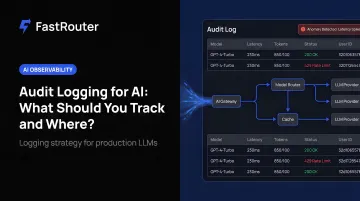
Audit logging for AI is no longer optional — it is a governance function within LLMOps, the operational discipline for managing LLMs reliably in production, and teams that treat it as a separate compliance task rather than part of their core LLM infrastructure consistently face fragmented trails and audit gaps. This guide covers what an AI audit log is, the specific fields to capture, how logging changes for autonomous agents, where logs should live, and what compliance frameworks actually require.
For teams operationalizing this, FastRouter is the LLMOps platform — one OpenAI-compatible API across 150+ models, sub-10ms overhead, zero markup, with built-in observability and cost governance.
Key Takeaways
- AI audit logs must capture user identity, full prompt, model version, safety trigger outcomes, and latency/cost metadata
- Agent workflows require step-level logging of every tool call, API invocation, and handoff — the final output alone is insufficient
- The EU AI Act (Articles 12 and 26) mandates logs for high-risk AI systems, with deployers retaining them for at least six months
- Log storage must be tamper-evident: write-once, cryptographically hashed, and isolated from the application that generated them
- Platforms like FastRouter that centralize logging across multiple models and providers make compliance significantly easier than per-tool, siloed approaches
What Is an AI Audit Log?
An AI audit log is a structured, time-ordered record of every significant event within an AI system — user inputs, model outputs, data accessed, decisions made, and administrative actions — built for accountability and forensic traceability.
Traditional logs capture system events: HTTP requests, error codes, response statuses. AI audit logs must capture something richer:
- Intent — the prompt the user actually sent
- Reasoning context — retrieved documents, memory, or conversation history that shaped the response
- Outcome — the exact text the model generated, and any safety interventions that occurred
This distinction matters in practice. A 500 error in a traditional app log tells you the server failed. A complete AI audit log entry tells you what the model was asked, what context it had, what it said, and whether any guardrail triggered.
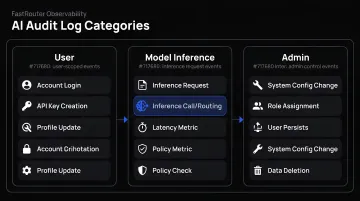
The Three Log Categories
Most AI systems require three distinct log types for a complete picture:
- User-level activity logs — who triggered the interaction, when, and from where
- Model inference and output logs — the full prompt-response pair, model version, parameters, and token counts
- Admin and system-level logs — configuration changes, access control updates, and deployment events
What Should You Track in an AI Audit Log?
Tracking everything is neither practical nor useful. The goal is capturing the minimum data needed to reconstruct any AI interaction for security investigation, debugging, cost analysis, or compliance review.
User-Level Activity Fields
Every log entry should identify the human (or system) that triggered the interaction:
user_idorsession_id— who initiated the requesttimestamp(UTC) — time-zone-agnostic forensics- IP address or device context — for access anomaly detection
- Authentication method used
- Application or interface through which AI was accessed (chat UI, API, embedded copilot)
Model Inference and Output Fields
To reconstruct an AI interaction, capture:
- The full prompt sent, including any system prompt
- Model name and version
- Temperature or sampling parameters
- Input and output token counts
- The complete model response
- Retrieved context chunks and source document IDs (for RAG systems)
- Latency and cost metadata
Why model version matters: when a provider releases an update, the same prompt can produce different outputs. Without version tracking alongside each response, debugging regressions or policy violations after a model update becomes nearly impossible. FastRouter's observability layer captures per-request model and provider data across its catalog of 150+ models — making this traceable without custom instrumentation.
That said, full prompt-response logging creates its own problem in regulated industries: those logs may contain PII or PHI even when legally required to retain them. OpenAI's Agents SDK addresses this directly with a trace_include_sensitive_data control that suppresses sensitive content capture. Any organization logging full prompt-response pairs needs a data classification policy in place before logging begins — not after an incident surfaces the gap.
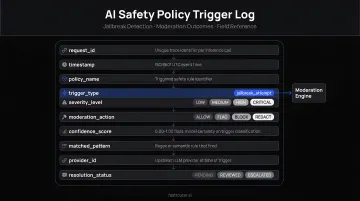
Safety and Policy Trigger Fields
These fields are often omitted — and consistently needed when an incident occurs:
- Whether a content policy, guardrail, or acceptable use rule triggered (and which one)
- Whether a jailbreak attempt was detected
- Whether sensitive data categories (PII, PHI, financial data) were present in the prompt or response
- The outcome of any moderation filter: blocked, flagged, or passed
Microsoft Purview's Copilot audit logs are instructive here — they explicitly capture a JailbreakDetected boolean, an XPIADetected flag for prompt injection attempts, and PolicyDetails containing rule identifiers when access is blocked. Azure OpenAI monitoring separately tracks RAIRejectedRequests and RAIHarmfulRequests as distinct metric fields. That level of granularity is what incident response requires.
Admin and System-Level Activity Fields
Inference-time logs capture what models did. Admin logs capture what humans configured:
- Model deployments and version changes
- Prompt template updates
- Integration and plugin additions
- Access control changes (grants and revocations)
- Manual overrides of AI-generated decisions
These map to what Google Cloud calls "Admin Activity" logs — distinct from data access logs, but essential when an incident traces back to a configuration change rather than a model request.
Audit Logging for AI Agents: A Special Case
Standard LLM chatbots generate one prompt and one response. AI agents are different. A single user request can trigger an agent to call three external APIs, read a file, execute code, and hand off to a sub-agent — each of those steps is a loggable event. Log only the final output and you've captured almost nothing useful.
What to Log at Each Agent Step
For every action in an agent's reasoning chain, capture:
- Action type: tool call, retrieval, sub-agent handoff, code execution
- Tool or API invoked and its parameters
- Input passed to the tool and output received
- Whether the action was human-approved or autonomous
- Step position in the reasoning chain (for example, step 3 of 7)
The OpenAI Agents SDK handles this through nested spans with parent_id fields. Each span records start and end times, and the parent-child structure preserves the full decision trace. AutoGen takes a similar approach using OpenTelemetry tracing. In both cases, the goal is the same: log the chain of reasoning, not just the conclusion.
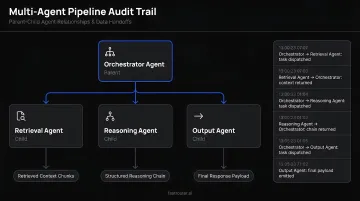
Multi-Agent Pipelines
Per-step logging solves the single-agent case. When one agent orchestrates others, the problem compounds. The audit trail must capture:
- Parent-child relationships between agents
- Each agent's identity
- Data passed between agents at each handoff
Without this, attributing a harmful or erroneous action in a complex pipeline is impossible. If Agent A passes flawed context to Agent B, which then makes a bad decision, a flat log showing only Agent B's output provides no useful accountability.
Regulatory Context
EU AI Act Article 12 requires high-risk AI systems to technically enable automatic recording of events over the system's lifetime, with traceability appropriate to the system's intended purpose. Article 26 requires deployers to retain automatically generated logs for at least six months unless otherwise specified by law.
The Act's definition of an AI system explicitly includes systems that operate with varying levels of autonomy. For teams building agentic applications, that makes agent action logs a compliance requirement, not just a debugging tool.
Where Should AI Audit Logs Be Stored?
Where logs live determines how queryable, tamper-evident, and cost-effective they are over time. Most organizations need a tiered approach:
| Tier | Timeframe | Purpose |
|---|---|---|
| Hot storage | 30–90 days | Active security monitoring, incident response, real-time querying |
| Cold/archival storage | 90 days to several years | Regulatory retention, historical forensics |
Primary Storage Destinations
- Cloud-native audit logging services (AWS CloudTrail, Google Cloud Audit Logs, Azure Monitor) — strong for infrastructure-layer events; Azure Monitor Log Analytics supports retention from 4 to 730 days
- SIEM platforms (Splunk, Microsoft Sentinel) — for correlation, alerting, and cross-system pattern detection
- Centralized data lakes or lakehouses — for cross-system analytics at scale
- AI gateway platforms — for unified logging across multiple models, providers, and agent tools in a single audit trail
For AI workloads specifically, a centralized log aggregator that unifies user, inference, agent, and admin logs is preferred over per-tool siloed logs. Siloed logs per provider create fragmentation that makes incident response and compliance audits significantly harder.
FastRouter's LLMOps platform captures complete logs of every LLM request and response across all connected models and providers in a searchable, unified activity log — purpose-built to address this fragmentation problem. Because audit logging is one governance layer within FastRouter's unified control plane, it feeds directly into the same platform as routing, observability, evaluations, guardrails, and cost governance — rather than requiring a separate logging infrastructure alongside your LLM stack.
Tamper-Evidence Requirements
Audit logs must be tamper-evident. The practical requirements:
- Write-once storage — logs cannot be modified after creation
- Cryptographic hashing — AWS CloudTrail's log file integrity validation uses SHA-256 hashing and SHA-256 with RSA digital signing to detect whether a log file was modified, deleted, or unchanged after delivery
- Separate storage from the application that generated the logs — a compromised AI system must not be able to erase its own trail
- Role-based access controls that prevent log deletion
Compliance and Governance: What Regulations Actually Require
Different frameworks impose different obligations. Map your logging practices to each regime rather than treating compliance as a single universal checklist.
| Framework | Relevant Requirement | Key Article or Section |
|---|---|---|
| GDPR | Records of processing activities, including automated decision-making safeguards | Articles 22 and 30 |
| HIPAA | Audit controls recording activity in ePHI systems | 45 CFR 164.312(b) |
| SOC 2 | Logical access controls and security event monitoring | TSC CC6, CC7 |
| EU AI Act | Automatic event logging for high-risk AI; deployer retention obligations | Articles 12, 16, 26 |
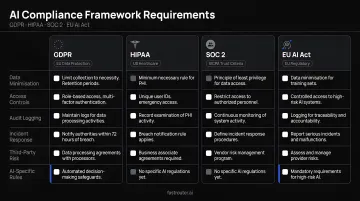
GDPR Article 30 requires controllers to maintain records of processing activities, including purposes, data categories, recipients, and security measures. HIPAA 45 CFR 164.312(b) requires hardware, software, or procedural mechanisms that record and examine activity in systems containing or using ePHI.
In regulated industries, the prompt-response log may itself constitute a regulated record — subject to defined retention periods, access controls, and regulator review on request. That means AI audit logs need the same data governance treatment as any other compliance record.
The Monitoring Effect
Compliance requirements set the floor, but a visible audit logging program delivers a governance benefit that goes beyond regulatory checkboxes: behavioral deterrence.
A 2014 retrospective cohort study published in BMJ Quality & Safety found hand hygiene compliance of 88.9% during monitored periods versus 31.5% overall — a textbook Hawthorne effect. Employees behave more carefully when they know actions are being logged. A visible AI audit log program works the same way: it's a standing deterrent against misuse, not just a post-incident investigation tool.
Best Practices for AI Audit Log Management
Log Based on Risk, Not Volume
Not every AI interaction warrants identical logging depth. A search autocomplete suggestion is categorically different from an AI-generated medical summary or an autonomous agent making a financial decision.
Conduct a logging risk assessment:
- Identify which AI interactions involve sensitive data, regulated decisions, or autonomous agent actions
- Define comprehensive logging requirements for high-risk interactions
- Apply lighter logging to low-risk, high-volume interactions to manage cost and storage
This aligns with how the EU AI Act structures its own requirements — logging obligations attach to high-risk systems specifically, not to every AI deployment.
Retention and Review Policies
- Document written retention policies specifying how long each log category must be kept, tied to the regulatory requirements you're subject to
- Implement automated alerting for anomalous patterns — Microsoft's documented alert signals include
RAIRejectedRequests,RAIHarmfulRequests, andRAIAbusiveUsersCount; FastRouter provides real-time alerts when spend, latency, or error rates breach defined thresholds - Schedule periodic human review of log samples for high-risk use cases — anomaly detection catches patterns, but human judgment catches context
Using AI to Analyze AI Logs
LLM-based log analysis tools can classify interaction patterns, surface anomalies, flag prompt injection attempts, and generate compliance summaries faster than manual review. Several platforms support this kind of trace analysis out of the box:
- OpenAI Traces dashboard — visual trace inspection for chat and completion calls
- AutoGen's OpenTelemetry integration — structured telemetry for multi-agent workflows
- LangSmith — observability and evaluation tooling across LangChain-based pipelines
That said, the AI system analyzing your logs also needs governance. Its outputs are consequential — misclassifying a policy violation as benign, or flagging legitimate interactions as suspicious, carries real operational and compliance risk. Treat your log analysis layer as a production AI system: version its prompts, monitor its outputs, and maintain a human review step for high-stakes classifications.
Frequently Asked Questions
What is an AI audit log?
An AI audit log is a structured record of all events within an AI system — including user inputs, model outputs, data accessed, and admin changes — used for security monitoring, compliance, and incident investigation. Unlike traditional application logs, AI audit logs capture intent (the prompt), context (retrieved data), and outcome (the generated response).
What should be included in an AI audit trail for decisions made by AI?
At minimum: user identity, timestamp, the full prompt, model version and parameters, retrieved context, the model's response, and safety policy outcomes. For regulated industries, each entry should also record whether human review occurred before the decision was acted upon — and treated as a formal compliance record.
How do you audit AI agent activity?
Auditing agents requires logging each step of the reasoning chain — every tool call, API invocation, retrieval, and sub-agent handoff — not just the final output. Frameworks like the OpenAI Agents SDK and AutoGen support this through parent-child spans that reconstruct the full sequence of autonomous actions.
How do companies track AI usage?
Most companies combine platform-native audit logs (Microsoft Copilot, AWS Bedrock), API gateway logs, and SIEM integrations. Purpose-built LLMOps platforms like FastRouter go further — centralizing usage data across multiple models and providers into a single audit trail that also covers routing decisions, cost attribution, and guardrail events from one control plane.
Can AI be used to analyze AI audit logs?
Yes — LLM-based tools can parse, classify, and summarize audit logs to detect anomalies, flag policy violations, and generate compliance reports at scale. Using AI for log analysis does introduce its own governance layer, though: the analysis system itself needs oversight, validation, and auditability.
What are the key pillars of responsible AI governance and compliance?
Four pillars underpin responsible AI governance: transparency (explainability and auditability), accountability (clear ownership of AI outputs), data governance (controlling what AI systems can access), and traceability (audit logs that demonstrate ongoing compliance). Regulated teams should treat all four as non-negotiable.