API Key Limits
Create and manage API access through an OpenAI-compatible gateway, with project-level and key-level controls for usage, spend, and model availability across 100+ AI models.
Control who can use your AI models, how keys are scoped, and how much each project can spend. FastRouter centralizes LLM API key management, access control, usage limits, logging, and governance across 100+ models through one OpenAI-compatible gateway, helping engineering, platform, and security teams move faster without losing oversight.
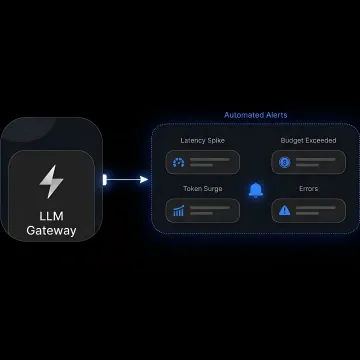
Centralize AI access, budget controls, permissions, logging, and governance across models and providers.
Create and manage API access through an OpenAI-compatible gateway, with project-level and key-level controls for usage, spend, and model availability across 100+ AI models.
Assign member roles and govern which users, projects, and applications can access specific models, helping teams protect sensitive or costly AI capabilities.
Set limits at the project and API-key level to prevent overspend, reduce surprise bill spikes, and keep AI budgets accountable across teams.
Capture request and response details, including model, provider, latency, token counts, cost, and outcome, for debugging, audits, and governance review.
Validate inputs and outputs at the gateway to enforce safety, compliance, response structure, and policy consistency across every connected model provider.
Track usage, spend, request volume, and consumption by model, provider, project, and team from a unified dashboard built for operational clarity.
FastRouter brings API keys, roles, limits, guardrails, logging, and usage visibility into one control plane for production AI. Instead of managing access separately across OpenAI, Anthropic, Gemini, xAI, and other providers, teams can apply policies once at the gateway and keep development flexible while finance, security, and platform leaders maintain control.
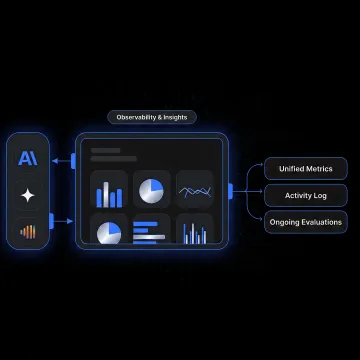
See how production AI teams gain tighter access control and clearer spend accountability.
"Excellent platform to test the latest LLMs for our use case. With new LLMs coming out every few weeks and benchmarks not giving the full picture, I rely on Fastrouter.ai to optimize my cost vs quality balance."

"Amazing product. Have had a great experience using FastRouter. Reliable access to models across providers helps removes the worry about outages or vendor lock-in."

"FastRouter is a good value add, specifically when you are not sure which LLM is better for your use cases. You can play around with models, can compare against them, and then use normal OpenAI compatible APIs call to leverage the full potential of it."

"Excellent platform to test the latest LLMs for our use case. With new LLMs coming out every few weeks and benchmarks not giving the full picture, I rely on Fastrouter.ai to optimize my cost vs quality balance."
"Amazing product. Have had a great experience using FastRouter. Reliable access to models across providers helps removes the worry about outages or vendor lock-in."
"FastRouter is a good value add, specifically when you are not sure which LLM is better for your use cases. You can play around with models, can compare against them, and then use normal OpenAI compatible APIs call to leverage the full potential of it."
"Excellent platform to test the latest LLMs for our use case. With new LLMs coming out every few weeks and benchmarks not giving the full picture, I rely on Fastrouter.ai to optimize my cost vs quality balance."
"Amazing product. Have had a great experience using FastRouter. Reliable access to models across providers helps removes the worry about outages or vendor lock-in."
"FastRouter is a good value add, specifically when you are not sure which LLM is better for your use cases. You can play around with models, can compare against them, and then use normal OpenAI compatible APIs call to leverage the full potential of it."
FastRouter gives teams a controlled, observable, and scalable way to operate LLMs.
One OpenAI-compatible gateway centralizes access across 100+ models and major AI providers.
Project and key-level limits help prevent overspend before AI usage becomes unmanageable.
Roles, permissions, guardrails, and logs support safer production AI operations across teams.
Automatic failover, routing, alerts, and monitoring help keep model-dependent applications resilient.
A control plane team focused on production AI operations.
FastRouter is built for teams moving from experimental AI usage to production-grade LLM operations. Its platform acts as a single OpenAI-compatible control plane for routing, observability, experiment tracking, guardrails, cost governance, and evaluations across 100+ models. Rather than forcing engineering teams to manage separate provider integrations, disconnected keys, and scattered billing data, FastRouter centralizes the operational layer around AI usage. The vision is straightforward: help businesses adopt powerful AI models safely, reliably, and intelligently, with the controls platform, security, finance, and product teams need to scale responsibly.
To get an AI gateway API key with FastRouter, start with initial platform access, which includes free credits and does not require a credit card. After creating or selecting a project, generate an API key and apply project-level or key-level limits. You can then point OpenAI-compatible SDK code to the FastRouter base URL and begin routing requests through the gateway.
Get practical guidance on secure AI access and governance.

Works with existing OpenAI SDK integrations.
Policies apply automatically at the gateway.
Logs support debugging, audits, and oversight.
Tell us how your team manages AI access today, and we’ll help you map keys, projects, limits, and governance policies to a cleaner FastRouter setup.
To help us assist you faster, please include the reason for your message so the relevant team can reach out as soon as possible.
To help us assist you faster, please include the reason for your message so the relevant team can reach out as soon as possible.