For growing businesses, this status quo carries real costs: wasted labor hours, compliance gaps, and financial data that's always three weeks behind reality.
AI spend management software changes this equation. By combining machine learning, predictive analytics, and automation, these platforms process, categorize, and monitor business spend in real time — giving finance leaders the visibility to make faster, better decisions instead of just reconciling past ones.
This guide covers how AI spend management software works, what ROI looks like, and how to choose and implement the right solution.
TL;DR
- 60% of AP teams still manually process invoices — AI automates capture, categorization, and policy checks in real time
- AI platforms deliver measurable gains: 52% fewer expense errors, 65% more compliant reports, and 50% faster reimbursements (IDC, 2022)
- Expense fraud appears in 13% of occupational fraud cases, with a median loss of $36,000 — AI anomaly detection reduces both frequency and duration
- ROI varies significantly by company size and scope — mid-market firms typically see payback within 12–18 months, while enterprise deployments often achieve it faster through volume savings
- Successful implementation requires data readiness, employee buy-in, and aligning tool selection to your team's specific workflow gaps
What Is AI Spend Management Software?
AI spend management software uses OCR, machine learning, analytics, and generative AI to capture spend data from receipts, invoices, cards, and purchase workflows. It then classifies that data, enforces policy, detects anomalies, and surfaces real-time visibility across expenses, vendor invoices, procurement, and budgets.
That scope matters. "Spend management" isn't synonymous with expense reports. It covers the full lifecycle:
- Employee expenses and reimbursements
- Vendor invoices and accounts payable
- Procurement and purchase orders
- Budget tracking and forecasting
How It Differs from Basic Expense Tracking
Basic expense tools record spend after submission. AI-powered platforms predict fields, auto-categorize transactions, check policy before approval, and flag anomalies before money leaves the company.
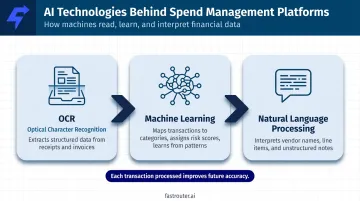
Three core technologies make this possible:
- OCR (Optical Character Recognition): extracts structured data from receipts and invoices
- Machine learning — maps transactions to categories, learns from historical patterns, and assigns risk scores to flag suspicious spend
- Natural language processing — interprets unstructured data like vendor names, line items, and notes
Each transaction the system processes improves future categorization accuracy — which means fewer manual corrections and tighter policy enforcement as adoption grows.
How AI Spend Management Software Works
Modern platforms function as a unified system where each capability feeds the next, not a collection of isolated features.
Smart Receipt Capture and Data Extraction
AI-powered OCR scans receipts, invoices, and digital documents to extract key fields automatically: merchant name, date, amount, and category. SAP Concur's ExpenseIt, for example, uses OCR to derive text from receipts and applies ML confidence scoring to predict vendor, location, currency, and amount. For complex hotel folios, generative AI steps in to itemize line items after a privacy filter strips personally identifiable information.
SAP Concur and comparable platforms report over 99% OCR accuracy on structured documents — a threshold that eliminates most manual data entry at the point of capture, though accuracy varies with document quality and format complexity.
Automated Expense Categorization
Once data is extracted, ML models map transactions to the correct spend categories based on historical patterns and company-specific rules. Platforms like Emburse support intelligent categorization across 39+ expense categories, with the system continuously refining its predictions as more transactions flow through.
Accurate categorization at this stage is what makes downstream policy enforcement reliable — the system can only flag violations it has correctly classified.
Real-Time Policy Enforcement
Rather than catching violations during audit, AI checks every submitted expense against company policy at the moment of submission. Out-of-policy purchases get flagged — or declined — before they reach an approver.
Oversight's analysis of 10 million T&E transactions found that 20% of travelers had at least one non-compliant transaction, with 2.8% of all transactions classified as suspicious out-of-pocket spend. Real-time enforcement catches this at scale instead of sampling after the fact.
Fraud Detection and Anomaly Monitoring
AI detects behavioral anomalies, not just rule violations. This includes duplicate receipts, unusual spend patterns, and AI-generated or altered documentation. Oversight's 2025 Receipt Analytics capability claims over 90% accuracy detecting fraudulent and AI-generated receipts, with 80% fewer false positives than keyword or OCR-only systems.
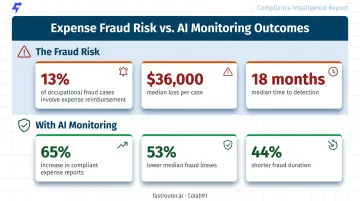
The ACFE's 2026 Report to the Nations found that proactive data monitoring was associated with 53% lower median fraud losses and 44% shorter fraud duration — making continuous AI monitoring a materially better control than periodic manual review.
Spend Analytics and Forecasting
All captured spend data aggregates into real-time dashboards, giving finance leaders a live view of where money is going. Common use cases include:
- Tracking budget consumption by department, vendor, or project as it happens
- Identifying high-spend vendors eligible for renegotiation
- Spotting seasonal or cyclical patterns to improve forecast accuracy
- Modeling future spend scenarios from historical trends
This replaces the traditional workflow of waiting for month-end closes to understand spending that already occurred.
Key Benefits of AI Spend Management Software
AI spend management delivers value across three dimensions: time savings, financial accuracy, and strategic control. The benefits compound as the system processes more data and refines its models.
Reduced Manual Workload
Automating data entry, categorization, and approval routing eliminates hours of administrative work per employee each month. Ramp reports that businesses using their platform saved an average of 4.2 hours per employee per month in 2024 from automating expense reporting alone. At scale, that's significant finance team capacity freed for higher-value analysis.
Improved Accuracy and Fewer Errors
Manual expense processing introduces misclassifications, duplicate entries, and lost receipts — all of which create downstream rework. An IDC study on SAP Concur users reported:
- 52% fewer expense report errors
- 52% fewer lost receipts
- 43% less time spent filling out expense reports
For finance teams still running manual workflows, those numbers translate directly into hours recovered and restatements avoided.
Stronger Compliance and Fraud Prevention
Real-time policy enforcement and anomaly detection work together to reduce violations before they become liabilities. IDC found a 65% increase in compliant expense reports among organizations using automated spend management. And when violations do occur, complete digital audit trails make remediation (and audit preparation) faster.
The fraud risk is material: ACFE data shows expense reimbursement schemes appear in 13% of occupational fraud cases, with a $36,000 median loss and an 18-month median duration before detection. Automated monitoring can cut that detection window from months to days by flagging anomalies at the point of submission.
Real-Time Spend Visibility
Finance leaders gain up-to-the-minute dashboards showing spend by department, project, vendor, or employee. That visibility changes how budget management actually works:
- Spot overspending trends before they hit budget limits
- Redirect funds mid-cycle rather than waiting for month-end close
- Align department leads on actuals without waiting for finance to run reports
Better Employee Experience
Slow reimbursements and clunky submission flows are where expense policy compliance breaks down. IDC reported reimbursement times falling 50% — from 3.6 weeks to 1.8 weeks — for SAP Concur users. Faster reimbursement isn't just a morale win; it also improves policy adherence, since employees are less likely to work around a process that actually works for them.
The ROI of AI Spend Management Software
ROI from AI spend management typically comes from three sources: labor savings, fraud and compliance cost reduction, and faster financial close. Together, these savings often produce payback in under six months.
Labor and Processing Cost Savings
IDC's 2022 white paper on SAP Concur — based on interviews with 10 organizations averaging 31,900 employees — reported 628% ROI with a 5.3-month payback period, driven in part by a $777,000 average annual reduction in T&E and reporting costs. A separate IDC snapshot for the same platform reported $1.6M in average annual savings and 406% three-year ROI.
These figures reflect large enterprise deployments. Smaller companies should expect lower absolute dollar savings but comparable percentage efficiency gains — Ramp's 4.2 hours per employee per month benchmark is more relevant at the SMB level.
Fraud and Compliance Cost Reduction
ACFE estimates organizations lose approximately 5% of annual revenue to occupational fraud broadly. Expense reimbursement schemes specifically run 18 months on average before detection without automated controls. Earlier detection — driven by AI anomaly scoring — compresses that loss window significantly.
Faster Financial Close and Cash Flow Benefits
Beyond fraud savings, compressing the expense lifecycle also reshapes how finance teams operate at close. Automating data capture and categorization delivers several measurable benefits:
- Reduces time chasing receipts during month-end close
- Shifts finance team capacity from data entry to analysis
- Improves cash flow forecasting when actuals are available in real time, not two weeks later
How to Calculate Your Potential ROI
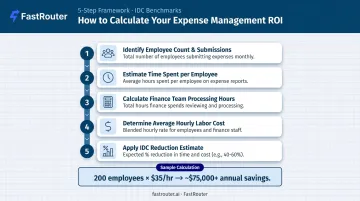
A simple framework for estimating labor savings:
- Count employees who submit expenses monthly
- Estimate current hours spent per employee on expense submission, categorization, and approvals (typically 1–3 hours/month)
- Add finance team hours spent processing, reviewing, and correcting reports
- Multiply total hours × average hourly labor cost
- Apply a 40–50% reduction estimate based on IDC benchmarks for automated platforms
For a 200-person company where employees average 2 hours/month and finance spends 40 hours/month on reports, at a $35 blended hourly rate, that's roughly $168,000 in annual labor exposure. Automation targeting 45% of that yields a $75,000+ annual saving before fraud prevention and compliance gains are counted.
Best Practices for Implementing AI Spend Management Software
Assess Current Pain Points Before Selecting a Tool
Audit your current expense process before evaluating software. Where do submissions pile up? Where do errors occur most frequently? Where do policy violations slip through?
Common friction points include invoice data entry backlogs, duplicate submissions, and approval delays. Mapping these to specific tool capabilities means you buy what you'll actually use — not a feature list that looks good in a demo.
Clean and Centralize Your Data
AI models perform only as well as the data they train on. Before go-live, consolidate historical spend data, standardize GL category mappings, and resolve duplicate vendor records. A clean data foundation produces accurate early categorization predictions. This matters because inaccuracies in the first weeks erode user trust and stall adoption before it takes hold.
Train Your Team and Communicate the Change
Most spend management rollouts fail because of people, not software. Employees who see the tool as surveillance rather than convenience won't use it consistently.
Frame the rollout around what's in it for them:
- Faster reimbursements (IDC benchmarks: down from 3.6 to 1.8 weeks)
- No more manual receipt logging
- Fewer rejected reports requiring resubmission
Short, practical training sessions at launch reinforce these benefits in concrete terms. Consistent usage from day one also produces better ML training data, which improves categorization accuracy over time — for everyone on the team.
How to Choose the Right AI Spend Management Solution
The best platform depends on company size, existing tech stack, and specific pain points. Prioritize fit over feature count. A platform with 50 features you'll never use delivers less value than one with 10 that map directly to your workflows.
Must-Have Capabilities to Evaluate
Non-negotiable features for any serious evaluation:
- Accurate OCR and automated data extraction from receipts and invoices
- ML-based categorization with customizable rules and GL mapping
- Real-time policy enforcement with pre-approval flagging
- Anomaly detection and duplicate/fraudulent receipt identification
- Native ERP and accounting software integrations (verify your specific systems)
- Mobile accessibility for employee submission
- Real-time analytics dashboards with department and vendor-level breakdowns
Questions to Ask During Vendor Evaluation
Push vendors on specifics rather than accepting feature lists at face value:
- How does the AI model improve over time? Ask for concrete accuracy improvement data, not just claims.
- What ERP and accounting systems does it integrate with? Request documentation, not just a list — verify your systems specifically.
- How is sensitive financial data secured? Ask about PII handling, particularly for generative AI features processing complex documents.
- What does onboarding look like, and what's required from our team? Coupa's Forrester TEI composite required 40 FTEs spending 1,500 hours each during deployment — know what you're committing to before signing.
Scalability and Integration Fit
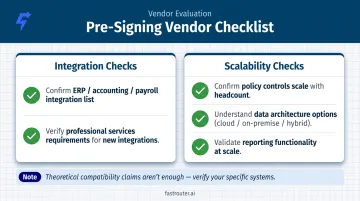
A platform that works at 100 employees should still work at 1,000 — without requiring migration to a new system. Before committing, verify documented integrations with your existing ERP, payroll, and accounting software. Theoretical compatibility claims aren't enough.
The same scrutiny applies at the AI infrastructure layer. If your team manages AI workloads alongside spend management, look for tools that offer cost governance, real-time observability, and consolidated multi-provider billing. FastRouter's audit service, for example, has identified an average 46% cost reduction across AI workload audits — the kind of visibility that complements what well-built spend management platforms aim to deliver at the expense layer.
Key scalability and integration checks before you sign:
- Confirm the vendor's integration list against your actual systems (ERP, accounting, payroll)
- Ask whether the platform requires professional services to add new integrations at scale
- Verify that reporting and policy controls remain functional as headcount grows
- Understand the data architecture — cloud-only, on-premise options, or hybrid
Frequently Asked Questions
What's the best AI spend management software for budgeting and expense management?
The right solution depends on company size and specific workflows. Top platforms combine automated expense capture, real-time budget tracking, policy enforcement, and ERP integration. Evaluate based on which pain points matter most in your organization — not on analyst rankings alone.
Is there AI spend management software that does bookkeeping?
AI spend management software isn't a replacement for dedicated accounting software. Most platforms do integrate directly with bookkeeping tools like Xero, Sage Intacct, or NetSuite, syncing approved expenses and eliminating duplicate data entry between systems.
Can I use AI spend management software to analyze my spending habits?
Most platforms include analytics dashboards that break down spending by category, department, vendor, or time period. Advanced platforms also use historical data to forecast future spending and surface cost-saving opportunities proactively.
How does AI detect expense fraud in spend management?
AI detects fraud through behavioral anomaly detection: flagging duplicate receipts, unusual spend patterns, and submissions that deviate from an employee's or team's historical norms. Risk scores are assigned before reimbursement is processed, not after.
How long does it take to implement AI spend management software?
Implementation timelines vary by company size and integration complexity. Cloud-based platforms with clean data and prepared teams can go live in weeks, while enterprise source-to-pay implementations can take months and require substantial internal resources. Scope your project carefully before selecting a solution.