
.png&w=3840&q=75)
Stop Paying “Real Time” Prices for Work No One Needs in Real Time
See which of your traffic qualifies for Flex tier pricing, and exactly how much it saves. Same model, same output, lower bill.

Here's a pattern I see all the time: teams will spend days shaving tokens off a prompt, but never revisit the service tier they're paying for. Meanwhile, the biggest driver of cost isn't the prompt. It's that more and more traffic quietly ends up running on the default, standard tier, even when the workload doesn't need instant responses.
That's exactly where FastRouter's Insights earns its keep. It doesn't just show you spend. It points to specific, evidence backed actions you can take, ranked by impact, so cost control becomes a weekly habit, not a quarterly fire drill.
And one of the fastest wins it surfaces for many organizations is Flex Tier.
Flex Tier: same model, same output, different economics
Flex Tier isn't a cheaper model. It's the same model on a different service tier that costs less, with one trade off: slower processing and occasional queuing.
That trade off is a deal breaker for user facing experiences where a human is waiting. But for a lot of real business workloads, where throughput matters more than latency, Flex can be the easiest savings lever you'll find:
- Batch enrichment and backfills
- Offline document processing
- Evals and benchmarking
- Background tagging, extraction, or classification
- Nightly or scheduled pipelines
If your customers never watch it happen live, there's a good chance you shouldn't be paying premium, standard tier rates for it.
Insights: recommendations with receipts
Most optimization tools give you generic advice and ask you to trust a black box. Insights works from your actual traffic and shows its work.
Every week, Insights analyzes a rolling 7 day measurement window and produces ranked recommendations, scoped to the exact project, API key, and model they apply to. Nothing is applied automatically. You review, decide, and implement.
You'll find it in the dashboard under Optimize → Insights.
At the top of the page, the summary bar gives you two useful views:
- Projected savings if you applied everything in the current run
- Totals by category: Caching, Flex Tier, and Model Switch
That category breakdown is more practical than it sounds. In many accounts, one large Flex Tier recommendation can be worth more than a dozen smaller optimizations elsewhere, so you can focus attention where it pays back.
What a Flex Tier recommendation tells you, and why it's actionable
When Insights detects high volume traffic running on a standard tier where the same model is available on Flex, it generates a Flex Tier card that's built for decision making, not guessing. You'll see:
- The recommended action in plain language, for example move a specific model's traffic to Flex
- Scope chips for the exact project, key, and model
- The projected weekly impact in dollars
- A supporting line based on real request volume
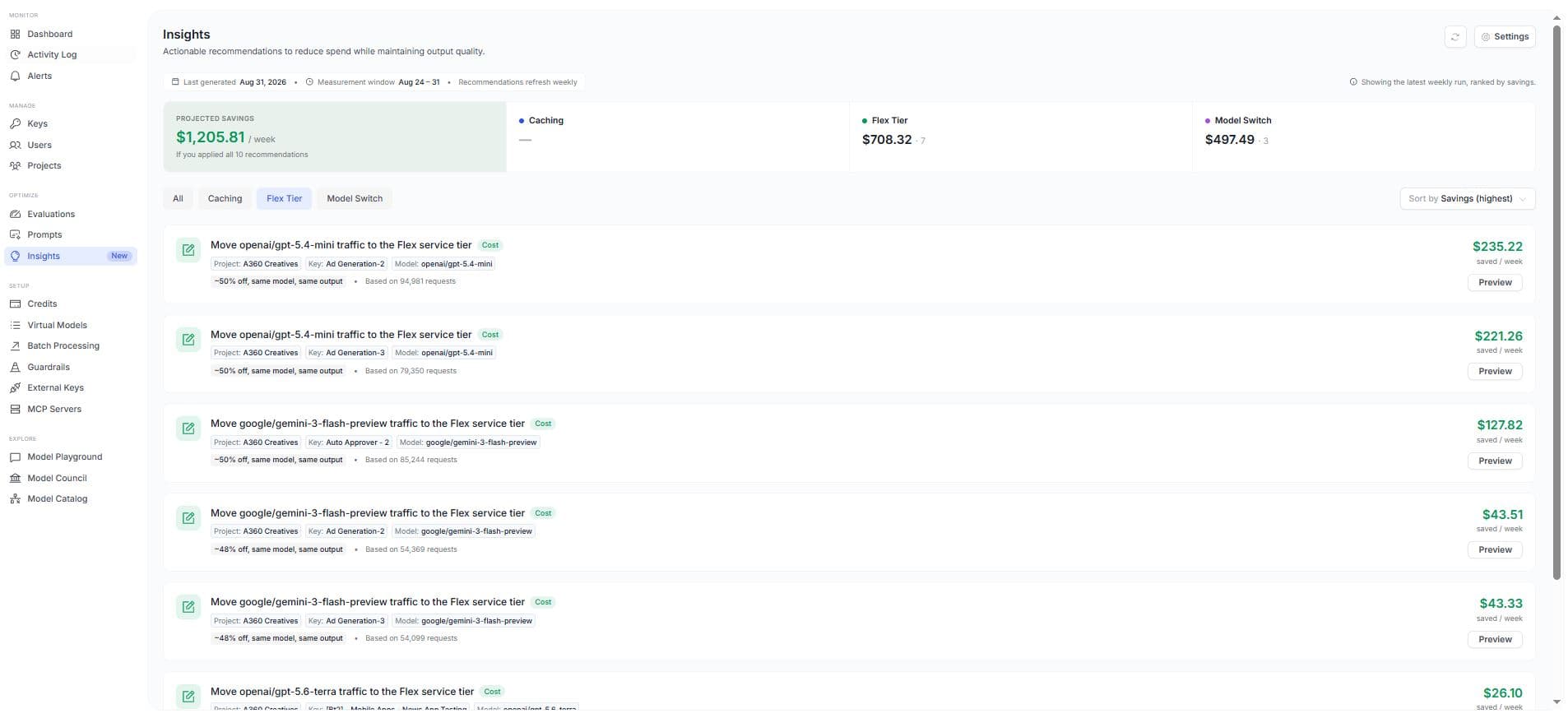
Click Preview and the details panel shows what finance and engineering both need:
- Why this recommendation: what pattern it detected and what it currently costs
- The calculation: standard cost versus Flex cost, and the difference
- Evidence: request counts and input and output token volumes, broken down by provider
- Warnings: Flex latency and queuing trade offs
- How to apply: the specific change to make
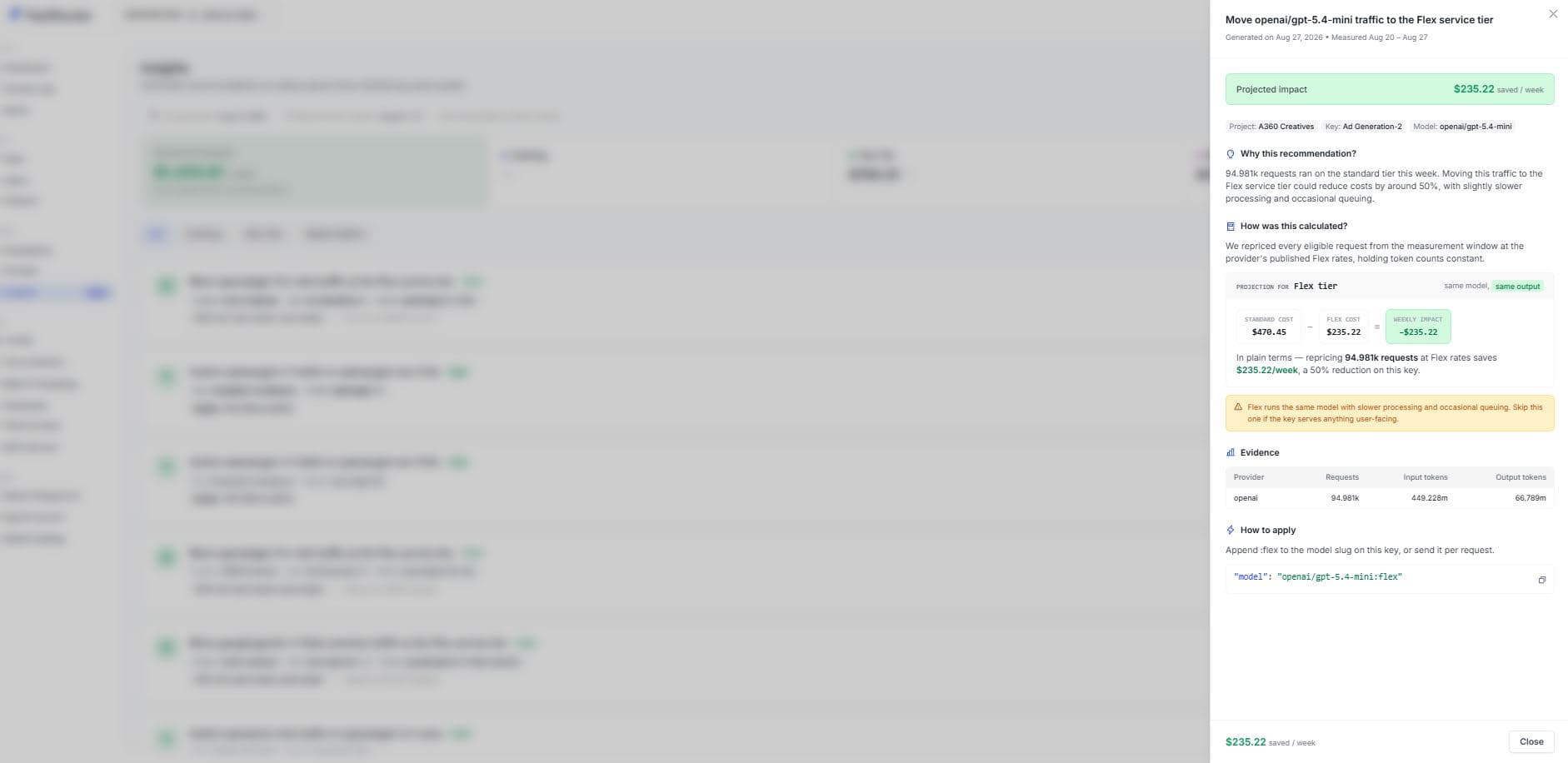
It's an ROI case, with the underlying evidence attached.
How the Flex savings are calculated, simple on purpose
Flex Tier projections are intentionally straightforward: Insights takes every eligible request from the last week, keeps token counts constant, and reprices it using published Flex rates.
The math is easy to sanity check:
Standard cost − Flex cost = projected weekly impact |
Because you're not switching models, you're not rolling the dice on output quality. The real question is operational: can this key tolerate slower responses?
A quick way to roll this out safely
If you want to capture savings without risking customer experience, start with a controlled rollout:
- Go to Optimize → Insights and filter to Flex Tier
- Sort by savings, highest first
- Open the top recommendation and read the Warnings and Evidence
- Apply Flex only to keys that power batch or background work
- Watch throughput and queue time expectations in that pipeline
- Re-check next week. Insights refreshes weekly and reflects what changed
Because Insights updates on a weekly cadence, recommendations naturally appear and disappear as your workloads change. When a suggestion drops off, it usually means the underlying pattern stopped, or you already fixed it.
How to apply Flex Tier
Implementation is intentionally low friction:
- Append :flex to the model slug on the key, or
- Send it per request
No prompt rewrite. No migration. Same model, different tier.
The takeaway
If your LLM spend is creeping upward, don't start with a risky model change. Start with the simplest question: which workloads are paying for speed they don't need?
FastRouter Insights answers that weekly, with ranked recommendations, full calculations, and raw evidence. And for the right pipelines, Flex Tier is often the cleanest cost win: same output, lower bill, so long as you're honest about latency.
Related Articles
.png&w=3840&q=75)
FastRouter vs TrueFoundry: Pricing Compared
FastRouter vs TrueFoundry pricing, side by side. See what you pay for LLM gateway access and where costs can add up.

.png&w=3840&q=75)
Cheapest Way to Access GPT-6, Claude & Gemini Through One API
Find out about Cheapest Way to Access GPT-6, Claude & Gemini Through One API in new FastRouter blog
.png&w=3840&q=75)
From One SDK to a Cost Problem: Why Teams End Up Needing Routing Intelligence
Most teams do not start an AI roadmap with optimized inference spend at the top of the list. They start with a deadline.