
LLM-as-judge scoring at scale
Define a rubric and let a judge model score every response automatically-on accuracy, relevance, conciseness, or any criterion you write.
Import your logs or datasets, run several models side by side, and let an LLM judge score every response-so you can compare quality, cost, and latency across text, images, and video before you ship.
No credit card required · Free to start
Run comparison
Support QA · 500 items
Stop relying on leaderboards and gut feel. FastRouter scores models on the data you actually serve, with criteria you define and judges you control.
Define a rubric and let a judge model score every response automatically-on accuracy, relevance, conciseness, or any criterion you write.
Run several models on the same data and compare quality, latency, cost, and pass rate in one dashboard-no spreadsheets required.
Evaluate chat completions and generated video on the same infrastructure, with multimodal Auto Graders built for video output.
Every evaluation runs asynchronously from your dashboard. Import data, add the models you want to compare, score with an LLM judge, and review the results side by side.
Step 1
Pull chat or video generation logs, or upload a CSV, JSON, or JSONL dataset.
Step 2
Generate outputs from one or more models to compare them side by side.
Step 3
Define a rubric and an LLM or multimodal judge scores every response.
Step 4
Review scores, latency, cost, and pass rate, then drill into judge reasoning.
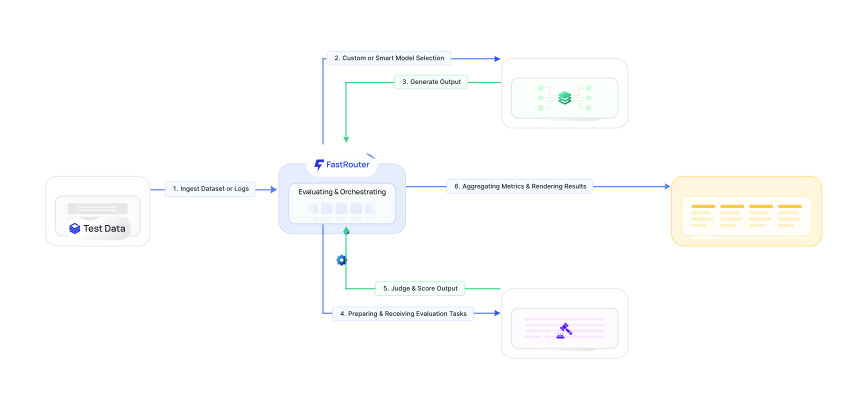
Evaluations run on your real workloads. Import production logs or a static dataset, then add one or more model runs to compare candidates on identical inputs.
Pull chat-completion or video generation logs by project, model, and date-or upload a CSV, JSON, or JSONL file.
Narrow by date range and input/output text, then sample a percentage of items to keep evaluation cost predictable.
Generate outputs from one or more models so every candidate is judged on exactly the same set of inputs.
New evaluation
Pick a capable model as the judge, describe what good looks like, and get quantitative scores plus the reasoning behind each one-so results are explainable, not a black box.
Select a capable LLM as the judge with your own system prompt and user-prompt template-multimodal models judge video.
Reference data with {{item.input}}, {{item.column_name}}, and {{sample.output}} to build precise, reusable rubrics.
Get 0-10 scores or pass/fail grades per criterion, an overall score per run, and the judge's reasoning for every response.
Test criteria
Judge reasoning
“The answer matches the reference on every key fact and cites the correct policy, but could be tighter in the closing sentence.”
The same evaluation engine extends to video. Import your video generation logs and configure an Auto Grader to score clips across the dimensions that matter for your use case.
Evaluate runs from the Videos tab, filtered by date range and video model such as google/veo3.1.
Score motion fidelity, audio-visual sync, cinematic quality, and prompt adherence with a multimodal judge model.
Generated video logs become available to evaluate roughly two hours after they're created.
Video evaluation
Every run is scored on identical inputs, so you can weigh quality against latency and cost and choose the model that fits your budget and bar for quality.
| Metric | GPT-5.5Candidate A | Claude Opus 4.8Candidate B | Gemini 3 ProCandidate C |
|---|---|---|---|
| Quality | |||
| Avg score (0-10) | 8.7 | 8.2 | 7.9 |
| Pass rate | 94% | 89% | 85% |
| Criteria met | 3 / 3 | 2 / 3 | 2 / 3 |
| Performance & cost | |||
| Avg latency | 820ms | 1,140ms | 910ms |
| Cost / 1k tokens | $0.41 | $0.62 | $0.38 |
Illustrative results from a sample evaluation. Your scores depend on your data, criteria, and selected judge model.
Evaluations turn model selection into a measurable, repeatable process-so every change to a model, prompt, or provider is backed by data from your own workloads.
Compare candidate models on your real traffic and switch only when the data shows a clear quality, cost, or latency win.
Test prompt variants against a fixed dataset and keep the version that scores highest on the criteria you care about.
Auto-grade motion fidelity, audio-visual sync, and prompt adherence across hundreds of clips instead of reviewing each by hand.
Re-run a saved evaluation after a model or prompt change to catch quality regressions before they reach production.
You can evaluate your own chat-completion logs or video generation logs directly from FastRouter, filtered by project, model, and date range-or upload a static dataset as a CSV, JSON, or JSONL file. For logged data you can also filter by input and output text so each evaluation focuses on the cases you care about.
Any capable LLM can serve as the judge for text and image evaluations, and a multimodal model acts as the Auto Grader for video. You choose the judge model, write its system prompt, and define a user-prompt template that references your data with variables like {{item.input}} and {{sample.output}}.
FastRouter uses LLM-as-a-judge scoring. You define one or more criteria with a rubric and scale-typically a 0-10 score or a pass/fail grade-and the judge evaluates every response against them. Results include a per-criterion score, an overall score per run, and the judge's written reasoning so each result is explainable.
Yes. You select an evaluation API key, and runs and judging execute on your selected key. Cost is token-based and reported per run alongside latency, so you can compare the true price-performance of each model on your own data.
Generated video logs become available for evaluation roughly two hours after the video is created. Once available, you can import them from the Videos tab, filter by date range and video model such as google/veo3.1, and grade them with a multimodal Auto Grader.
Yes. Evaluations support a sampling rate, so you can run on a percentage of the matching items rather than the full set. Sampling keeps large evaluations fast and affordable while still giving you a representative comparison across models.
Spin up an evaluation on your own data in minutes-score with custom criteria, compare runs side by side, and grade text, image, and video outputs.