
Register once, use everywhere
Connect GitHub, Linear, DeepWiki, Intercom, or your own internal APIs as MCP servers and expose their tools to any model you route through FastRouter.
Register external MCP tool servers once and FastRouter handles credential injection, tool discovery, and auto-execution-so every routed model can act in GitHub, Linear, DeepWiki, or your own APIs, safely.
No credit card required · Free to start
Github Production
github-production
Transport
Auth method
12 tools enabled
2 excluded · scoped to Production
Give models real capabilities without handing out credentials or wiring a bespoke integration for every app.
Connect GitHub, Linear, DeepWiki, Intercom, or your own internal APIs as MCP servers and expose their tools to any model you route through FastRouter.
Static headers and OAuth tokens are encrypted server-side and injected per request, so secrets stay out of prompts, responses, and logs.
Choose exactly which tools to expose, exclude destructive operations, and restrict each server to the projects that should use it.
Models call tools through a single endpoint. FastRouter injects credentials, discovers and filters tools, then runs the tool-call loop-so your servers stay loosely coupled and independently governed.
Model
FastRouter
Tool servers
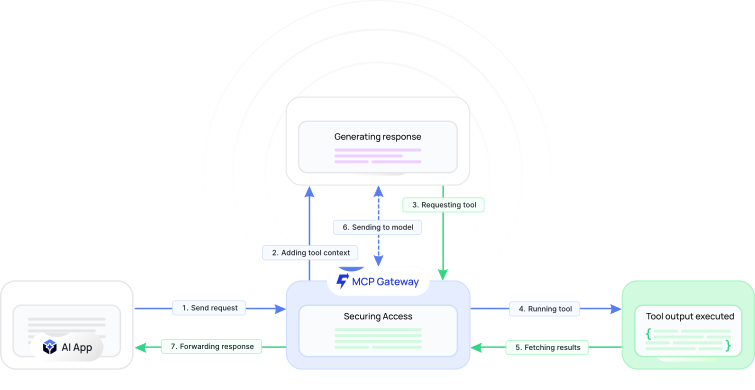
Register a server once and any project, key, or model can call its tools. Swap providers, rotate credentials, or add new servers without touching a line of application code.
The gateway stores authentication once and injects it into every tool call at request time. Models act through your tools while raw secrets stay locked behind FastRouter.
Static headers and OAuth client secrets are encrypted server-side and never returned to the model.
OAuth access tokens are refreshed by the gateway so long-running agents keep working without manual rotation.
Models receive only tool results, keeping secrets out of prompts, completions, and trace logs.
Authentication
Every server enumerates the tools it offers. You decide which ones models can call-so powerful integrations stay useful without becoming a liability.
Enable only the tools your workflow needs and leave the rest invisible to every model.
Keep operations like delete_repository out of reach across your entire organization.
Filter long tool lists and use Select All or Clear All to configure servers in seconds.
Tool selection
create_issue
Open issues on a repository
get_file_contents
Read files and code
list_pull_requests
List open pull requests
create_pull_request
Propose changes
delete_repository
Destructive operation
Drive everything from the mcp object on the chat completions API. Flip on auto-execution and the gateway handles tool calls end to end, with safe, predictable limits.
Set auto_execute_tools: true and the gateway runs the tool-call loop for you (requires stream: false).
Tool rounds are bounded by max_tool_rounds and hard-capped at 5 to keep agent loops predictable.
Tools resolve as {server}__{tool}, like deepwiki-mcp__ask_question, and land in Logs & Traces with full span detail.
Connect public servers with no auth, internal APIs with a static header, or production services with full OAuth 2.0-the gateway stores and injects credentials the same secure way for each.
| Capability | No AuthPublic servers | Static HeaderAPI keys & tokens | OAuth 2.0Full credential flow |
|---|---|---|---|
| Credential handling | |||
| Credentials stored encrypted | Not included | Included | Included |
| Per-request header injection | Not included | Included | Included |
| Automatic token refresh | Not included | Not included | Included |
| When to use | |||
| Best for public servers | Included | Not included | Not included |
| Best for production | Not included | IncludedInternal | Included |
Every method injects credentials server-side at request time-models never receive raw secrets.
From single-tool helpers to multi-server agents, the MCP Gateway keeps tool access powerful, observable, and tightly controlled.
Connect GitHub, Jira, and Slack so agents act in your stack with exactly the permissions you approve-nothing more.
Remove high-risk tools like delete_repository everywhere, so no prompt or model can ever trigger them.
Register read-only and read-write variants with distinct slugs like github-readonly and github-admin for each project.
Let a single request span GitHub, Linear, and DeepWiki while auto-execution handles the entire tool-call loop.
The gateway speaks two Model Context Protocol transports: Streamable HTTP, which follows the MCP 2025-03-26 specification, and Server-Sent Events (SSE). You choose the transport when you register a server, so both modern and legacy MCP servers connect through the same gateway.
Static headers and OAuth client secrets are encrypted and stored server-side. FastRouter injects them into each tool call at request time, so models only ever receive tool results-raw credentials are never placed in prompts, completions, or logs.
When you set auto_execute_tools: true, the gateway runs the full tool-call loop for you across multiple rounds. Rounds are bounded by max_tool_rounds and hard-capped at 5, and auto-execution requires stream: false so the complete result is returned in a single response.
Every exposed tool is namespaced as {server-name}__{tool-name}-for example, deepwiki-mcp__ask_question. The prefix keeps tools from different servers unambiguous, and each call is captured in Logs & Traces with full span detail.
Yes. Each MCP server can be restricted to specific projects or made available to All Projects. Pair scoping with selective tool exposure to register, for example, a read-only server for one project and a read-write server for another.
Requests that reference an Inactive server return an error. Each server lists its Status, tool count, auth method, and projects in the dashboard-reactivate a server before routing traffic to it.
Register your first MCP server, set credentials once, and expose exactly the tools your agents need-in minutes.