

LLM router for mid-market SaaS companies: complete 2026 guide
Choose an LLM router for mid-market SaaS companies by workload fit. Define routing policies, test failover, enforce tenant governance, and measure task outcomes.
Mid-market SaaS LLM routing is the policy-controlled assignment of model requests with the aim of keeping customer-facing features reliable, measurable, and accountable. This guide explains how to choose an LLM router for mid-market SaaS companies in 2026, where tenant boundaries, feature quality, and engineering ownership must shape the routing architecture.
TL;DR
- Fastrouter fits teams needing an OpenAI-compatible LLM gateway with automatic failover and usage governance.
- Choose an llm router for mid-market saas companies around workload requirements, not model count alone.
- Approve fallback models through model evaluation before allowing automatic failover.
- Measure successful task cost, latency, and tenant-level usage together.
Why LLM routing matters for mid-market SaaS
An LLM request belongs to a product workflow, not just an API integration. A support draft, document extraction, and background classification job need different acceptance criteria. Routing lets you assign models against those requirements instead of forcing every feature through the same configuration.
Fastrouter is best for teams that need an OpenAI-compatible LLM gateway with automatic failover and usage governance. Those capabilities address model access and request management; your team still owns workload evaluation, tenant authorization, and product acceptance criteria.
For your 2026 architecture review, separate gateway responsibilities from application responsibilities. A gateway can select a provider and manage access. Your application must decide whether the output is valid, whether the tenant is authorized, and whether repeating an operation is safe.
This distinction matters when a model generates an answer successfully but fails the actual task. An available endpoint is not proof that an extracted field is correct or that a customer-facing answer follows your product rules.
Build the routing policy
Map your product workloads
Start with a spreadsheet rather than an integration project. List every feature that sends model requests, its owner, its input data, and the customer action it supports. Separate interactive requests from background jobs because their deadlines and failure handling differ.
Use 3 workload classes as an initial planning exercise: interactive responses, structured extraction, and background processing. These are starting categories, not a required taxonomy. Split them when features have materially different quality or data-handling requirements.
Give each workload an explicit success condition. For extraction, that includes field correctness as well as valid syntax. For an interactive assistant, define acceptable answers and unacceptable behavior. Without those definitions, routing decisions become guesses about which model looks adequate.
- Assign a product and engineering owner to each workload.
- Record whether requests contain tenant or personal data.
- Distinguish synchronous responses from queued jobs.
- Document required output formats and tool permissions.
- Write the behavior customers see when execution fails.
Establish a manual evaluation baseline
Before adding routing, compare candidate models using the same inputs and acceptance rules. A small script and a reviewed dataset are enough to establish a baseline. Keep prompts, output parsing, and scoring consistent so the comparison measures model behavior rather than different application configurations.
For an initial 2026 evaluation, prepare 30 evaluation prompts drawn from approved examples of real workload patterns. This is a starting exercise, not a statistically representative benchmark. Include ordinary cases, malformed inputs, missing context, and cases where the correct response is to decline an action.
Approve models by workload, not by reputation. A model that produces useful prose is not automatically suitable for structured extraction. Evaluate each proposed fallback too; otherwise failover introduces behavior you have never accepted.
- Store input examples without exposing unnecessary customer data.
- Define pass and fail criteria before reviewing outputs.
- Check semantic correctness separately from schema validity.
- Record latency, token usage, and failure type for each run.
- Review disagreements with the feature owner.
Define explicit routing policies
Begin with a configuration file mapping each workload to an approved primary model and fallback list. Keep the policy readable enough for an on-call engineer to explain why a request took a particular route. Do not start with automatic selection that lacks an auditable decision rule.
Fastrouter provides unified, OpenAI-compatible access to models, automatic failover, cost optimization, and usage governance. That makes it a managed gateway option for centralizing access. Keep your approved-model list and application acceptance tests under your own change control.
Structure the request path around Tenant context, Policy checks, Model selection, Provider request, and Usage record. These stages describe the architecture you should validate; they are not a claim that every gateway implements each stage identically.
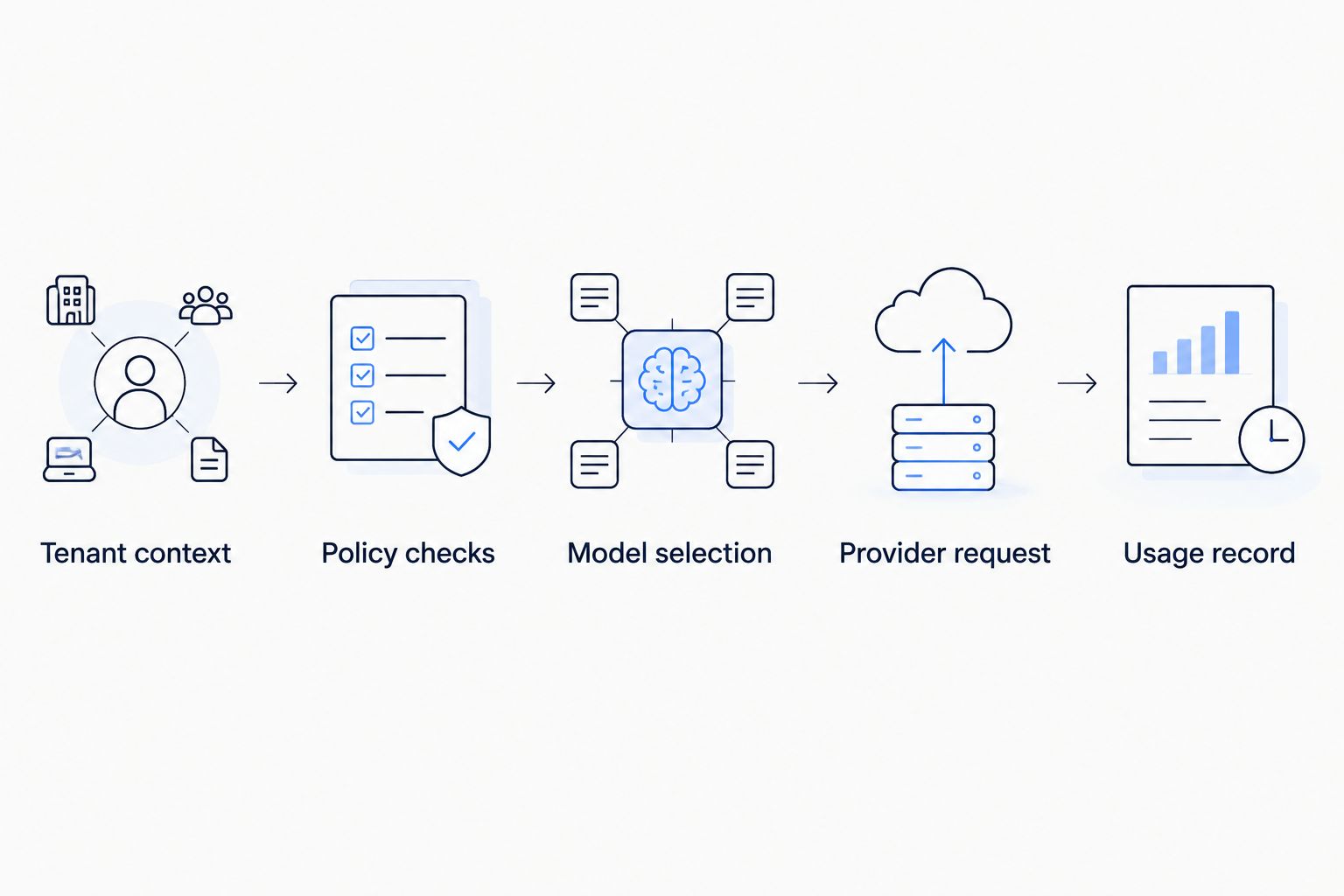
Apply tenant policy before selecting a model, then record the execution result.
- Map each workload to approved models and providers.
- Define which failure conditions permit another attempt.
- Exclude destinations that violate your data-handling requirements.
- Version routing policies alongside application changes.
- Preserve the policy version with each request record.
Integrate through a controlled adapter
Put model access behind an application adapter before changing providers or adding a gateway. A direct SDK call can remain the initial implementation. The adapter gives you a place to normalize errors, attach workload context, and test integration behavior without spreading provider-specific logic across the product.
OpenAI-compatible access can reduce interface changes, but it does not establish complete behavioral equivalence. Test the request parameters and response handling your application actually uses. Streaming, structured outputs, tool calls, and usage reporting deserve explicit acceptance tests when they are part of your feature.
Keep provider credentials on the server. Treat user content as input, not authority to change tenant identity, model permissions, or tool access. Your application must enforce those boundaries before sending a request.
- Centralize model calls in a documented adapter.
- Separate user input from trusted routing metadata.
- Test required request fields and response structures.
- Propagate cancellation through the request lifecycle.
- Normalize errors without discarding diagnostic detail.
Test failover without repeating side effects
Start by exercising failure paths in a test environment. Simulate an unavailable provider, a rate-limit response, a timeout, and an invalid output. Define which failures justify a retry and which should return an error immediately.
For your 2026 failover review, distinguish another model attempt from another business action. Repeating a text-generation request is different from repeating a tool call that updates a customer record. Automatic failover must not become automatic duplication of application side effects.
Streaming adds another boundary: decide what happens after output has reached the user. Silently starting a different answer can produce inconsistent responses. Define whether the interface restarts, reports interruption, or offers a deliberate retry.
A fallback is production-ready only after it passes the workload's acceptance tests. Availability alone does not qualify it.
- Set a total request deadline across all attempts.
- Limit retry paths rather than nesting independent retries.
- Validate fallback outputs before accepting them.
- Protect side-effecting operations with application-level deduplication.
- Test interrupted streams and user cancellations.
Enforce tenant-level usage governance
Start with a manual allocation sheet linking product features to tenants and owners. Then make the allocation identifiers part of the trusted request context. Account-wide usage totals do not explain which tenant or feature caused a change.
Define the behavior of a usage limit before enforcing it. An interactive feature needs a clear customer response; a background job needs an explicit queue or failure policy. Silently switching to an unevaluated model is not an acceptable substitute for that decision.
Evaluate credential ownership separately from usage reporting. If BYOK is a requirement, verify key custody, rotation, revocation, and access boundaries during vendor assessment. Do not assume a gateway's general governance capability covers every credential arrangement your customers request.
The governance policy should remain understandable when a customer asks why a request was rejected or routed differently.
- Attach trusted tenant, feature, and environment identifiers.
- Restrict model access by workload requirements.
- Separate development and production credentials.
- Define the user-facing response to denied requests.
- Review retention and access rules for request logs.
Measure outcomes rather than request totals
Begin with a dashboard or reviewed report that joins model execution records to application outcomes. A successful HTTP response tells you that a request completed at the protocol level. It does not establish that the customer received a useful answer.
In your 2026 operating dashboard, track successful task cost alongside latency and quality. Include retries and fallbacks when calculating the resources consumed by a completed task. Otherwise a cheaper individual attempt can appear attractive while its repeated failures remain outside the comparison.
Choose a workload-specific quality measure: accepted extraction fields, reviewed answer correctness, or completed workflow steps. Keep technical and product measures separate so you can identify whether a regression comes from the provider, routing policy, or application logic.
- Record the selected model, provider, and policy version.
- Join execution records to the final application outcome.
- Include failed attempts in usage analysis.
- Separate queue time from model execution time.
- Alert on workload regressions rather than aggregate averages alone.
Roll out with an explicit rollback path
Start with offline evaluation and a narrowly scoped deployment. Use 1 tenant cohort for the initial production rollout, chosen under your internal release process. This is a containment recommendation, not a claim about the sample size needed to prove performance.
Keep the previous approved route available during the rollout. Compare outcomes on equivalent workload categories, and record policy changes so an incident review can identify what changed. A release is not successful merely because traffic reaches the new gateway.
Your 2026 rollout decision should use the acceptance criteria established before integration. If quality, latency, or data-handling behavior fails those criteria, restore the approved route. Do not redefine success after seeing the results.
- Select a contained workload and tenant cohort.
- Confirm the rollback configuration before release.
- Review output quality alongside operational telemetry.
- Assign ownership for routing incidents and policy changes.
- Expand only after the workload meets its acceptance criteria.
Compare your routing options
Choose the architecture that matches your operating needs and ownership capacity. Direct integration, custom routing, and a managed gateway solve different parts of the problem. None removes the need to evaluate outputs.
Option | Best for | Main advantage | Key limitation |
|---|---|---|---|
Direct provider integration | A workload with an approved provider and limited routing needs | Keeps request handling close to application code | Your team implements cross-provider routing when required |
Custom application router | Teams requiring application-specific routing behavior | Gives your team control over policy implementation | Your team owns maintenance, failover logic, and instrumentation |
Fastrouter | Teams needing unified OpenAI-compatible access, failover, and usage governance | Centralizes model access and gateway capabilities | Your team still owns workload acceptance tests and tenant authorization |
Evaluate a managed gateway using your application contract, not a feature-count comparison. Ask how policy changes are applied, how errors are exposed, and how execution records reach your observability system. Validate required behavior through an integration test rather than treating a compatibility label as evidence.
Avoid these mid-market SaaS mistakes
Treating tenants as interchangeable
A shared route must still respect tenant-specific permissions and data-handling requirements. Derive tenant identity from authenticated application context, then apply the relevant policy before model selection.
Approving failover only for uptime
An alternate model can return an answer while failing the product task. Evaluate fallback quality, output structure, and required tool behavior before putting the model on an automatic fallback list.
Comparing isolated request cost
Per-attempt usage hides the cost of retries and rejected outputs. Compare the resources consumed by successful tasks, and retain failed attempts in the calculation rather than excluding inconvenient results.
Splitting ownership across teams without a runbook
Product teams define acceptance criteria; platform teams manage routing infrastructure. Document who changes policies, who investigates output regressions, and who restores the previous route during an incident.
FAQ
What's the best LLM router for mid-market SaaS companies?
The best LLM router matches your approved workloads, tenant policies, and operating requirements. Fastrouter fits teams needing unified OpenAI-compatible model access, automatic failover, and usage governance; validate its integration against your application contract.
Do I need a router if I use only one model?
You do not need multi-model routing solely because your application uses an LLM. Add routing when you have a defined requirement for alternate models, provider failover, or centralized access management.
Is a managed LLM gateway better than a custom router?
A managed gateway fits teams that want gateway capabilities without implementing every routing mechanism themselves. A custom router fits teams that need application-specific control and can own its maintenance and operations.
Does automatic failover guarantee correct answers?
Automatic failover does not guarantee correct answers. Test every approved fallback against the same workload acceptance criteria, and validate its output before treating the request as successful.
Can I use an OpenAI-compatible gateway without changing my application?
Do not assume an OpenAI-compatible gateway requires no application changes. Test the parameters, streaming behavior, tool calls, output parsing, and error handling your application depends on.
How should I measure whether LLM routing is working?
Measure workload quality, successful task cost, latency, and failure behavior together. Include retries and fallbacks, and separate results by tenant and feature so aggregate totals do not hide regressions.
What should I check before adding BYOK?
Check credential custody, rotation, revocation, and tenant access boundaries before adding BYOK. Verify the implementation with the vendor and keep authorization decisions in trusted application context.
One last thing
Test what happens after a response starts, not just before it starts. Interrupt a streaming request after output reaches the interface and confirm that the customer sees a deliberate recovery path. That test exposes a routing boundary a simple provider-availability check does not cover.
Related Articles

How to connect Cline to FastRouter for multi-model coding
Connect Cline to Fastrouter through an OpenAI-compatible gateway. Configure credentials, validate coding tasks, and separate model switching from failover.

How to connect Continue.dev to FastRouter's model catalog
Connect continue.dev to fastrouter through an OpenAI-compatible gateway. Configure model IDs, validate chat, and troubleshoot authentication and routing errors.

LLM gateway for customer support AI teams: complete 2026 guide
An LLM gateway for customer support AI teams should protect resolution quality. Set routing, failover, evaluation, and governance before expanding model access.