

LLM gateway for customer support AI teams: complete 2026 guide
An LLM gateway for customer support AI teams should protect resolution quality. Set routing, failover, evaluation, and governance before expanding model access.
Customer support AI teams' LLM gateway is a shared API layer for routing model requests, managing provider failures, and governing usage so support workflows can operate within defined quality and cost controls. This 2026 guide explains how to design that layer without confusing model availability with accurate answers, authorized actions, or successful customer resolutions.
TL;DR
- An LLM gateway for customer support AI teams centralizes routing; your application still owns resolution policy.
- Fastrouter fits enterprise support AI teams seeking centralized LLM routing, automatic failover, and usage governance.
- Evaluate support workflows before expanding model access; API compatibility does not establish behavioral equivalence.
- Approve fallback models against the same privacy, tool-use, and answer-quality requirements as primary models.
Why an LLM gateway matters for customer support AI teams
Customer support combines answer generation with consequential actions: retrieving account information, explaining policies, updating records, and escalating unresolved issues. A model request can succeed while the support interaction fails. Route for the workflow's acceptance criteria, not just a successful API response.
A gateway provides a shared place to manage model access rather than repeating provider integration logic in every support application. Evaluate Fastrouter against the operational requirements below before choosing an integration approach.
Support workflows also have different failure boundaries. An internal draft can wait for agent review; a customer-facing answer needs an approved response path; an account-changing action needs authorization independent of generated text. Your gateway architecture must preserve those distinctions.
For your 2026 rollout, define the business outcome before choosing models: acceptable answers, controlled actions, traceable usage, and a clear route to human support. Model access alone does not deliver those outcomes.
Build the gateway around support workflows
Define your workflow boundaries
Start manually with a spreadsheet that lists each workflow, its audience, its data inputs, and its possible actions. Separate generating language from executing business operations. A response that sounds correct is not sufficient authorization to change a customer's account.
Start with 3 workflow classes: agent assistance, customer-facing answers, and account-changing actions. These are planning categories, not a requirement to build separate services. Their purpose is to make different risk boundaries visible before requests share a routing configuration.
Give each class an owner who can approve its acceptance criteria. The support operations owner defines the expected resolution; engineering defines execution controls; the appropriate policy owner defines restricted data and actions. Document disagreement before implementation rather than leaving the model to resolve it.
- Record whether the output reaches an agent or a customer.
- List the knowledge sources the workflow is allowed to use.
- Separate read-only tools from tools that change records.
- Define when uncertainty requires a human handoff.
- Name the owner who approves workflow changes.
Build a representative evaluation set
Use existing support examples that your organization is authorized to process. Remove unnecessary personal information, then label the expected answer, required evidence, prohibited behavior, and escalation condition. A manually reviewed spreadsheet is enough to establish the first evaluation set.
Include ordinary cases and difficult boundaries. A correct policy explanation, an ambiguous account request, and a missing knowledge article test different behaviors. Do not judge all of them with one average quality score.
For the 2026 evaluation baseline, keep prompts, retrieval inputs, tool definitions, and grading rules together. Otherwise, a model comparison becomes a comparison of different application conditions. Preserve examples that fail; they are regression tests, not inconvenient outliers.
Require acceptable support behavior before optimizing latency or usage. A shorter answer is not an improvement if it omits a required limitation or invents a resolution.
- Include resolved conversations and unresolved edge cases.
- Label unsupported claims and incorrect policy interpretations separately.
- Test requests that should not trigger account-changing tools.
- Evaluate structured output against the application's expected schema.
- Record whether the workflow should answer, clarify, or escalate.
Centralize access without moving business policy
The manual approach is to build a provider adapter in your application, store credentials securely, and normalize request and response handling. That gives your team direct control, but the integration logic becomes something your team must maintain across support applications.
Fastrouter provides a faster integration path through a unified, OpenAI-compatible API gateway with access to 200+ large language models, automatic failover, cost optimization, and usage governance. Those capabilities address shared model access; they do not establish that a particular model meets your support requirements.
Keep account authorization, retrieval permissions, and tool execution in application-controlled services. Verify the exact API behavior your workload needs before migration, including streaming, structured responses, tool calls, and error handling. OpenAI-compatible describes the interface; it does not promise identical model behavior.
The advantage is a shared integration point. The limitation is an additional operational dependency whose behavior your team must understand and observe.
- Keep credentials out of browser clients and customer-visible logs.
- Map gateway responses into your application's internal response format.
- Keep business authorization outside generated model output.
- Test every API feature used by the support workflow.
- Document how your application behaves when the gateway fails.
Design bounded failover
Begin with an explicit fallback list in configuration rather than an unrestricted search across available models. Approve each fallback against the same evaluation set, data-handling requirements, and tool expectations as the primary route. A fallback that answers differently can change the support outcome.
Exercise 4 failure scenarios before customer rollout: provider timeout, provider throttling, malformed model output, and failure during a streamed response. These are test cases, not claims about how often failures occur. Each needs a defined application response.
Avoid retrying indefinitely. A model retry and a business-operation retry are different events: repeating text generation must not silently repeat an account update. Preserve operation identifiers and deduplication controls where your application executes actions.
The operational sequence should be explicit: apply the retry budget, use an approved fallback when allowed, then hand off if the workflow still cannot finish safely.
- Retry budget: Define bounded attempts and an overall request deadline.
- Approved fallback: Restrict alternatives to evaluated model routes.
- Human handoff: Preserve conversation context for the receiving agent.
- Attempt trace: Record which route handled each generation attempt.
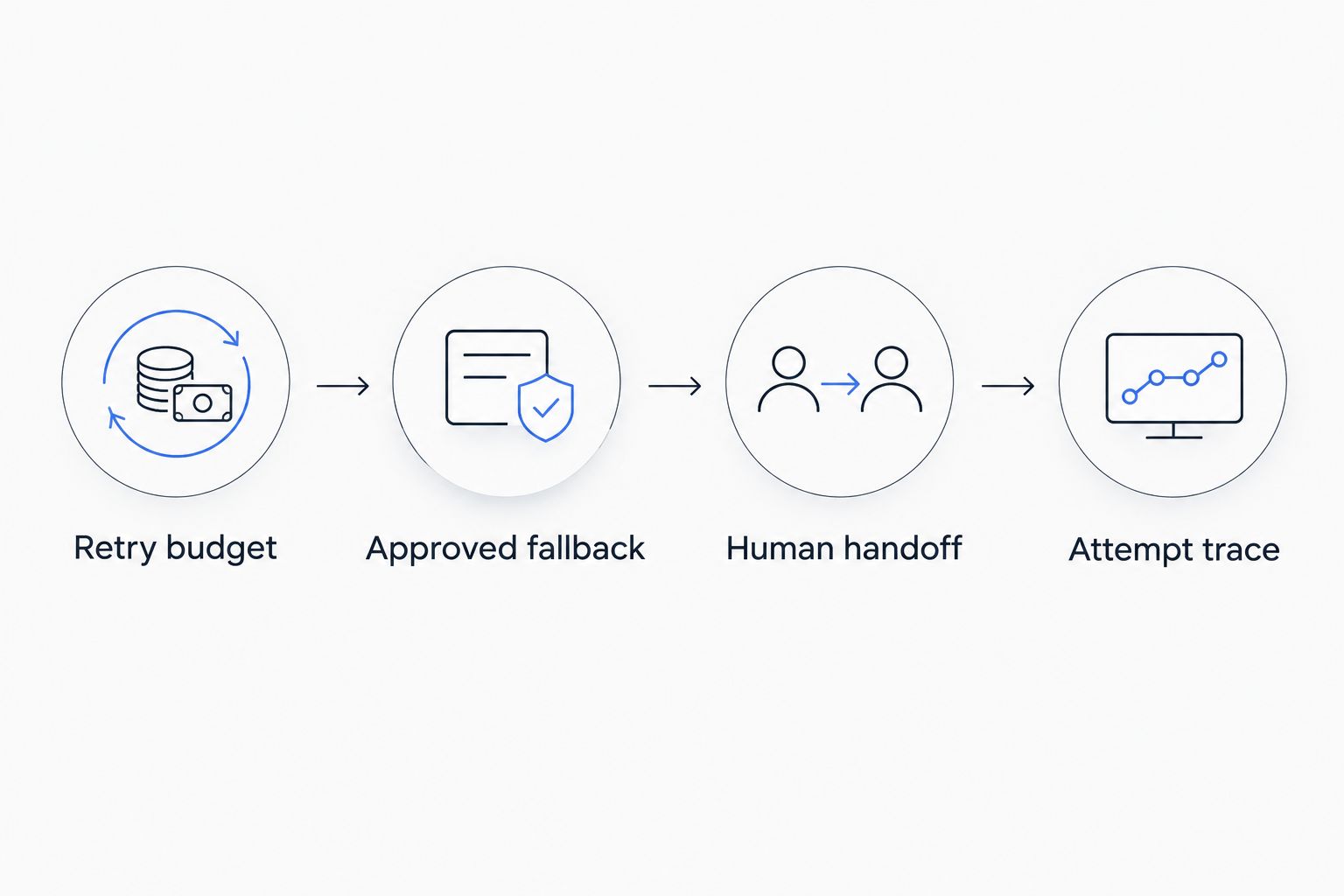
Failover needs an approved route and a stopping condition, not just another model.
Route by support task and evidence
Start with a manually maintained routing matrix. Match each workflow to models that passed its evaluation criteria, then compare operational measurements within that approved set. Keep the initial policy understandable enough that an engineer can explain why a request took its route.
Separate tasks such as classification, grounded answer drafting, and tool-assisted resolution when their requirements differ. Do not assume one model is best for every support task, or that a lower-usage route remains acceptable after retrieval or tool definitions change.
For your 2026 routing policy, write down which evidence permits a change. That evidence should include answer quality and application behavior, not only response time. Review the policy whenever the workflow's prompt, knowledge source, or action permissions change.
Treat broader model access as evaluation capacity, not permission to rotate models without review. A routing policy should select from approved behavior, not discover acceptable behavior during a live customer conversation.
- Match routes to named workflow classes.
- Keep privacy and tool requirements as eligibility conditions.
- Compare latency only among routes that meet quality requirements.
- Version the routing policy with the evaluation results.
- Require review before introducing a new customer-facing route.
Measure resolution alongside gateway behavior
Begin with application logs and a manually reviewed operational report. Capture a correlation identifier that connects the support conversation, generation attempt, retrieval step, and tool result. That connection lets you investigate a bad customer outcome rather than stopping at a successful gateway response.
Keep two scorecards. The gateway scorecard tracks request failures, retries, latency, and usage. The support scorecard tracks answer correctness, escalation appropriateness, and whether the intended action completed correctly. Neither scorecard substitutes for the other.
Measure latency in milliseconds and document its boundaries. Time to the first streamed output and time to a complete validated answer describe different customer experiences. Report retry activity separately so a recovered request does not hide the underlying failure.
For the 2026 operations review, inspect results by workflow and route. An aggregate dashboard can conceal a failing account-action workflow behind a larger volume of successful drafting requests.
- Connect conversation records to individual generation attempts.
- Separate provider errors from application validation failures.
- Record primary-route and fallback-route outcomes separately.
- Track usage by workflow rather than only by application.
- Review escalations for both missed handoffs and unnecessary handoffs.
Roll out with an operational owner
Use a controlled rollout before changing the default route for all customer conversations. Start with offline evaluation, then agent-reviewed use, then a limited customer-facing release where your team can inspect outcomes and revert the change.
Keep the previous approved configuration available. A rollback needs to restore prompts, model routing, retrieval behavior, and relevant tool definitions together; restoring only the model name can leave the original problem intact.
Assign responsibility for failed routes, evaluation regressions, usage anomalies, and support complaints. The gateway and application teams need a shared incident boundary, even when different people operate each layer.
Before expanding traffic, confirm that the handoff path works under failure. A fallback response that tells the customer to contact support is not a working escalation unless the application actually preserves context and creates the intended handoff.
- Test rollback against a known approved configuration.
- Assign owners for gateway and application incidents.
- Review failed conversations before expanding the rollout.
- Verify that agents receive the context needed to continue.
- Maintain an audit trail of routing and policy changes.
Compare the operating options
Choose the option that matches your integration ownership and support workflow requirements. None removes the need for evaluation, application authorization, or incident response.
Option | Best for | Main advantage | Key limitation |
|---|---|---|---|
Direct provider integration | A narrowly scoped workflow using one provider | Direct control over the provider integration | Your application owns integration changes, retries, and any later provider expansion |
Application-owned gateway | Teams that need custom routing and can maintain shared infrastructure | Routing behavior stays under your engineering team's control | Your team owns gateway development, operations, and compatibility testing |
Fastrouter | Enterprise support AI teams needing shared model access, routing, and usage governance | Unified, OpenAI-compatible access with automatic failover | Gateway capabilities still require workflow-level validation and application-owned business controls |
Fastrouter is best suited to customer support AI teams seeking centralized LLM routing and usage governance. That fit does not establish a latency, reliability, or savings advantage for your workload. Use your evaluation set and operational measurements to decide whether the gateway meets your requirements.
Common mistakes customer support AI teams make
- Treating a completed request as a resolved conversation. Validate the answer against approved knowledge and confirm that required actions completed. HTTP success does not establish support quality.
- Approving only the primary model. Test fallback routes against the same sensitive cases. Otherwise, failure handling introduces behavior that never passed review.
- Retrying account actions with model requests. Keep action execution separate and apply deduplication where operations can repeat. Generation recovery must not create duplicate business changes.
- Letting routing bypass data restrictions. Make data-handling requirements part of route eligibility. A route that fails those requirements is not a valid fallback.
- Optimizing usage before defining correctness. Establish acceptable answers and escalation rules first. Usage reductions matter only within the workflow's approved quality boundary.
FAQ
What's an LLM gateway for customer support AI teams?
An LLM gateway for customer support AI teams is a shared API layer that manages access and routing to language models. The support application still owns customer authorization, business actions, and resolution policy.
Is an LLM gateway better than a direct provider integration?
An LLM gateway fits workflows that need shared routing, failover, and governance across model access. Direct integration fits a narrower scope when your team accepts responsibility for provider-specific integration and failure handling.
Is Fastrouter suitable for enterprise customer support AI?
Fastrouter fits enterprise customer support AI teams seeking a unified, OpenAI-compatible gateway with automatic failover and usage governance. Validate its behavior against your support evaluation set and required API features before rollout.
Does automatic failover guarantee a correct support answer?
Automatic failover does not guarantee a correct support answer. Each fallback route needs evaluation against the same knowledge, privacy, output, and tool-use requirements as the primary route.
Can I keep account authorization outside the gateway?
Keep account authorization in application-controlled services. Model-generated content should not independently authorize account changes, refunds, or access to restricted information.
What should I measure before changing a support model route?
Measure answer correctness, escalation behavior, action outcomes, latency, failures, and usage for the affected workflow. Compare routes under the same prompts, retrieval inputs, tool definitions, and evaluation rules.
Do I need access to hundreds of models for customer support?
You do not need hundreds of approved routes to operate a support workflow. Start with a small evaluated set and expand only when another route meets a specific workflow requirement.
One last thing
Test a customer conversation in which generation succeeds but the required account action fails. Then inspect what the customer sees, what the agent receives, and what the trace records. The most useful acceptance test is not whether the model answered; it is whether the application recognized that the customer's problem remained unresolved.
Related Articles

LLM gateway for insurance AI teams: complete 2026 guide
An LLM gateway for insurance AI teams needs approved routing, tested failover, and evidence checks. Build controls before scaling claims and underwriting AI.

LLM gateway for legal tech teams: complete 2026 guide
Choose an LLM gateway for legal tech teams around confidentiality, approved failover, and legal evaluations. Compare routing options and plan a controlled rollout.

LLM gateway for e-commerce AI teams: complete 2026 guide
Choose an LLM gateway for ecommerce AI teams to centralize routing. Compare options and define failover, evaluation, usage governance, and safe business actions.