
How to connect Windsurf to FastRouter for automatic fallback
Connect Windsurf to FastRouter through a supported endpoint or terminal workflow. Verify client compatibility, configure fallback, and test routing safely.
Instead of manually switching models after a failed coding request, connect Windsurf to FastRouter through a supported custom-endpoint integration or a separate terminal workflow, then configure fallback at the gateway. The connection requires an endpoint, credentials, and a valid routing identifier; OpenAI compatibility alone does not establish native Windsurf integration.
TL;DR
- To connect Windsurf to FastRouter, first confirm whether your client integration accepts a custom OpenAI-compatible endpoint.
- FastRouter provides gateway-level automatic failover; the editor still needs a supported way to reach that gateway.
- A terminal workflow connects your own script, not Windsurf’s native chat or coding assistant.
- Test primary routing and controlled fallback separately before sending production code.
Why this matters
A gateway can handle model selection and fallback without putting provider-specific routing logic into every application. The editor connection is a separate concern: a credential field does not, by itself, establish support for a different API host.
FastRouter is a fit for enterprise development teams that need centralized LLM routing, automatic failover, and usage governance. Its OpenAI-compatible gateway gives your application a common interface, but the application must send requests to that interface.
Start with FastRouter for the gateway side of the setup. For this 2026 workflow, keep the boundary explicit: gateway connectivity, editor integration, and fallback behavior are separate checks. Passing one does not prove the others work.
Before you start
- Client access: Have Windsurf available and identify the integration surface you intend to use. Native assistant routing requires an integration that explicitly supports a custom API endpoint; the terminal method below requires Python and permission to install the OpenAI SDK.
- Gateway configuration: Have an authorized gateway credential, the exact API base URL, and a model or routing identifier accepted by your account. Configure an approved primary destination and fallback destination before testing failover.
- The gotcha: Do not paste a gateway credential into a provider-specific credential field and assume it changes the destination. Confirm custom-host support first, and check which code, prompts, and repository content your organization permits sending to fallback providers.
Treat those as prerequisites, not troubleshooting tasks. If the intended editor integration cannot select a custom host, use the separate terminal workflow only when that workflow meets your requirements.
Choose your connection path
Two workflows are relevant, but they connect different things. Choose by the feature you need, not by whether both workflows run inside the same editor window.
Connection path | Best for | Advantage | Constraint |
|---|---|---|---|
Supported custom-endpoint integration | Teams that need an editor feature to use the gateway | Sends that feature’s requests through the configured gateway | Requires explicit support for custom endpoints and compatible request behavior |
Separate terminal script | Developers building or testing their own coding workflow | Makes endpoint, credentials, and request payload explicit | Does not reconfigure Windsurf’s native assistant |
For a 2026 deployment, verify the integration you actually use rather than relying on a screenshot from a different editor version. Record the version and connection surface in your internal runbook so another developer can reproduce the setup.
The terminal route is useful for validating credentials and gateway behavior. It is not proof that an editor’s chat, autocomplete, or agent features use the same connection.
Client connection
Confirm the integration boundary
- Identify the Windsurf feature you want to route: an editor integration or a script you execute from a terminal.
- For an editor integration, inspect its current configuration instructions for an explicit custom endpoint or base URL setting. Do not infer this capability from a bring-your-own-key option.
- Confirm that the integration can pass a gateway credential and a gateway-recognized model or routing identifier.
- Check the request features your workflow needs, including streaming or tool calls. An accepted text request does not validate every request type.
- If custom-host support is not established, stop the native integration setup. Continue with the terminal method only as a separate application workflow.
Expected result: You know which component will send the request and whether that component can address the gateway. You have not confused a credential setting with endpoint configuration.
Prepare the terminal method
For the terminal method, create an isolated Python environment and install the openai package. Use your organization’s approved dependency process rather than modifying a shared environment.
Set these 3 environment variables in the environment that will execute the script:
Variable | Value to supply | Handling rule |
|---|---|---|
| The exact gateway API base URL | Copy it from the account’s connection instructions |
| An authorized gateway credential | Keep it out of source control and shared logs |
| An accepted model or routing identifier | Use the identifier associated with the intended routing policy |
These names belong to the example application. They are not claimed Windsurf settings or gateway dashboard labels.
Do not substitute a website address for the API base URL. Do not derive an endpoint path from the phrase OpenAI-compatible. Endpoint paths and accepted routing identifiers must match the connection instructions for your account.
Expected result: The script’s execution environment contains the endpoint, credential, and routing identifier without embedding secrets in the repository.
Gateway routing policy
Configure routing before testing the client. Otherwise, a successful request establishes authentication and basic connectivity but says nothing about fallback.
- Select the primary destination for the coding workload.
- Select an approved fallback destination and define its position in the fallback policy using the gateway’s supported configuration mechanism.
- Check that both destinations support the request features your application sends. Review structured output, streaming, and tool use separately where applicable.
- Define which failures should qualify for fallback according to the gateway’s supported policy controls. Do not treat authentication errors or invalid requests as reasons to keep trying different models.
- Confirm that the application’s
LLM_MODELvalue invokes the intended policy. A direct model identifier and a routing identifier are not interchangeable unless the gateway explicitly defines them that way.
For the initial test, keep the policy narrow: 2 destinations, a primary and a fallback. This is a setup recommendation, not a product limit. Add more destinations after you can explain why each belongs in the policy.
Expected result: The gateway has an intentional routing policy, and the application references that policy through an accepted identifier.
Keep the routing layers separate
Use the client for application intent and the gateway for destination selection. That separation makes a failed request easier to diagnose: the client submitted a workload, the gateway selected a destination, and the destination returned a response or error.
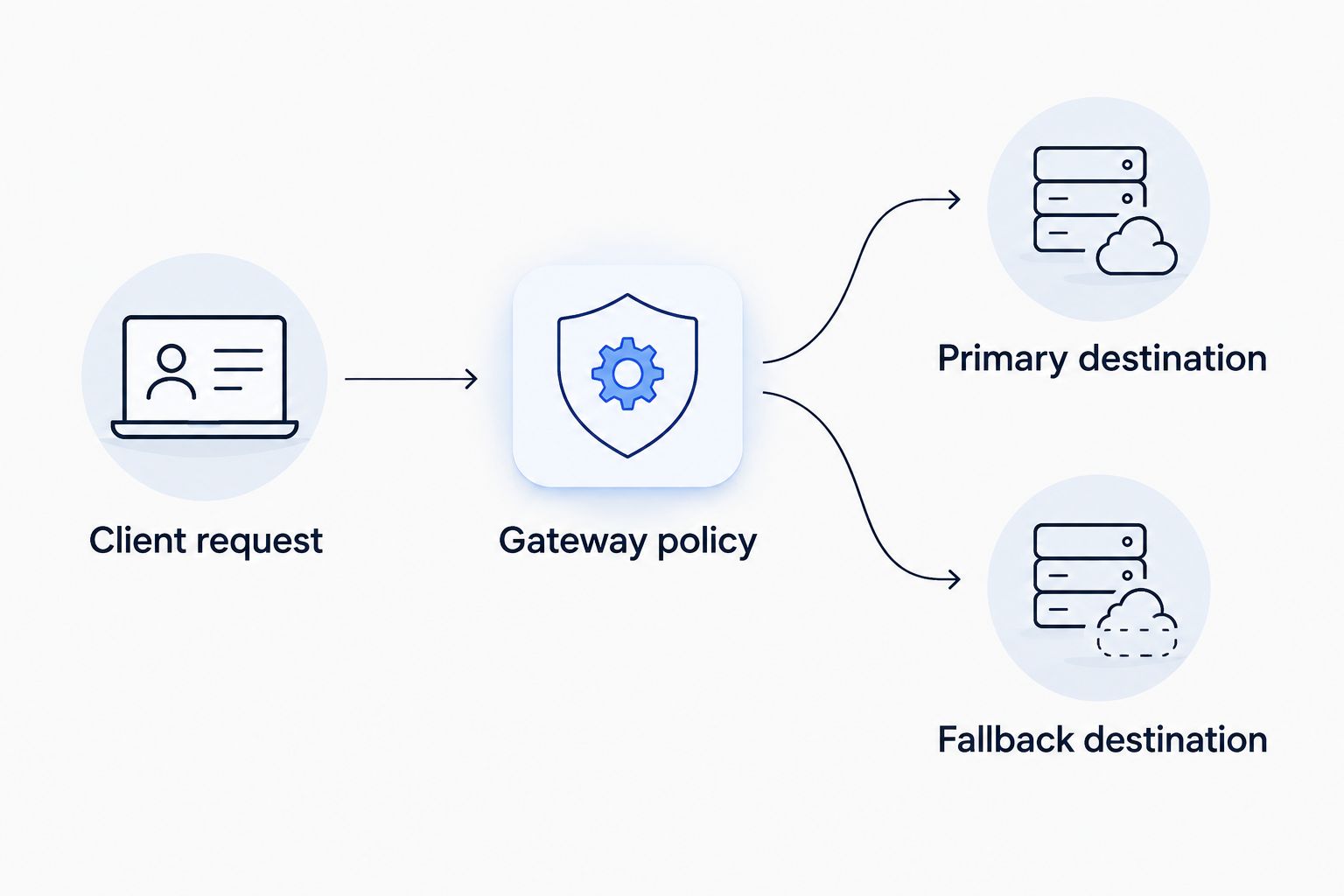
The client connection and gateway fallback policy are separate configuration responsibilities.
Avoid adding application-level provider switching during the first test. Multiple routing layers obscure which component retried the request and which destination handled it.
Request validation
Use a minimal request before adding repository context or agent tools. The example below uses the OpenAI Python SDK’s actual configuration names: api_key, base_url, and model. These are code parameters, not editor buttons.
1import os2from openai import OpenAI34client = OpenAI(5 api_key=os.environ["LLM_API_KEY"],6 base_url=os.environ["LLM_BASE_URL"],7 max_retries=0,8)910response = client.chat.completions.create(11 model=os.environ["LLM_MODEL"],12 messages=[13 {14 "role": "user",15 "content": "Explain what a Python context manager does.",16 }17 ],18)1920print(response.choices[0].message.content)
The example disables SDK retries to keep the initial diagnostic request easier to interpret. That is a test configuration, not a recommendation to disable retries throughout production.
- Run the script from the terminal environment where you set the variables.
- Confirm that it returns a text response without authentication or routing errors.
- Inspect the gateway’s available request records for the corresponding request. Check the selected destination where that information is exposed.
- Keep credentials and sensitive prompt content out of any diagnostic output you share.
Expected result: Your script reaches the gateway and receives a response through the selected route. This validates the script, not native Windsurf assistant routing.
Test fallback separately
Run 1 controlled fallback test after the baseline request succeeds. In a non-production configuration, use a documented test mechanism or an approved simulation that makes the primary destination fail in a way the policy recognizes.
Check the gateway record for evidence that the fallback destination handled the request. A successful response alone is insufficient: the primary destination might still have served it.
Do not expose production traffic to a deliberately broken route. Do not use an invalid API key as a substitute for a supported primary-failure test; authentication failure does not demonstrate destination failover.
For your 2026 acceptance record, capture the test configuration, observed routing decision, and final response status. Record only what the available request evidence establishes.
Expected result: You can distinguish a normal primary response from a fallback response and identify the policy responsible for the switch.
Variant: Route different coding tasks
A second workflow uses the same connection pattern for different application tasks. Instead of switching provider configuration in code, your application selects an approved routing identifier for the task it is performing.
For example, separate a plain-text explanation workflow from a workflow that uses tools. This is an application design pattern, not a claim about built-in editor controls.
- Define each task’s required request and response features.
- Create a gateway policy for each task using supported routing controls.
- Give each policy fallback destinations that satisfy that task’s requirements.
- Pass the appropriate accepted identifier as the SDK’s
modelvalue. - Repeat baseline and fallback validation for each policy.
Best for: platform teams maintaining several application workloads. The advantage is explicit task-level routing without duplicating provider credentials across scripts. The trade-off is more policy configuration and more evaluation work.
Do not assume that a fallback suitable for text explanations is also suitable for tool-driven repository changes. Test the complete workflow, including how your application parses and acts on the response.
Troubleshooting
The credential is accepted, but requests bypass the gateway
Check the component making the request and its configured destination. For the terminal method, inspect the resolved base_url without printing the credential. For an editor integration, verify that the specific feature supports and uses a custom endpoint.
Fix: Correct the destination configuration or choose a supported connection surface. Adding another credential does not redirect traffic.
The script reports a missing environment variable
The process running Python cannot read the required variable. Setting a variable in one shell does not establish it in every other process.
Fix: Set the variables in the execution environment that launches the script, then rerun it. Keep actual credential values out of screenshots and error reports.
Authentication or model selection fails
Check the credential’s authorization and the exact accepted routing identifier. Also check whether the endpoint is the API base URL expected by the SDK rather than a website URL or an individual operation path.
Fix: Correct these inputs before testing fallback. Invalid credentials and unknown identifiers are configuration failures, not evidence that the primary model needs replacing.
Requests succeed, but fallback is unproven
A successful primary request does not exercise the fallback policy. The request might also reference a direct destination instead of the intended route.
Fix: Confirm the identifier’s routing behavior, run the approved controlled test, and inspect the selected destination in the available request evidence.
Text works, but the coding workflow fails
Basic text completion validates only that request shape. Streaming, tool calls, and structured responses introduce additional requirements.
Fix: Add those features individually and evaluate both primary and fallback behavior. Keep a failed application action separate from a failed model request when diagnosing the result.
Customize your workflow
After connectivity and fallback pass, add the operational controls your team needs: approved destinations, credential management, usage governance, and request observability. Match each control to a defined responsibility rather than assuming the gateway replaces application safeguards.
FastRouter provides centralized routing and governance, but your application still owns prompt construction, response validation, and permission checks before executing generated actions. Automatic fallback does not establish that two destinations produce equivalent answers.
For a 2026 rollout, use staged adoption. Start with a non-sensitive workload, validate the route, then evaluate the request features and repository access your real coding workflow requires.
FAQ
How do I connect Windsurf to FastRouter?
Use a supported integration that accepts a custom OpenAI-compatible endpoint, or run your own gateway-connected script from a terminal. Supply the exact API base URL, an authorized credential, and an accepted routing identifier.
Does an OpenAI-compatible gateway automatically work with Windsurf?
No. The specific editor integration must support a custom endpoint and the request features your workflow uses; OpenAI compatibility does not establish that client capability.
Does the terminal method change Windsurf’s native assistant?
No. The terminal method connects the script you run, not the editor’s native assistant, autocomplete, or agent configuration.
Where should I configure automatic fallback?
Configure destination fallback in the gateway policy used by your application. Confirm that the identifier sent in the request invokes that policy, then test a qualifying primary failure.
How can I tell whether fallback actually happened?
Check request evidence showing that a fallback destination handled the controlled test. A successful response alone does not establish failover because the primary destination might have served it.
Can I use different routes for different coding tasks?
Yes, your own application can select different accepted routing identifiers for different tasks. Configure and test each policy against the task’s required request features.
What should I check before deploying this workflow in 2026?
Check endpoint support, credential authorization, route selection, fallback evidence, and data-handling approval. Validate streaming, tools, and structured responses separately whenever the application uses them.
One last thing
A gateway-connected terminal is not a gateway-connected editor assistant. Make that distinction an acceptance criterion in your 2026 runbook: name the component that sends requests, verify its destination, and prove fallback with request evidence. That prevents a working script from being mistaken for a completed native integration.
Related Articles
LlamaIndex to production RAG pipelines: 2026 workflow
Build a llamaindex fastrouter integration for production RAG. Separate retrieval from routing, configure the compatible client, and test failover before release.

Aider to production AI pair programming: 2026 workflow
Build an aider fastrouter integration with OpenAI-compatible routing, scoped repository edits, test gates, and a controlled path from coding to production.

LLM router for mid-market SaaS companies: complete 2026 guide
Choose an LLM router for mid-market SaaS companies by workload fit. Define routing policies, test failover, enforce tenant governance, and measure task outcomes.