How to connect CrewAI to FastRouter for cost-optimized agents
Connect CrewAI to Fastrouter through one gateway. Configure credentials, validate model calls, and evaluate agent usage before expanding routing and failover.
Instead of maintaining provider credentials and model choices inside every agent, connect CrewAI to Fastrouter through CrewAI’s LLM configuration and an OpenAI-compatible base URL. You keep agent orchestration in CrewAI while moving model access, automatic failover, and usage governance behind Fastrouter.
TL;DR
- Connect CrewAI to Fastrouter with an explicit base URL, gateway credential, and supported model identifier.
- Fastrouter fits enterprise agent teams that need unified model access and usage governance.
- Validate one model call before adding agents, tools, or routing changes.
- Measure complete-task usage and quality; a different model does not prove lower operating cost.
Why this matters
An agent workflow can make several model calls before delivering a useful result. Changing the model on an individual call does not establish that the entire workflow uses fewer resources. Extra iterations, failed tool calls, and application retries belong in the evaluation.
Fastrouter is best for enterprise agent teams that need unified model access and usage governance. Its gateway provides routing, automatic failover, and cost optimization; your CrewAI application still owns task definitions, tool permissions, and acceptance criteria.
Keep that boundary explicit. Gateway failover handles model access, not the correctness of an agent’s answer or the safety of repeating a tool action. For your 2026 integration baseline, record the installed package versions alongside the connection configuration so later changes are traceable.
Before you start
- Access and credentials: Obtain a gateway credential, the exact OpenAI-compatible base URL, and a model identifier accepted by the gateway. Store credentials outside source control and use access appropriate to your deployment.
- Local environment: Prepare a Python environment that supports your selected CrewAI release. Install
crewai, record the resolved dependency versions, and run the initial test without production tools or sensitive records. - Compatibility gotcha: OpenAI-compatible transport does not guarantee identical behavior for every model feature. Start with plain text; validate structured output and tool calling separately before using either in a production crew.
The examples below read connection values from environment variables. They deliberately do not hard-code an endpoint or model name. Copy those values from your actual gateway configuration rather than deriving an API address from the public website.
Use these application-owned environment variables:
Variable | Value to supply | Validation |
|---|---|---|
| Exact OpenAI-compatible API base URL | Includes the required API path, not just a website hostname |
| Credential authorized for the gateway | Belongs to the intended environment and access scope |
| Model identifier accepted by the gateway | Matches the identifier supplied by the gateway |
These variable names belong to this example. They are not claims about dashboard field names or platform-required naming conventions.
Connection settings
- Install CrewAI in your project environment with
pip install crewai. - Set the three environment variables in your shell, deployment configuration, or secret manager. Keep the credential out of notebooks, shared terminal recordings, and repository files.
- Create a connection module using the code below. Set
model,base_url, andapi_keyexplicitly rather than relying on ambient provider defaults. - Preserve the gateway model identifier after the
openai/provider prefix. The prefix selects OpenAI-compatible handling in this configuration; it does not identify the underlying model vendor.
1import os2from crewai import LLM34base_url = os.environ["FASTROUTER_BASE_URL"].rstrip("/")5api_key = os.environ["FASTROUTER_API_KEY"]6model_id = os.environ["FASTROUTER_MODEL_ID"]78if not base_url or not api_key or not model_id:9 raise ValueError("Gateway connection values must not be empty")1011llm = LLM(12 model=f"openai/{model_id}",13 base_url=base_url,14 api_key=api_key,15)
The openai/ prefix and the gateway identifier serve different purposes. Supply the gateway’s accepted identifier through FASTROUTER_MODEL_ID; do not add a provider prefix to that environment value simply because it appears in the example’s model expression.
Expected result: The application creates an explicitly configured CrewAI LLM object. Object construction alone does not verify network access, authorization, or model support; the next step does.
Single-call check
- Run 1 model call before creating a crew. Use a short, non-sensitive prompt with a plainly observable answer.
- Print the response locally and confirm that a usable text answer returns.
- Review any available gateway usage record to confirm that the request reached the intended environment. Do not treat a successful answer alone as proof of the routing destination.
- Save a sanitized test record containing the package versions, configured model identifier, and outcome. Exclude the credential and any sensitive request content.
1response = llm.call(2 "Reply with the word connected and no other text."3)4print(response)
A formatting deviation is different from a connection failure. If the model returns additional text, inspect the response before changing credentials or endpoint settings. Authentication, transport, and instruction-following require different fixes.
Expected result: A successful response demonstrates that this client configuration can reach an authorized model through the gateway. It does not establish tool compatibility, output quality on your workload, or failover behavior.
Keep this smoke test in your 2026 deployment checks. It isolates connection problems from orchestration problems and gives you a small request to reproduce failures without launching a full agent run.
Crew configuration
- Create an
Agentand pass the configured object throughllm. Keepallow_delegationdisabled for this initial test so delegation does not complicate diagnosis. - Create a
Taskwith a bounded description and explicitexpected_output. Use provided material rather than a request that requires external research. - Create a
CrewwithProcess.sequential, then runkickoff(). - Inspect the final answer against the task requirements. Keep verbose logging disabled initially; enable diagnostic logging only with an appropriate data-handling policy.
1from crewai import Agent, Task, Crew, Process23analyst = Agent(4 role="Release note analyst",5 goal="Summarize supplied release notes accurately",6 backstory="You distinguish stated facts from missing details.",7 llm=llm,8 allow_delegation=False,9 verbose=False,10)1112summary_task = Task(13 description=(14 "Summarize these supplied release notes: "15 "The application now records gateway request identifiers. "16 "Do not infer performance improvements."17 ),18 expected_output=(19 "A short summary identifying the stated change "20 "without adding unsupported benefits."21 ),22 agent=analyst,23)2425crew = Crew(26 agents=[analyst],27 tasks=[summary_task],28 process=Process.sequential,29 verbose=False,30)3132result = crew.kickoff()33print(result)
The agent has no production tools and no external research requirement. That makes a poor answer easier to attribute to the task, instructions, or model rather than to an unavailable tool or unexpected external document.
Expected result: The crew produces a summary from the supplied release notes. Verify that it mentions request identifiers without inventing throughput, latency, or reliability improvements.
The integration sequence is Connection settings, Single-call check, Crew configuration, then Evaluation gate. Keep each stage independently testable.
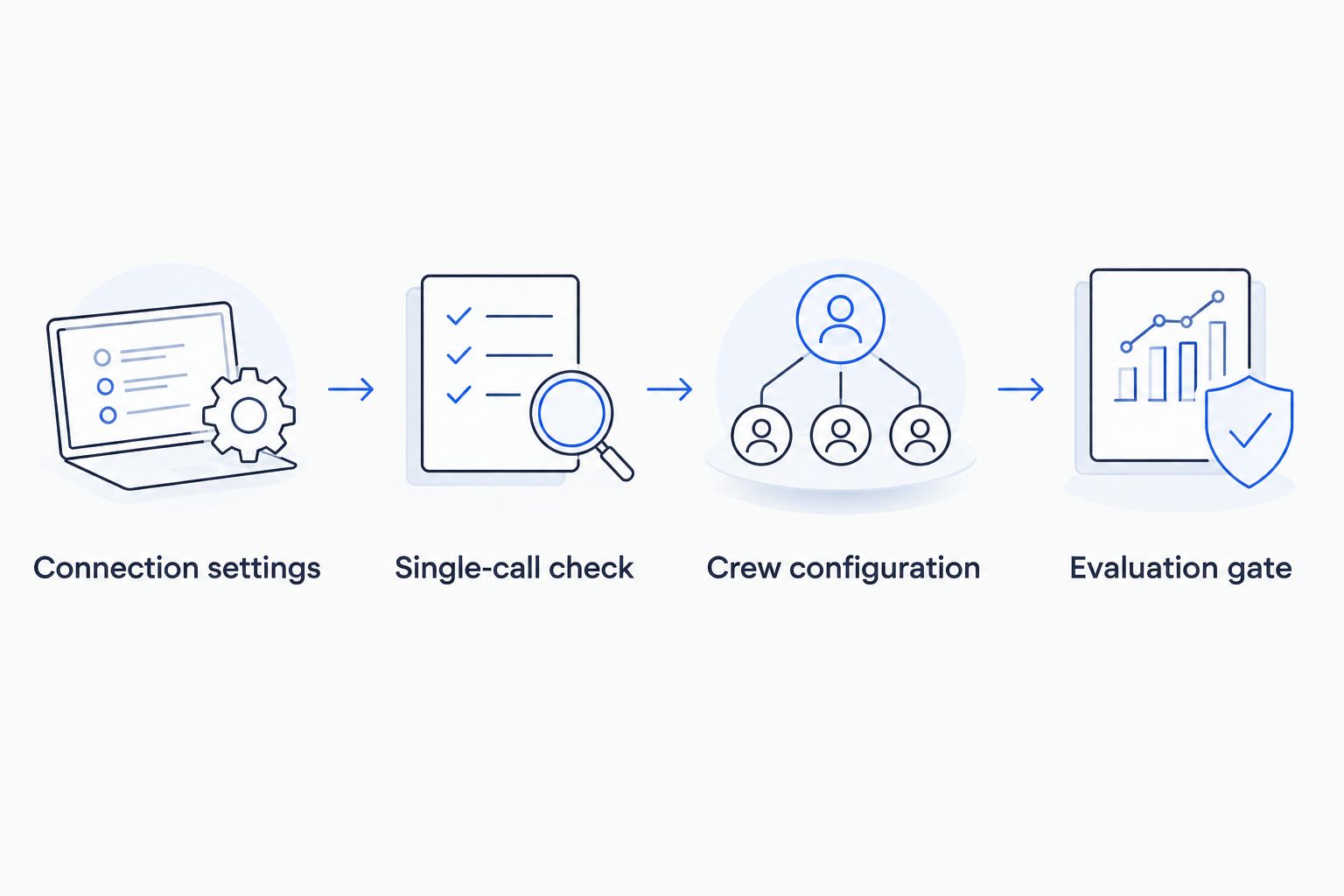
Validate the connection before testing agent orchestration and workload quality.
Evaluation gate
- Define 3 test cases from your workload: routine input, ambiguous input, and a dependency failure. Use synthetic or approved material.
- Establish acceptance criteria before changing model configuration. Check factual accuracy, required output structure, successful tool completion, and rejection of unsupported claims.
- Record complete-run elapsed time, model calls, token usage where available, errors, and retries. Distinguish measurements reported by the gateway from measurements collected by your application.
- Change one configuration dimension at a time. Compare the candidate against the baseline using the same inputs and criteria.
Optimize successful task completion, not an isolated request. A candidate that uses fewer tokens per call but causes more iterations needs a full-run comparison before adoption.
Include the date and scope in your evaluation record: for example, a 2026 regression suite for release-note summarization. Do not present a result from that narrow task as evidence for research agents, coding agents, or customer-facing workflows.
Expected result: You have a repeatable acceptance decision supported by your own workload measurements. The connection is ready for controlled expansion only when output quality and operational behavior meet your requirements.
Use different models by agent role
A second workflow assigns separate gateway-backed LLM objects to different agent roles. Use it when task requirements differ enough to justify independent evaluation, not merely because the architecture permits it.
Define 2 agent roles with separate model identifiers: one for producing a draft and one for checking the draft against supplied requirements. Keep both on the same explicitly configured gateway connection.
1writer_llm = LLM(2 model=f"openai/{os.environ['FASTROUTER_WRITER_MODEL_ID']}",3 base_url=base_url,4 api_key=api_key,5)67reviewer_llm = LLM(8 model=f"openai/{os.environ['FASTROUTER_REVIEWER_MODEL_ID']}",9 base_url=base_url,10 api_key=api_key,11)
Assign writer_llm to the drafting agent’s llm argument and reviewer_llm to the reviewing agent’s llm argument. Pass the draft into the review task through CrewAI’s task context mechanism, and state what the reviewer must check.
An additional reviewer creates additional work. Evaluate whether the review catches relevant errors rather than assuming that another agent guarantees better output.
Connection pattern | Best for | Advantage | Trade-off |
|---|---|---|---|
Direct provider connection | A workload intentionally using one provider | Keeps gateway configuration out of the application | Provider access and switching remain application concerns |
Shared gateway LLM | Initial integration and a controlled baseline | Gives agents one explicit connection configuration | Does not distinguish model requirements by role |
Role-specific gateway LLMs | Tasks with different evaluated requirements | Separates model selection for drafting and review | Adds configuration and evaluation work; review adds calls |
Start with a shared gateway LLM; adopt role-specific gateway LLMs after evaluation demonstrates a reason. This recommendation keeps the initial failure surface smaller without treating one model as the permanent answer for every agent.
Troubleshooting
Authentication fails
Confirm that the gateway credential is present in the process running CrewAI, not just in an interactive shell. Check its authorization scope and intended environment. Do not substitute a provider credential unless the gateway’s actual configuration calls for it.
The endpoint returns a missing-route error
Compare base_url with the exact API base supplied for your gateway access. A public website address is not an API endpoint. Avoid adding a guessed path or duplicating an API path already included in the supplied value.
The model identifier is rejected
Check the complete model value and the model identifier accepted by the gateway. Separate client-side provider selection from gateway model naming. Test a plain text call again before investigating agent behavior.
Text works but tools or structured output fail
Reduce the request to the failing capability. Verify that the selected model, gateway request handling, and installed CrewAI release support the required behavior. Keep the plain-text smoke test unchanged so you can distinguish feature compatibility from connection health.
Retries repeat work or obscure failures
Inspect retries across the application, client dependencies, and gateway configuration. Give state-changing tools their own duplicate-execution controls, such as application-managed operation identifiers. Model failover does not establish that repeating a tool action is safe.
Customize your workflow
Expand the integration in this order: approved tools, structured responses, role-specific model selection, then controlled failure testing. Keep an acceptance test at each boundary rather than changing all of them in one release.
For a 2026 production rollout, maintain a configuration record covering dependency versions, credential ownership, permitted models, and application retry behavior. Treat routing changes as deployment changes with a recorded evaluation outcome.
Fastrouter provides the shared model-access layer. Your application should still enforce tool permissions, redact sensitive logs, and connect agent-run identifiers to available gateway request records. Keep those responsibilities explicit when assigning operational ownership.
FAQ
How do I connect CrewAI to Fastrouter?
Configure CrewAI’s LLM object with an explicit OpenAI-compatible base URL, gateway credential, and supported model identifier. Run a plain-text call before assigning that object to an agent.
Do I have to rewrite my CrewAI agents?
You do not need to rewrite task logic to pass a gateway-backed LLM object to an agent. Check separately configured model clients, tool integrations, and feature compatibility before treating the entire application as migrated.
What base URL should I use?
Use the exact OpenAI-compatible API base URL supplied for your gateway access. Do not derive it from the public website or append an unverified API path.
Does a gateway connection automatically lower agent operating cost?
A gateway connection alone does not prove lower operating cost. Evaluate complete-task usage, retries, completion quality, and the effect of routing changes on your actual workload.
Can different CrewAI agents use different models?
Yes, agents can receive separate LLM objects through their llm arguments. Evaluate each role independently and include the additional calls from review or delegation in the complete-run measurement.
Does model failover make tool retries safe?
No, model failover does not make repeated tool actions safe. State-changing tools need application-level duplicate-execution controls and an explicit retry policy.
What should I record for a 2026 deployment?
Record dependency versions, the configured endpoint, accepted model identifiers, credential ownership, and evaluation outcomes. Exclude secrets and sensitive prompt content from shared diagnostic records.
One last thing
A successful answer does not prove that the intended connection handled it. Explicit configuration and a matching gateway request record are stronger evidence than output alone. Keep the single-call check after deployment, dependency changes, and credential rotation; it is the shortest path back to a reproducible connection test.
Related Articles

AutoGen to multi-model agent teams: complete 2026 workflow
Build an autogen fastrouter integration with explicit agent routes. Configure model clients, bound team execution, and validate failover before production use.
Automatically fail over AI workflows when a model goes down in n8n
Set up n8n AI model failover with controlled recovery, error classification, fallback routing, and output validation. Prevent duplicate actions after failures.
.png&w=3840&q=75)
FastRouter vs TrueFoundry: Pricing Compared
FastRouter vs TrueFoundry pricing, side by side. See what you pay for LLM gateway access and where costs can add up.