

How to connect Continue.dev to FastRouter's model catalog
Connect continue.dev to fastrouter through an OpenAI-compatible gateway. Configure model IDs, validate chat, and troubleshoot authentication and routing errors.
Instead of maintaining separate provider connections in Continue, connect Continue.dev to Fastrouter through its OpenAI-compatible gateway and configure the model IDs you want to use. Fastrouter provides the routing layer; Continue supplies the editor interface and model configuration.
TL;DR
- Connect continue.dev to fastrouter with Continue’s OpenAI provider, the gateway API base, an API key, and exact model IDs.
- Fastrouter fits enterprise teams that need centralized LLM routing, automatic failover, and usage governance.
- Start with chat; validate streaming and model behavior before adding autocomplete or tool-dependent workflows.
- Gateway access does not replace Continue configuration: select and test the models your editor workflow needs.
Why this matters
An editor integration and a model gateway solve different problems. Continue connects your coding workflow to a model. The gateway manages access and routing behind that connection. Keeping those responsibilities separate makes configuration errors easier to diagnose.
Fastrouter is best for enterprise development teams that need centralized LLM routing and usage governance. Its OpenAI-compatible interface provides the connection point for this workflow. Compatibility at that interface does not establish that every model supports every editor feature.
For a 2026 deployment, separate connection validation from capability validation. First prove that Continue can authenticate and receive a response. Then test the capabilities your developers actually need: streaming, repository context, structured edits, or tool execution.
The benefit is a shared gateway connection rather than a collection of direct-provider credentials. The trade-off is another configuration boundary: the editor, gateway, and selected model must agree on the request format and supported behavior.
Before you start
- Install Continue and locate its active configuration. This guide uses Continue’s YAML configuration format. Confirm which configuration your installed extension loads before editing; changing an inactive file produces no visible change.
- Prepare gateway credentials and connection details. Have an authorized API key, the OpenAI-compatible API base, and an exact model ID from the gateway’s current documentation or account. Keep the key out of repository files and shared screenshots.
- Check model capabilities, not just catalog membership. A model listed in the catalog is not automatically suitable for autocomplete, tool execution, or every editing operation. Start with 1 chat model entry and validate that role before expanding.
The setup gotcha is the API base. Continue needs the API base expected by its OpenAI provider, not a website address or a complete chat-completions request URL. Copy the documented value rather than constructing it from the brand’s domain.
For your 2026 rollout record, capture the Continue extension version, selected model ID, and configuration owner. These are deployment records, not credentials. They let another engineer reproduce the integration without copying a secret.
Gateway connection
- Obtain an API key authorized for your intended gateway access. Store it using your organization’s approved secret-handling method.
- Copy the gateway’s documented OpenAI-compatible API base. Preserve the documented path and version segment.
- Copy the exact model ID you intend to use. Treat the ID as an API identifier, not a display name.
- Check that your development environment can reach the gateway. Include any organization-specific proxy or outbound-network requirements in the connection review.
Your connection settings have separate jobs:
Configuration field | Purpose | Common mistake |
|---|---|---|
provider | Selects Continue’s request adapter | Selecting a direct-provider adapter for a gateway connection |
apiBase | Sets the OpenAI-compatible API base | Entering a website address or a complete request endpoint |
apiKey | Supplies gateway authentication | Using a credential intended for a different service |
model | Identifies the requested model | Copying a display label instead of the exact API identifier |
roles | Declares the Continue workflow for that entry | Assigning capabilities before validating them |
Do not substitute an upstream provider credential for the gateway key unless the gateway’s documented authentication flow explicitly requires it. BYOK arrangements and gateway authentication are separate concerns; configure each according to the applicable instructions.
Expected result: you have an authorized credential, a documented API base, and an exact model ID. No guessed endpoint or model alias remains in the setup.
Continue configuration
Continue’s YAML configuration supports model entries with an OpenAI provider and a custom API base. The relevant keys are name, provider, model, apiBase, apiKey, and roles. These are configuration fields, not dashboard button labels.
- Open Continue’s active YAML configuration in your editor. Back it up before making changes.
- Locate the models list. Preserve unrelated configuration and existing entries.
- Add a model entry with provider set to
openaiand roles containingchat. - Set apiBase, apiKey, and model to the verified connection values. Use name for a recognizable local label.
- Save the configuration and reload the extension if the installed version requires it. Select the new chat model in Continue.
The following Python helper generates a YAML-compatible model entry from values you supply. It prints only the entry to merge into the existing models list; it does not overwrite your configuration.
1import getpass2import json34name = input("Local model label: ").strip()5api_base = input("Documented gateway API base: ").strip()6model = input("Exact gateway model ID: ").strip()7api_key = getpass.getpass("Gateway API key: ").strip()89values = {10 "name": name,11 "provider": "openai",12 "model": model,13 "apiBase": api_base,14 "apiKey": api_key,15}1617if not all(values.values()):18 raise SystemExit("Every connection field must be populated.")1920for index, (key, value) in enumerate(values.items()):21 prefix = " - " if index == 0 else " "22 print(f"{prefix}{key}: {json.dumps(value)}")23print(" roles:")24print(" - chat")
JSON-quoted strings are valid YAML strings, so the helper quotes punctuation-sensitive values rather than relying on manual escaping. Paste the output beneath the existing models key and match the surrounding indentation.
The generated output contains the credential. Run this helper only in a private local session, do not capture its output in shared logs, and do not commit the resulting configuration. If your installed Continue version supports a documented secret-reference mechanism, use that mechanism instead of a literal key.
Expected result: Continue loads the entry without a configuration error, and the configured chat model appears as a selectable option. Appearance in the selector proves configuration loading, not successful authentication.
Request validation
Validate the request path before testing a large repository task. A short prompt separates connection problems from context size, tool behavior, and code-editing complexity.
- Select the newly configured chat model. Send a plain-text request asking for a short explanation of a familiar programming concept.
- Confirm that the response completes. If streaming is enabled, check that the response arrives without a parsing error or premature termination.
- Send a second request referencing a small, non-sensitive code selection. Confirm that the answer addresses the selected code rather than answering generically.
- Review the available editor logs and gateway usage records. Check the requested model and outcome without recording prompt content or credentials unnecessarily.
Use these 2 test prompts as a minimum smoke test: one plain-text request and one code-context request. This is a recommended validation sequence, not a performance benchmark.
The connection has three boundaries: the editor sends the request, the gateway handles access and routing, and the model returns output. Troubleshoot the boundary that failed instead of changing every setting simultaneously.
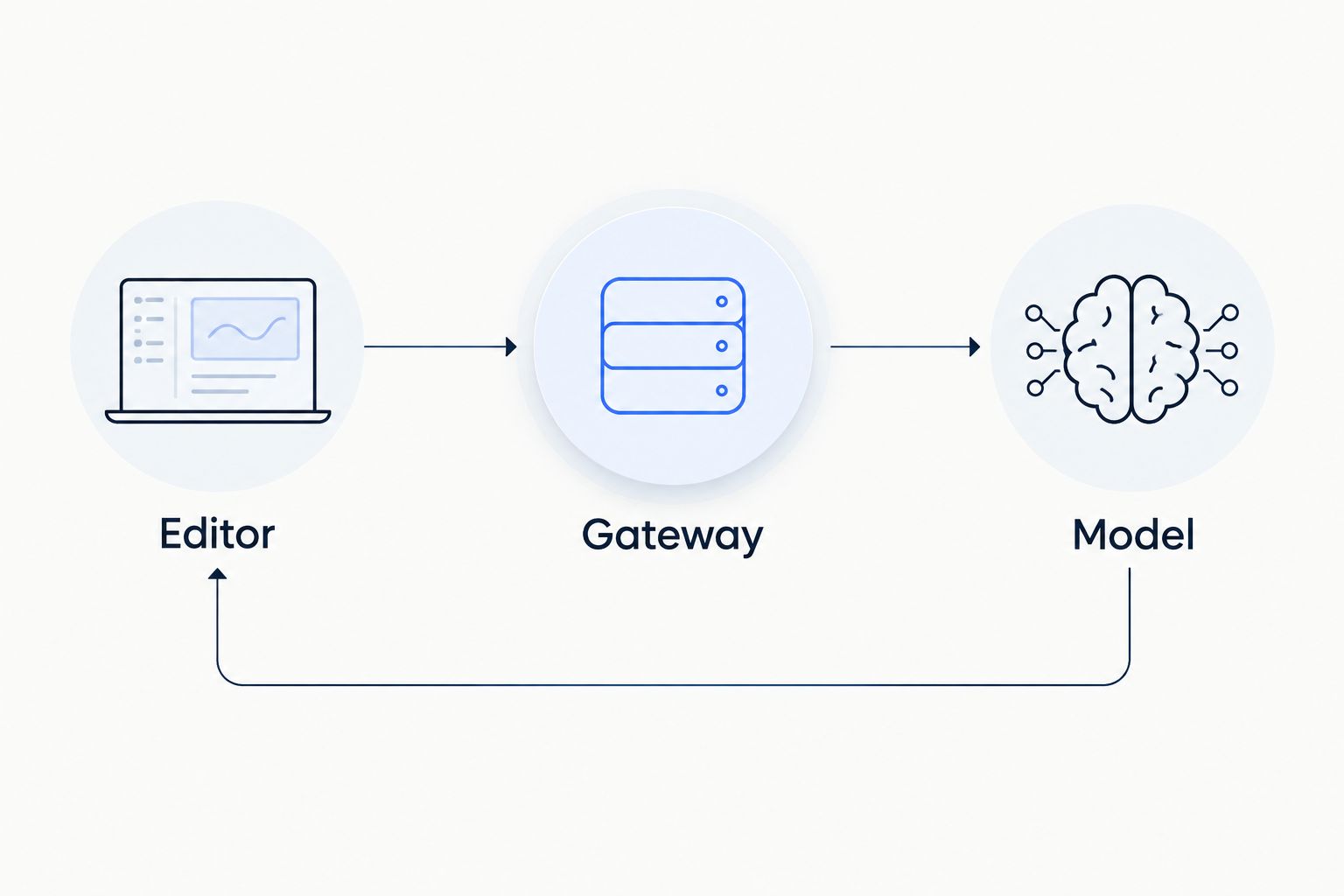
Validate the connection before testing advanced editor behavior.
For a 2026 acceptance check, record the observed outcome of each prompt and the configuration used. Do not label the integration production-ready solely because a model appears in the selector.
Expected result: both requests return usable responses through the configured gateway connection. Any remaining failure has a specific location: configuration loading, authentication, model selection, or response handling.
Model selection updates
A second workflow is useful when your team wants to compare models without changing the gateway connection. Keep the same connection settings and add another explicitly configured model entry.
- Copy the working entry within the models list.
- Change name to a distinct local label and model to another verified catalog ID.
- Keep provider, apiBase, and the approved authentication mechanism unchanged.
- Assign only the role you intend to test. Repeat the same smoke tests before introducing the entry to other developers.
Choose the configuration pattern according to the evaluation task:
Configuration pattern | Best for | Advantage | Trade-off |
|---|---|---|---|
Single chat entry | Establishing a working baseline | Fewer configuration variables | Does not support a side-by-side model choice |
Separate named entries | Comparing model behavior | Explicit selection and repeatable prompts | Each entry needs capability validation |
Gateway failover | Handling provider failures under a defined routing policy | Routing remains behind the editor connection | A fallback response can differ from the original model’s behavior |
Fastrouter supports automatic failover, but the editor connection alone does not establish your intended routing policy. Confirm the configured fallback behavior separately and test the output requirements that must remain valid across fallback models.
Do not treat a catalog connection as automatic catalog synchronization. This workflow configures selected IDs. If your team needs automatic discovery or configuration updates, verify a supported mechanism before making it part of the deployment plan.
Expected result: developers can choose between the configured entries while using the same gateway connection. Each choice has a recorded capability check, rather than an assumption based on catalog membership.
Troubleshooting
The model entry does not appear
Check the active configuration file and YAML indentation. Ensure the entry sits beneath models, not beside it, and that the installed extension accepts the configuration format. Reload as required and inspect configuration errors before investigating the network.
Authentication is rejected
Verify that apiKey supplies the intended gateway credential and that the credential has the required access. Check for accidental whitespace or an unresolved secret reference. Replace an exposed key rather than continuing to use it during troubleshooting.
The request reaches an invalid path
Compare apiBase with the documented API base character for character. Remove a complete request endpoint if you entered one where an API base belongs. Check proxy rewriting separately; a correct local setting does not prevent a proxy from altering the path.
The requested model is rejected
Copy the model ID again from the current catalog and confirm access for the credential in use. Do not shorten the ID or substitute its display label. Change only model, then repeat the plain-text smoke test.
Chat works, but streaming or tools fail
Test the failing capability separately. A successful chat response establishes basic request compatibility, not tool execution or streaming behavior. Check Continue’s installed-version documentation and the selected model’s supported capabilities before changing request settings.
During the 2026 troubleshooting review, retain sanitized errors and configuration changes. Remove authorization headers, credentials, source code, and sensitive prompt content before sharing diagnostics.
Customize your workflow
Expand only after the baseline passes. Keep connection settings stable while introducing new roles or routing policies so you can identify which change caused a regression.
- Add autocomplete separately. Create a dedicated entry only after confirming compatibility with Continue’s autocomplete workflow. Chat quality is not an autocomplete validation result.
- Validate editing behavior. Test how proposed changes apply to a disposable code sample before using the integration on important repository changes.
- Review governance requirements. Define permitted models, credential ownership, and acceptable handling of repository context. A working connection does not establish those policies.
- Test failover deliberately. Confirm that fallback output still satisfies the application’s format and capability requirements. A completed request is not enough if its output breaks the workflow.
Use 3 acceptance checks before distributing the configuration: successful authentication, usable code-context responses, and confirmed behavior for every assigned role. These checks are a rollout recommendation, not a claim about gateway performance.
For a 2026 team rollout, distribute non-secret configuration through your approved process and provision credentials separately. Keep a named owner for model changes so a catalog update does not become an undocumented editor change.
FAQ
How do I connect Continue.dev to Fastrouter?
Configure a Continue model entry with the OpenAI provider, the documented gateway API base, an authorized API key, and an exact catalog model ID. Start with the chat role and validate a plain-text request before adding advanced workflows.
Do I need a separate provider key for each model?
This workflow authenticates Continue to the gateway with a gateway credential, rather than configuring separate direct-provider connections. Any BYOK requirements must be handled according to the gateway’s documented setup.
Does connecting the gateway import the whole model catalog?
This setup adds the model IDs you explicitly configure; it does not implement automatic catalog synchronization. Add and validate separate entries for the models your team wants to select.
Can I use the same connection for autocomplete?
Reuse the gateway connection only after validating the selected model and Continue adapter for autocomplete. A working chat entry does not prove autocomplete compatibility.
Why does Continue reject my model ID?
Check that the model field contains the exact current API identifier and that your credential has access to it. A display name or shortened identifier is not a reliable substitute.
Can automatic failover change the response?
Yes, a fallback model can return different output from the originally requested model. Validate the required format, capabilities, and editing behavior across your configured fallback policy.
How should I validate this integration in 2026?
Run a plain-text request and a small code-context request, then test every additional role separately. Record the extension version, model ID, sanitized errors, and observed outcomes without exposing credentials.
One last thing
A successful response is not the same as a successful coding workflow. The gateway can return valid text while the editor still lacks the behavior required to apply an edit or execute a tool. Keep the first working chat entry as your baseline, and validate each added capability independently.
Related Articles

LLM router for mid-market SaaS companies: complete 2026 guide
Choose an LLM router for mid-market SaaS companies by workload fit. Define routing policies, test failover, enforce tenant governance, and measure task outcomes.
How to connect Cline to FastRouter for multi-model coding
Connect Cline to Fastrouter through an OpenAI-compatible gateway. Configure credentials, validate coding tasks, and separate model switching from failover.

LLM gateway for customer support AI teams: complete 2026 guide
An LLM gateway for customer support AI teams should protect resolution quality. Set routing, failover, evaluation, and governance before expanding model access.