
FastRouter vs TypingMind: which is better in 2026
Fastrouter vs TypingMind: choose a gateway for production routing or a chat interface for users. Compare failover, governance, integration, and team fit in 2026.
Choose Fastrouter if you need an API gateway for production applications, model routing, automatic failover, and usage governance; choose TypingMind if you need a chat interface for people working directly with language models. In 2026, the deciding factor is whether you are building the model-access layer or choosing the workspace above it.
TL;DR
- Fastrouter vs TypingMind is an API gateway versus chat interface decision, not a like-for-like feature contest.
- Fastrouter is best for enterprise development teams managing production LLM routing and access.
- TypingMind is best for users who want an interactive workspace for conversations with language models.
- Evaluate application reliability and human workflow separately before choosing either category.
Why this matters
A chat interface and an API gateway sit at different points in your architecture. Confusing them leads to a purchase that solves the visible workflow while leaving the production problem untouched.
Fastrouter provides a unified, OpenAI-compatible gateway for access to 200+ large language models, with automatic failover, cost optimization, and usage governance. TypingMind provides a user-facing interface for interacting with language models.
Fastrouter is an LLM gateway for enterprise development teams managing model access across production applications. TypingMind serves a different buyer: someone who wants to use models through a conversational workspace rather than build that workspace into an application.
For your 2026 evaluation, separate the application request path from the employee interaction path. That distinction determines which product deserves the deeper technical review.
At a glance
Dimension | Fastrouter | TypingMind |
|---|---|---|
Best for | Enterprise teams building applications that call language models | People working directly with language models through chat |
Architectural role | API gateway between applications and model providers | User-facing conversational workspace |
Standout feature | Unified model access with automatic failover | Interactive chat interface |
Integration priority | OpenAI-compatible application integration | Human interaction with models |
Reliability focus | Routing and failover in the application request path | Usability of the conversational workflow |
Cost-control focus | Model-access cost optimization and usage governance | Evaluate the workspace together with underlying model usage |
Evaluation requirement | Test application outputs and operational behavior | Test conversation outputs and user workflow |
Pricing model | Evaluate gateway terms alongside underlying inference costs | Evaluate workspace terms alongside underlying inference costs |
The table describes different responsibilities, not equivalent feature coverage. A good chat experience does not establish gateway suitability, and a gateway feature list does not establish a good employee workspace.
The gateway wins for application infrastructure
Choose an API gateway when your application, rather than a person in a chat window, owns the request. This includes a product feature, an internal service, or a background workflow that needs model access through application code.
The gateway belongs between that code and the model providers. This separation gives your engineering team a place to manage routing without making the user interface responsible for provider selection.
OpenAI compatibility is relevant because it provides a familiar integration surface. It is not proof that every endpoint, parameter, streaming behavior, or provider-specific feature behaves identically. Validate the exact calls your application makes.
The tradeoff is implementation work. Your team still owns application behavior, error handling, output validation, and deployment decisions. A gateway does not replace those responsibilities.
TypingMind is the better starting point when you do not need that application layer. If your immediate requirement is for employees to conduct conversations with models, building a custom interface around a gateway introduces work that a chat workspace already addresses.
The chat interface wins for direct interaction
Choose TypingMind when the core requirement is a human conversation with a model. The relevant evaluation is whether users can complete their actual work comfortably in the interface, not whether the product resembles backend infrastructure.
Ask users to perform representative tasks: draft a response, revise a document, or explore a technical question. Observe where they need to edit, repeat, or clarify the conversation. Those interactions are the workflow you are buying.
A user-facing workspace makes the conversation itself the central experience. That is a different benefit from a gateway, where the primary consumer is application code and the visible interface belongs to your product.
The limitation is architectural fit. Selecting a chat workspace does not, by itself, satisfy a requirement for application-level routing and automatic failover. Treat those as separate acceptance criteria.
For a 2026 rollout, assign the chat evaluation to the people doing the work. Assign the gateway evaluation to the team accountable for the application request path. Each group should test the layer it will operate.
Automatic failover favors the gateway
Automatic failover is an explicit gateway capability in this comparison. It matters when your application needs another route after an upstream request fails.
Evaluate failover as application behavior, not as a reliability slogan. A successful alternate response is only useful if it still satisfies the application contract: expected format, required content, acceptable behavior, and downstream handling.
Start with 2 failure scenarios: an upstream timeout and an upstream error. For each scenario, record what your application receives, how it handles the response, and whether the alternate output remains usable. These are proposed test cases, not measured product results.
Keep the operational responsibilities distinct:
- Routing: Decide where the request should go.
- Failover: Exercise the alternate path after a failure.
- Validation: Confirm that the returned output meets the application contract.
- Monitoring: Record enough context to investigate the result.
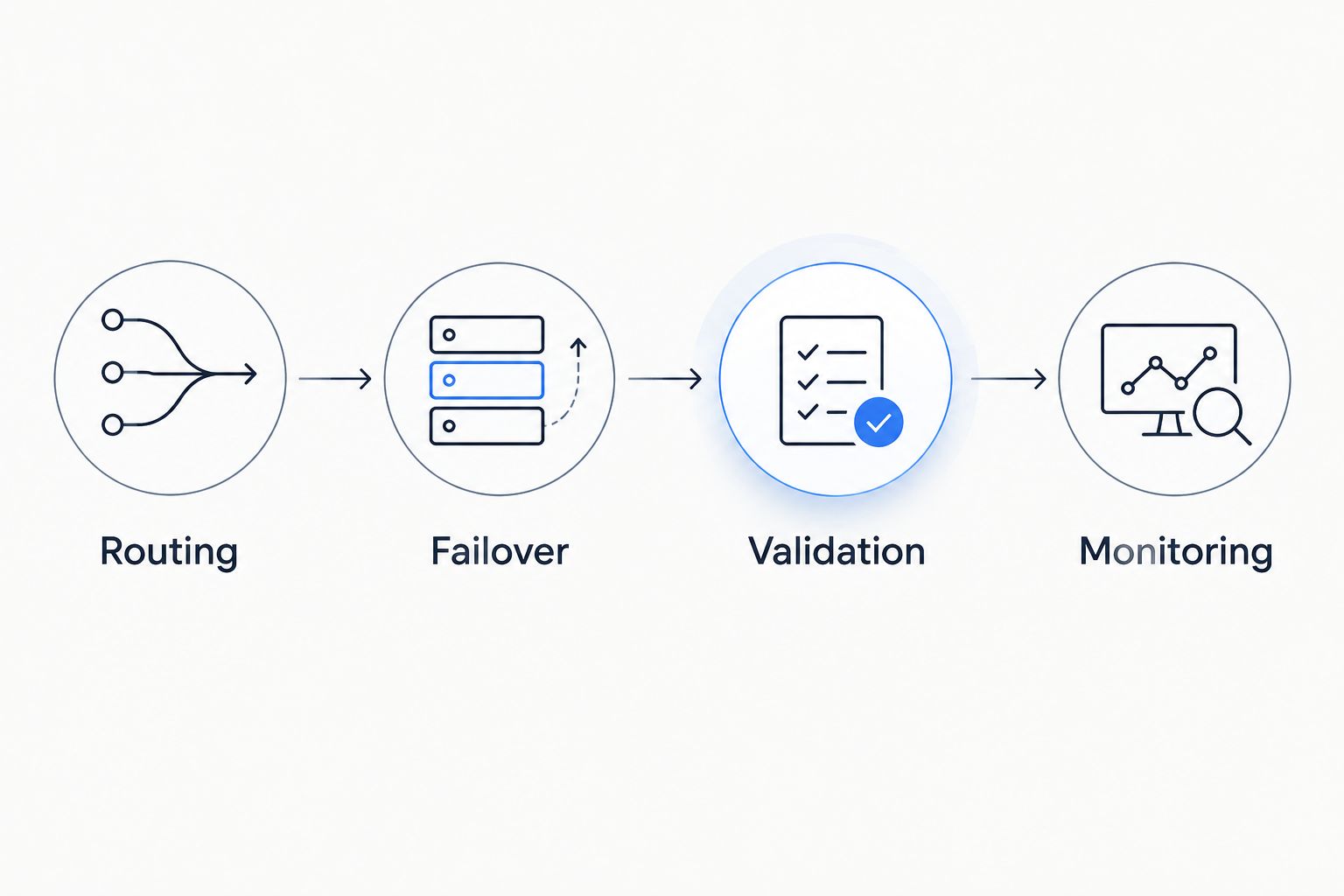
Failover needs output validation, not just a successful response.
TypingMind should instead be judged on the user's conversational experience. Do not make a workspace purchase carry an infrastructure requirement that belongs elsewhere in the system.
Both require task-specific model evaluation
Neither product category removes the need to evaluate model output. Access, routing, and interface quality affect how you use a model; they do not establish that its answers are correct for your task.
Use the same input material and acceptance criteria when comparing outputs. Otherwise, a better prompt or easier task can look like a better product.
Build your evaluation around 3 workflows: interactive drafting, structured extraction, and application error handling. Use only the workflows relevant to your deployment; the purpose is to distinguish human-facing work from software-facing work.
For interactive drafting, assess factual correctness, editability, and usefulness to the user. For structured extraction, assess whether the result follows the required schema and preserves the source information. For error handling, assess whether your application responds correctly when a request fails.
Both options deserve this discipline. The gateway has to support the application's requirements, while the chat workspace has to support the user's task. This dimension is a tie: evaluate the outcome, not just access to a model.
Governance favors the gateway for application usage
Usage governance is an explicit gateway capability here. For platform teams, it belongs in the discussion about how applications access models and how that access is managed.
Before accepting a governance design, describe the policy in operational terms. Which workloads need access? Who owns the usage? What happens when a request conflicts with a rule? What evidence does the operator need afterward?
These questions are evaluation requirements, not claims that every control is available. A broad governance label is not a substitute for checking the particular control your organization needs.
The gateway is the more direct fit when your concern is model access across applications. The chat interface is the more direct fit when your concern is how people conduct their conversations.
The tradeoff is ownership. Centralizing the access layer gives your platform team another component to operate and another policy surface to define. Your security and engineering teams still need to approve the deployment rather than assume that centralization alone establishes compliance.
Both need a data-handling review
Neither an API gateway nor a chat interface earns automatic security approval. Both introduce a layer that your organization must evaluate before routing sensitive prompts or responses through it.
Map the data path first. Identify where requests originate, which services receive them, what information returns, and where operational records are stored. Review credentials separately from prompt and response content.
For an application deployment, inspect how credentials are supplied and how the gateway participates in the request path. For a conversational deployment, inspect how users access the workspace and what information they enter.
If BYOK is part of your requirements, verify the supported configuration and credential-handling behavior directly. Do not infer a security boundary from the acronym.
For 2026 procurement, make the review specific to your intended deployment. Approval for a drafting workflow does not automatically approve production traffic containing different data. This dimension is another tie: architecture and documented handling practices decide the result.
Pricing: compare the complete cost
The useful pricing comparison is gateway economics versus workspace economics. Review each vendor's current commercial terms together with the underlying model usage rather than treating the interface or access layer as the entire cost.
For a gateway, evaluate how the commercial arrangement fits application traffic, operational ownership, and the model-access strategy. Cost optimization is relevant, but it needs to preserve the quality threshold your application requires.
For a chat workspace, evaluate the commercial arrangement against the people using it and the work it replaces. Include underlying inference usage wherever it is billed separately under your chosen setup.
Compare predictability and flexibility explicitly:
- A fixed commitment can simplify planning but needs to match actual adoption.
- A usage-based commitment tracks activity but requires traffic forecasting and controls.
- Separately billed services require a combined budget, not isolated purchasing decisions.
These are purchasing tradeoffs, not assertions about either vendor's current billing terms. Do not declare a cost winner until the proposed deployment and current contract terms are comparable.
Final verdict: choose the layer you need
Choose Fastrouter if you own production model access
Your profile is an enterprise platform lead, application developer, or technical founder responsible for software that calls language models. You need a gateway with unified access, OpenAI compatibility, automatic failover, cost optimization, and usage governance.
The named winner for that profile is Fastrouter. Its role matches the infrastructure requirement; your next step is to validate integration behavior, failover results, and governance requirements against your application.
Do not choose a gateway solely to give employees a chat window. That requirement belongs to the user-experience layer.
Choose TypingMind if you own the conversational workflow
Your profile is a product leader, technical user, or internal team selecting a workspace for direct conversations with models. Your immediate problem is helping people complete tasks through an interface, not managing the production request path.
The named winner for that profile is TypingMind. Evaluate it with real user tasks and the data-handling requirements of your intended deployment.
Do not treat the chat workspace as a substitute for a gateway evaluation. If both needs exist, assess both layers separately and verify any proposed connection before committing to the architecture.
Dimension | Winner |
|---|---|
Production application infrastructure | API gateway |
Direct conversational workflow | TypingMind |
Application failover requirement | API gateway |
Task-specific model evaluation | Tie: both require testing |
Application usage governance | API gateway |
Data-handling review | Tie: deployment-specific |
Complete deployment cost | No universal winner |
FAQ
Is Fastrouter better than TypingMind for production applications?
Fastrouter is the better architectural fit for production applications that need an LLM API gateway. Its stated capabilities include unified model access, OpenAI compatibility, automatic failover, cost optimization, and usage governance.
Is TypingMind better for employees who want to chat with models?
TypingMind is the better category fit for employees who want a user-facing conversational workspace. Evaluate it with the tasks those employees actually perform rather than backend routing requirements.
Are an LLM gateway and a chat interface the same thing?
An LLM gateway and a chat interface serve different layers. The gateway handles application access to models, while the chat interface lets people interact with models directly.
Does automatic failover guarantee a correct answer?
Automatic failover does not guarantee a correct answer. Validate the alternate response against the same content and format requirements as the original request.
How should I compare the cost of these options?
Compare the complete deployment cost using current vendor terms and underlying model usage. Include implementation and operational ownership rather than comparing the access layer or workspace in isolation.
Do I still need model evaluations with either option?
Both options require task-specific model evaluations. Use representative inputs and explicit acceptance criteria to separate output quality from interface or routing behavior.
What should an enterprise team verify before choosing in 2026?
An enterprise team should verify architectural fit, data handling, integration behavior, and operational ownership. Test the proposed deployment rather than assuming that a product category satisfies every requirement.
One last thing
Test the unhappy path before approving the happy path. In your 2026 evaluation, interrupt a model request, inspect the resulting behavior, and ask who owns the recovery.
The most useful distinction is not how many models you can access. It is where your team needs control: inside the application request path or inside the user's conversation.
Related Articles
FastRouter vs MindStudio: which is better in 2026
FastRouter vs MindStudio: choose a gateway for model routing or a builder for visual workflows. Compare architecture, failover, governance, and evaluation.

FastRouter vs Hugging Face: which is better in 2026
fastrouter vs hugging face: choose routing and failover for application delivery, or model discovery and deployment control. Compare architecture and governance.

FastRouter vs AI/ML API: which is better in 2026
FastRouter vs AI/ML API: choose centralized LLM routing or keep a validated integration. Compare failover, governance, API contracts, and migration criteria.