

FastRouter vs Hugging Face: which is better in 2026
fastrouter vs hugging face: choose routing and failover for application delivery, or model discovery and deployment control. Compare architecture and governance.
Choose FastRouter if your enterprise application needs unified LLM access, routing, automatic failover, and usage governance; choose Hugging Face if your team needs model discovery, datasets, model artifacts, and deployment workflows. In 2026, the deciding factor is whether you need to manage application requests or work directly with the models behind them.
TL;DR
- FastRouter vs Hugging Face compares an LLM routing gateway with a platform for model discovery, development, and deployment.
- FastRouter is best for enterprise teams centralizing LLM routing, automatic failover, and usage governance.
- Hugging Face is best for teams working directly with model repositories, datasets, and deployment workflows.
- Choose by operational responsibility, then validate compatibility, failure handling, and total operating cost.
Why this matters
A model repository and a request gateway solve different problems. Choosing between them without naming your operational problem creates the wrong shortlist.
If your application already calls external models, focus on routing policy, failure recovery, and usage control. If your team needs to inspect weights, select datasets, or deploy a particular model, focus on model artifacts and deployment tooling.
FastRouter is an LLM gateway for enterprise teams that need routing, failover, and usage governance. Hugging Face addresses a broader model-development workflow through its Hub, libraries, and deployment services. For a 2026 platform decision, assign responsibility before comparing features: who selects the model, who serves it, and who handles a failed request?
At a glance
Dimension | FastRouter | Hugging Face |
|---|---|---|
Best for | Enterprise application teams managing LLM access | Teams discovering, developing, and deploying models |
Architecture | Unified API gateway for model requests | Model Hub, development libraries, and inference services |
API integration | OpenAI-compatible gateway | Integration depends on the selected service and model |
Model access | Access to 200+ LLMs through one gateway | Repositories containing model artifacts and supporting information |
Evaluation | Compare models through unified access | Inspect model cards, datasets, and model artifacts |
Failure handling | Automatic failover | Request recovery depends on the chosen serving setup |
Governance | Usage governance across gateway access | Repository access and deployment controls address different layers |
Standout feature | Routing combined with automatic failover | Model repositories connected to development and deployment workflows |
Pricing model to examine | Gateway terms alongside underlying model consumption | Service-specific terms, including managed inference compute |
The table identifies responsibilities, not benchmark results. It does not establish a latency, throughput, reliability, or cost advantage. Those require measurements from your own workload and the exact serving configuration you plan to use.
The gateway fits applications; the Hub fits model work
The gateway wins when request management is the primary job. An application needs a stable way to submit requests while model choices and provider health change behind that interface. Centralizing that responsibility keeps routing policy out of individual application integrations.
The supplied gateway capabilities cover unified access, model comparison, automatic failover, cost optimization, and usage governance. That is a coherent application-delivery layer. It does not establish a model-training platform, a model repository, or control over model weights.
Hugging Face wins when model artifacts are the primary job. The Hub organizes model repositories, datasets, and model cards. Its development ecosystem includes libraries such as Transformers, while Inference Endpoints provides a managed deployment route.
The tradeoff is responsibility. A model-development platform gives your team tools for working with models, but that is not the same as a documented application-wide routing policy. Conversely, a gateway simplifies access without replacing the work of checking licenses, selecting datasets, or understanding model behavior.
OpenAI compatibility suits existing application integrations
An OpenAI-compatible interface is useful when your application already uses that request pattern. The gateway approach lets you evaluate model access through a shared interface rather than treating every provider integration as a separate application project.
Compatibility is an integration advantage, not a promise that every model behaves identically. Request fields, response structures, streaming behavior, tool use, and structured output still need validation against the models you select.
Hugging Face integration depends on the service you use. Working with Transformers in your own runtime is a different implementation path from calling managed inference. Treat those as distinct architectures rather than assuming a single Hugging Face interface describes every workflow.
For your 2026 integration review, check:
- Request contract: Which application fields must survive unchanged?
- Response contract: Which fields does downstream code actually consume?
- Streaming contract: How does your application handle partial output and interruptions?
- Feature contract: Which model-specific behaviors does the product require?
The gateway has the clearer fit for an existing OpenAI-style application contract. Hugging Face has the clearer fit when your implementation intentionally follows a model-specific library or deployment workflow.
Hugging Face wins on model artifacts and development workflows
Access to a model and access to its underlying artifacts are different capabilities. The gateway description states access to 200+ large language models. That establishes catalog breadth, not access to weights, training data, or fine-tuning infrastructure.
Hugging Face model repositories make artifacts and supporting documentation central to the workflow. Model cards help developers inspect intended use, limitations, and licensing information supplied by repository authors. Datasets supports another part of the development process: working with data rather than only sending inference requests.
Choose Hugging Face for artifact inspection and model-development work. Its advantage is the workflow around models, not an assumed guarantee of model quality.
Repository content still needs review. A published model card is documentation, not proof that a model meets your security, legal, or production requirements. Check the license and validate behavior before adopting an artifact.
The gateway's strength is narrower and operational: letting an application reach and compare models through unified access. Its limitation for this buyer profile is that the stated offering does not establish the artifact-level workflow a model-development team needs.
Both need workload-specific evaluation
Neither option wins model quality without your evaluation set. A gateway can help you compare models through a common access layer. A model-development platform can help you inspect candidates and assemble the surrounding evaluation workflow. Neither makes an unrelated benchmark representative of your application.
Use the same task definitions, scoring rules, and failure criteria across candidates. Include the inputs your product actually handles, especially cases where an incorrect answer creates operational work or business risk.
Separate the dimensions you measure:
- Output quality: Does the response satisfy the task and its required format?
- Latency: Does the response arrive within the application's deadline?
- Throughput: Can the serving configuration handle the intended concurrency?
- Cost: What resources does a successfully completed task consume?
Report p95 latency as well as typical latency. The 95th percentile describes the point at which 95% of measured requests are at or below that duration; it exposes slow requests that an average can hide.
For a 2026 evaluation, record the model identifier, configuration, and test date. A result without that scope is not a repeatable comparison. This dimension is a tie until your own results establish a winner.
Automatic failover favors the gateway
Automatic failover is the gateway's clearest operational advantage. It is an explicitly stated capability and directly addresses applications that need an alternative when a model request cannot complete through its original route.
Hugging Face offers deployment and inference workflows, but the platform name alone does not define your application's recovery policy. You still need to establish how the selected serving setup handles an unavailable endpoint, a timeout, or a rejected request.
Do not equate rerouting with successful task completion. An alternative model must still satisfy your application's response contract and quality requirements. A technically successful response can fail the business task.
Build the failure test around four observable stages:
- Request deadline: Set the time after which the application stops waiting.
- Failure classification: Distinguish retryable failures from invalid requests.
- Alternative route: Check that another route can complete the same task.
- Response validation: Confirm that the returned result meets the application contract.
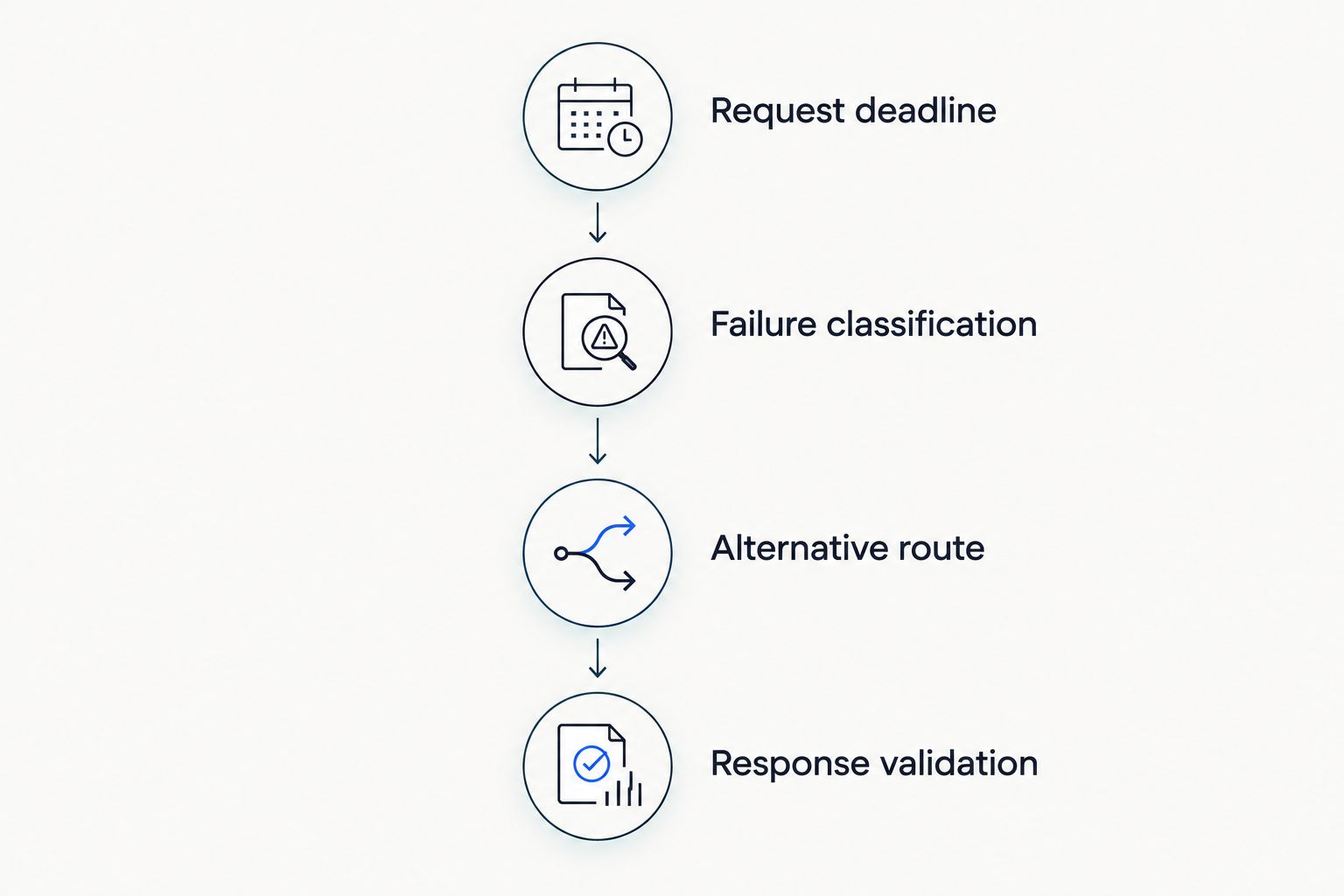
A recovered request still has to satisfy the application's response contract.
HTTP 429 means Too Many Requests; HTTP 503 means Service Unavailable. Both belong in your failure-testing discussion, but neither status alone tells you whether retrying is safe or whether an alternative model is acceptable.
Check interrupted streams separately. Once a user has received partial output, recovery becomes an application-design question, not merely a routing decision.
Usage governance and repository control serve different owners
Gateway usage governance fits application platform ownership. The stated capability gives enterprise teams a reason to evaluate centralized control over model access and consumption. Confirm the actual controls against your organization's requirements rather than assuming a particular permission hierarchy or reporting feature.
Hugging Face repository access and deployment controls operate around a different set of resources. They matter when your team manages model artifacts, repository permissions, or deployed inference infrastructure.
Neither layer replaces the other. Restricting access to a repository does not establish an application's spending policy. Governing requests does not establish whether a model license permits the intended use.
For a 2026 governance review, assign an owner to each decision:
- Who approves models for application use?
- Who approves licenses and artifact provenance?
- Who reviews consumption and operating cost?
- Who controls production deployments?
- Who investigates failed or unexpected requests?
This is an honest tie on importance, but not on scope. Choose the governance layer that matches the resources your team is accountable for, and document the responsibilities that remain elsewhere.
Compare cost models, not an isolated bill
Neither option has a demonstrated cost advantage in this comparison. The gateway offering includes cost optimization, but that capability does not establish savings for your traffic pattern. Evaluate the mechanism and measure the resulting workload cost.
For the gateway route, review the commercial terms alongside underlying model consumption. Establish which charges are usage-based, which are contractual commitments, and how failed or repeated requests are accounted for.
For Hugging Face, separate the Hub and development workflow from managed inference. Managed endpoints involve compute provisioning; using downloadable artifacts in your own environment moves infrastructure responsibility into your deployment stack. Those choices produce different cost structures.
Predictability and flexibility are the central tradeoff. Provisioned capacity creates an explicit capacity-planning responsibility. Consumption-based services connect expenditure to request activity, but traffic growth and retries still need controls.
Use successful task completion as the comparison unit. Include engineering maintenance, evaluation, recovery behavior, and infrastructure operation alongside service charges. A lower inference bill is not a better result if it transfers more operational work to your team.
Before committing in 2026, ask each option to clarify billing behavior for your intended setup. Confirm current terms directly rather than treating a comparison article as a contract.
Final verdict: choose the responsibility you need to centralize
Choose FastRouter if you own enterprise application delivery
Best for: platform leads and application teams centralizing LLM routing. Choose the gateway when unified OpenAI-compatible access, automatic failover, model comparison, and usage governance address the problem you need to solve.
Its limitation is scope: the stated capabilities do not replace model repositories, dataset workflows, or artifact-level development. Validate response compatibility and recovery behavior before placing critical traffic behind any gateway.
Choose Hugging Face if you own model selection and deployment
Best for: ML engineers and teams working directly with model artifacts. Choose Hugging Face when model discovery, repository inspection, development libraries, and deployment workflows are central to the project.
Its limitation in this comparison is architectural: choosing a model platform does not, by itself, settle application-wide routing, cross-model recovery, or spending policy. Define those responsibilities explicitly.
Dimension | Winner |
|---|---|
Enterprise request-management fit | FastRouter |
Existing OpenAI-style integration fit | FastRouter |
Model artifacts and development workflows | Hugging Face |
Workload-specific model quality | Tie until evaluated |
Explicit automatic failover capability | FastRouter |
Governance | Different scopes; no overall winner |
Model repository and deployment workflow | Hugging Face |
Total operating cost | No demonstrated winner |
FAQ
Is FastRouter better than Hugging Face for enterprise LLM applications?
FastRouter is the better fit when the requirement is unified LLM routing, automatic failover, and usage governance. Hugging Face is the better fit when the team needs model repositories, development tools, and deployment workflows.
What's the main difference between an LLM gateway and Hugging Face?
An LLM gateway manages application access to models, while Hugging Face provides a broader ecosystem for discovering, developing, and deploying models. Compare the responsibility you need to centralize, not just the number of models you can access.
Does OpenAI compatibility mean every model supports the same features?
No. OpenAI compatibility describes an interface pattern, not identical behavior across models. Validate streaming, structured output, tool use, and the response fields your application requires.
Is Hugging Face better for inspecting model weights and licenses?
Hugging Face is the better fit for model-artifact inspection because model repositories and supporting documentation are central to its Hub. Review each repository's license and documentation before approving a model for production.
Does automatic failover guarantee a successful application response?
No. Automatic failover changes the request route, but the alternative response must still satisfy your application's format, quality, and deadline requirements. Test interrupted streams and alternative-model behavior separately.
How should I compare the operating cost of these options?
Compare the cost of successfully completed tasks, including service charges and operational work. Review current commercial terms, retry behavior, infrastructure responsibilities, and engineering maintenance for the configuration you intend to use.
What should I test before choosing a platform in 2026?
Test request compatibility, output quality, latency, throughput, and failure recovery using your application's workload. Record the model identifier, configuration, and test date so the comparison remains repeatable.
One last thing
Test the alternative model before testing the failover mechanism. If the alternative cannot produce an acceptable result, successful rerouting only moves the failure.
Keep a response-contract test beside every routing test. Require the recovered request to pass the same task checks as the original route. That turns failover from an infrastructure feature into a verified application behavior.
Related Articles

FastRouter vs MindStudio: which is better in 2026
FastRouter vs MindStudio: choose a gateway for model routing or a builder for visual workflows. Compare architecture, failover, governance, and evaluation.
FastRouter vs TypingMind: which is better in 2026
Fastrouter vs TypingMind: choose a gateway for production routing or a chat interface for users. Compare failover, governance, integration, and team fit in 2026.

FastRouter vs AI/ML API: which is better in 2026
FastRouter vs AI/ML API: choose centralized LLM routing or keep a validated integration. Compare failover, governance, API contracts, and migration criteria.