
AutoGen to multi-model agent teams: complete 2026 workflow
Build an autogen fastrouter integration with explicit agent routes. Configure model clients, bound team execution, and validate failover before production use.
Instead of maintaining separate provider credentials and request code for every AutoGen agent, configure OpenAI-compatible model clients through FastRouter and assign each agent an explicit model route. This autogen fastrouter integration workflow builds a text-only writer–reviewer team, then shows how to add fallback routing without confusing provider recovery with agent-level error handling.
TL;DR
- FastRouter suits enterprise teams centralizing model access, automatic failover, and usage governance.
- An autogen fastrouter integration connects AutoGen model clients to a gateway through base_url and api_key.
- Assign explicit model routes to writer and reviewer agents before testing multi-model coordination.
- Validate model capabilities, termination, and failure handling before adding tools or production traffic.
Why this matters
A multi-agent application has two separate control planes: the framework decides which agent acts next, while the gateway handles model access and routing. Mixing those responsibilities makes failures difficult to diagnose. A stalled reviewer is not necessarily a provider outage, and a successful fallback does not prove that the answer meets your application's requirements.
FastRouter is best for enterprise development teams centralizing LLM routing, failover, and usage governance. Its OpenAI-compatible gateway lets you organize model access behind a common interface; your application still owns prompts, team coordination, acceptance criteria, and side effects.
Start with FastRouter for gateway access, then supply the endpoint and model identifiers from your account to the configuration below. Do not derive an API endpoint from the public website address.
For a 2026 implementation, keep the initial scope narrow: 2 agent roles, 1 task per test run, and a ceiling of 6 team messages. These are configuration choices for this example, not performance benchmarks. They make the execution path easier to inspect before you add parallel work or external tools.
Before you start
- Prepare gateway access. Obtain an authorized gateway credential, the exact OpenAI-compatible API base URL, and two model identifiers permitted for your account. Confirm that the routes are approved for the data you will send.
- Prepare an isolated Python environment. Install
autogen-agentchatandautogen-ext[openai], record the versions that pass your tests, and keep credentials outside source control. This guide uses the AgentChat package API, not olderpyautogenexamples. - Check the capability mismatch first. OpenAI compatibility does not establish that every selected model supports tools, images, or structured output. An unfamiliar model identifier also requires explicit model metadata in AutoGen; the example deliberately declares only text-generation capabilities.
Gate the integration on a successful standalone request before creating the team. If authentication, endpoint configuration, or model access fails at the client level, agent orchestration only adds noise.
For your 2026 deployment record, save the package versions, endpoint configuration, selected routes, and declared capabilities together. A model alias or dependency change deserves the same review as an application configuration change.
Gateway client configuration
The integration boundary is the AutoGen model client. Configure base_url, api_key, and model there; keep business instructions in the agents' system_message fields.
- Install the AgentChat packages in your isolated environment:
1python -m pip install autogen-agentchat 'autogen-ext[openai]'
- Set
FASTROUTER_BASE_URLto the exact API base URL supplied for your account. SetFASTROUTER_API_KEYto your authorized gateway credential. - Set
FASTROUTER_WRITER_MODELandFASTROUTER_REVIEWER_MODELto accepted model identifiers. Use distinct models when testing a multi-model team; using the same identifier verifies orchestration but not model diversity. - Create separate
OpenAIChatCompletionClientinstances for the two roles. They can share gateway configuration while retaining independent model selections. - Declare
model_infofor unfamiliar model names. Match capability declarations to verified behavior rather than enabling features because another model supports them.
The code below reads configuration from environment variables rather than embedding an endpoint, credential, or model name. Its capability flags are conservative: vision, function_calling, and json_output are disabled because this workflow needs ordinary text responses only.
Setting a flag to false is a client-side declaration, not a claim that the underlying model lacks that capability. Extend the declaration only when your application needs the feature and your selected route passes a corresponding test.
Expected result: both clients initialize with the intended route identifiers, and a standalone text request reaches the gateway without an authentication, endpoint, or model-access error. Initialization alone is not a connectivity test.
Agent team configuration
Give each agent a bounded responsibility. The writer creates a draft; the reviewer checks the draft against the task. Keeping responsibilities explicit makes cross-model disagreements visible instead of letting both agents rewrite the same answer indefinitely.
- Create a writer
AssistantAgentwith the writer client and a drafting instruction. - Create a reviewer
AssistantAgentwith the reviewer client and an acceptance instruction. - Add
TextMentionTerminationfor the acceptance marker andMaxMessageTerminationfor a hard message ceiling. - Put the agents in
RoundRobinGroupChatso the initial workflow uses a predictable turn order. - Run one test task and inspect the complete conversation, not just the final message.
1import asyncio2import os34from autogen_agentchat.agents import AssistantAgent5from autogen_agentchat.conditions import (6 MaxMessageTermination,7 TextMentionTermination,8)9from autogen_agentchat.teams import RoundRobinGroupChat10from autogen_agentchat.ui import Console11from autogen_ext.models.openai import OpenAIChatCompletionClient121314def make_client(model_env):15 return OpenAIChatCompletionClient(16 model=os.environ[model_env],17 base_url=os.environ["FASTROUTER_BASE_URL"],18 api_key=os.environ["FASTROUTER_API_KEY"],19 model_info={20 "vision": False,21 "function_calling": False,22 "json_output": False,23 "family": "unknown",24 },25 )262728async def main():29 writer_client = make_client("FASTROUTER_WRITER_MODEL")30 reviewer_client = make_client("FASTROUTER_REVIEWER_MODEL")3132 try:33 writer = AssistantAgent(34 name="writer",35 model_client=writer_client,36 system_message=(37 "Draft the requested document. Use only supplied facts. "38 "Revise your draft when the reviewer requests changes. "39 "Do not emit the acceptance marker."40 ),41 )42 reviewer = AssistantAgent(43 name="reviewer",44 model_client=reviewer_client,45 system_message=(46 "Check the draft against the task and supplied facts. "47 "Request specific corrections when needed. "48 "When the draft meets the requirements, respond with "49 "REVIEW_COMPLETE."50 ),51 )5253 termination = (54 TextMentionTermination("REVIEW_COMPLETE")55 | MaxMessageTermination(max_messages=6)56 )57 team = RoundRobinGroupChat(58 [writer, reviewer],59 termination_condition=termination,60 )6162 await Console(team.run_stream(task=(63 "Draft a short internal policy for this example: "64 "credentials stay outside source control; "65 "model routes require approval; "66 "application logs exclude confidential prompt text. "67 "Use only these supplied requirements."68 )))69 finally:70 await writer_client.close()71 await reviewer_client.close()727374if __name__ == "__main__":75 asyncio.run(main())
This example uses no external tools and performs no business-system writes. Run it with non-sensitive test content before connecting real application data.
Expected result: the writer produces a draft, the reviewer accepts it or requests corrections, and the team stops on the acceptance marker or message ceiling. Inspect the stop reason: reaching the ceiling is a bounded exit, not an accepted result.
Request flow
The execution sequence is Client configuration, Writer draft, Reviewer check, and Team termination. Each agent uses its assigned client; the gateway handles the corresponding model request. The team termination condition remains an application concern.
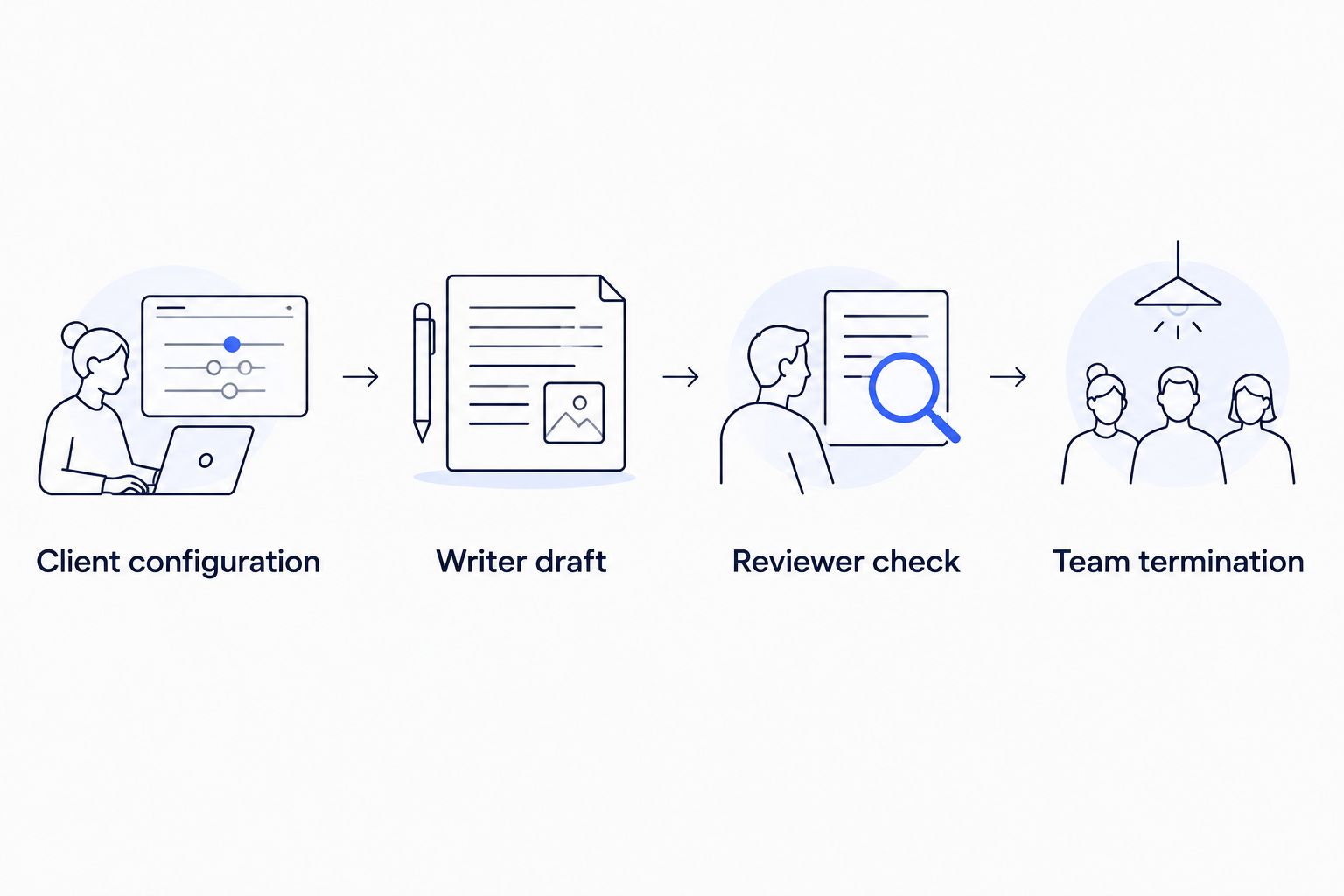
Model routing and agent termination belong to different control layers.
Do not treat the reviewer's approval as a security boundary. The acceptance marker is conversational text, so adversarial or accidental content can affect text-based termination. For a production workflow, restrict which participant can authorize completion and validate the result outside the conversation.
Acceptance and observability configuration
A functioning demo answers only one question: can the team complete this task through the configured clients? A production integration must also explain which route ran, why the workflow stopped, and whether the output passed application checks.
- Record a correlation identifier for each task and propagate it through your application's logging context.
- Record each agent's configured model identifier, request outcome, elapsed duration, and team stop reason. Capture usage fields when returned; do not assume every route supplies identical metadata.
- Validate the final artifact against your own requirements. For this example, check that all supplied policy requirements appear and that no unsupported policy claims were added.
- Separate accepted completion, message-ceiling termination, cancellation, and request failure in your application status handling.
- Test a controlled request failure outside the successful baseline. Verify the configured gateway policy and the error your application receives when recovery does not succeed.
Expected result: you can distinguish an accepted document from a bounded but incomplete run, and you can investigate a request failure without reading confidential prompt text.
For a 2026 rollout, compare the same task set under the same acceptance rules before changing model assignments. Measure your own latency and usage rather than treating a different model route as an automatic improvement.
Variant: shared routing with fallback
Once explicit per-agent routes work, keep the same team structure and apply an approved fallback policy at the gateway. FastRouter supports automatic failover; the exact configuration and eligible routes must come from your account's documented controls.
There are two useful arrangements. Neither removes the need for application-level acceptance checks.
Arrangement | Best for | Advantage | Constraint |
|---|---|---|---|
Explicit per-agent models | Evaluating different models by role | Keeps writer and reviewer assignments visible in application configuration | Each assignment needs separate capability and quality validation |
Shared routing policy | Centralizing provider recovery | Moves configured provider failover out of individual agent logic | A fallback changes the execution path and still needs task-level validation |
- Keep the baseline prompts and test task unchanged.
- Configure the approved fallback behavior through the gateway's documented settings. Do not invent request headers or assume a model identifier automatically enables fallback.
- Confirm that every fallback route meets the task's data-handling and capability requirements.
- Exercise a controlled failure and inspect routing evidence when your account exposes it.
- Check the resulting draft against the same acceptance rules used for the primary route.
Expected result: an eligible request failure follows the configured recovery policy, or returns a failure that your application handles explicitly. A successful response alone does not establish that fallback occurred.
The gateway's benefit is centralized routing; its constraint is another configuration boundary to test. In 2026, include gateway policy changes in release review rather than treating them as invisible infrastructure updates.
Troubleshooting
Authentication fails before the first response
Check FASTROUTER_API_KEY, the supplied base_url, and the credential's model access. A provider credential and a gateway credential are not interchangeable unless the documented configuration explicitly says so. Keep secrets out of exception reports and shared logs.
AutoGen rejects the model identifier locally
Supply model_info when the client does not recognize the model name. Start with the text-only declaration shown above. Separately confirm that the gateway accepts the identifier; local metadata does not grant remote access.
A request fails after adding tools
Remove tools and rerun the text-only baseline. Then verify tool-call support for the selected primary and fallback routes before enabling function_calling. A declared capability does not implement a capability missing from the route.
The team stops without an accepted draft
Inspect the stop reason and transcript. MaxMessageTermination prevents an unbounded conversation but does not certify success. Tighten the review instruction, repair missing task requirements, or adjust the ceiling deliberately after inspecting the failed run.
Provider recovery works but the task remains incomplete
Separate request recovery from task recovery. A replacement response can still contain an invalid document or an agent-level mistake. Revalidate the artifact, and avoid blindly retrying workflows that have already performed external side effects.
Customize your workflow
Add one new responsibility at a time: a fact-checking role, a structured-output stage, or a tool-enabled agent. Each addition needs a verified model capability, a bounded execution path, and an acceptance check independent of the agent's own claim of success.
For enterprise deployment, review data access and routing together. FastRouter provides usage governance, but your integration still needs an explicit decision about which credentials and routes each workload can use. Do not infer account-specific enforcement rules from the existence of a governance feature.
Keep the 2026 release baseline reproducible: retain dependency versions, prompts, route configuration, capability declarations, and test outcomes. Change one layer at a time so a regression has an identifiable cause.
FAQ
How do I connect AutoGen to FastRouter?
Configure an AutoGen OpenAIChatCompletionClient with your authorized gateway api_key, the supplied base_url, and an accepted model identifier. Assign that client to an AssistantAgent and test a standalone text request before building the team.
Can different AutoGen agents use different models?
Yes. Give each AssistantAgent its own model client and model identifier. Separate clients make role assignments explicit, but each selected route still needs capability and task-quality validation.
Does OpenAI compatibility guarantee tool calling?
No. OpenAI compatibility does not establish identical capabilities across model routes. Verify tool-call behavior on every primary and fallback route before enabling tools in AutoGen.
Which AutoGen packages does this workflow use?
This workflow uses autogen-agentchat and autogen-ext with its OpenAI extra. It follows the AgentChat API using AssistantAgent and RoundRobinGroupChat rather than older pyautogen examples.
Does gateway failover restart a failed agent workflow?
No. Gateway failover concerns eligible model requests under the configured routing policy. Your application remains responsible for agent-state recovery, output validation, and any external side effects.
How do I stop an AutoGen team from looping?
Combine a task-completion condition with a hard message ceiling. This example uses TextMentionTermination and MaxMessageTermination; inspect the stop reason because reaching the ceiling does not mean the task passed.
What should I log for a multi-model agent team?
Log the task correlation identifier, configured agent routes, request outcomes, elapsed durations, and team stop reason. Capture usage or routing metadata when returned, and exclude confidential content and credentials from ordinary logs.
One last thing
Test the acceptance marker as an input, not just as an output. A text-based termination rule reacts to text, including content that appears somewhere unexpected in the conversation. Submit a test task containing the marker and verify that your application does not mistake an early stop for a reviewed artifact.
That distinction is the final gate: request success, conversation termination, and accepted business output are three different outcomes. Keep them separate before you expand the team.
Related Articles

How to connect CrewAI to FastRouter for cost-optimized agents
Connect CrewAI to Fastrouter through one gateway. Configure credentials, validate model calls, and evaluate agent usage before expanding routing and failover.

Automatically fail over AI workflows when a model goes down in n8n
Set up n8n AI model failover with controlled recovery, error classification, fallback routing, and output validation. Prevent duplicate actions after failures.
.png&w=3840&q=75)
FastRouter vs TrueFoundry: Pricing Compared
FastRouter vs TrueFoundry pricing, side by side. See what you pay for LLM gateway access and where costs can add up.