

Aider to production AI pair programming: 2026 workflow
Build an aider fastrouter integration with OpenAI-compatible routing, scoped repository edits, test gates, and a controlled path from coding to production.
Instead of manually switching provider credentials during coding sessions, configure an aider fastrouter integration through an OpenAI-compatible gateway, then gate every generated change with repository tests and human review. This 2026 workflow separates model access from release approval: aider edits your working tree; your existing delivery process decides what ships.
TL;DR
- The aider fastrouter integration connects repository editing to centralized LLM routing through an OpenAI-compatible API.
- Fastrouter suits enterprise teams that need unified model access, automatic failover, and usage governance.
- Use an explicit model identifier, a scoped branch, and repository-specific tests before accepting edits.
- Gateway compatibility does not guarantee that fallback models support the same coding behavior.
Why this matters
A coding assistant needs model access. A production system needs reviewed changes, reproducible checks, and a controlled release. Treating those as the same problem creates an unsafe shortcut from a successful model response to a deployed change.
Fastrouter provides a unified, OpenAI-compatible API gateway with routing, automatic failover, cost optimization, and usage governance. Fastrouter is best for enterprise teams that need unified gateway access to coding models. That centralizes access; it does not replace code review or establish that a generated patch is correct.
The architectural boundary is simple: aider sends model requests through the gateway and applies proposed edits locally. Your repository tooling checks those edits. Your release pipeline controls deployment. Keep those responsibilities separate in your 2026 implementation.
Before you start
- Prepare access and configuration. Obtain a gateway credential, the documented OpenAI-compatible API base URL, and an exact model identifier. Confirm that your account permits that model. Keep credentials outside tracked files and use your organization's secret-handling process.
- Prepare the repository. Install Git, use a Python environment compatible with the aider release you select, and identify the project's test command. Start from a clean working tree or preserve existing changes before proceeding. Record the installed version for reproducibility.
- Check the compatibility gotcha. OpenAI-compatible transport does not make every model equally suitable for aider. Validate the selected model's editing behavior and any configured fallback against your task. Do not assume tool behavior, context capacity, or response formatting stays identical after rerouting.
These are setup gates, not cleanup tasks. If you cannot identify the correct API base or model identifier, resolve access before editing repository files. If the repository has no meaningful automated checks, define the acceptance criteria before asking for implementation.
Access setup
Connect aider through environment variables rather than embedding credentials in source code. The following commands use Bash and prompt for real configuration values; they deliberately do not guess a gateway endpoint.
- Create an isolated Python environment in a directory outside the repository. Activate it and install aider:
1python -m venv aider-env2source aider-env/bin/activate3python -m pip install aider-chat4aider --version
- Record the reported version in your team's setup documentation. For a reproducible rollout, pin the aider version you validate instead of treating an unversioned installation command as a permanent standard.
- Enter the API base and credential in the terminal where you will run aider:
1read -r -p 'Gateway API base URL: ' OPENAI_API_BASE2export OPENAI_API_BASE3read -r -s -p 'Gateway API key: ' OPENAI_API_KEY4printf '\n'5export OPENAI_API_KEY
- Copy the documented API base exactly. Do not append a guessed path, paste a dashboard address, or substitute a model-specific URL.
Expected result: aider is installed, its version is recorded, and the current shell contains the connection settings. This establishes local configuration; a successful authenticated model request is verified in the next unit.
Environment variables reduce the chance of committing credentials, but they are not a complete secret-management system. Avoid diagnostic commands that print the key. Clear the shell's credential when the session ends, and follow your organization's credential-rotation policy after any exposure.
Model selection
A gateway model identifier and aider's provider prefix serve different purposes. The identifier selects the gateway's model; the openai/ prefix tells aider to use its OpenAI-compatible connection path.
- Enter the exact model identifier supplied for your gateway access:
1read -r -p 'Gateway model identifier: ' MODEL_ID2export MODEL_ID
- Launch aider from the repository root with automatic commits disabled:
1aider --model "openai/${MODEL_ID}" --no-auto-commits
- Confirm that aider starts with the intended model. Before adding files, send a short request such as:
Reply with a brief acknowledgement. Do not change files. - Check that the request succeeds. If it fails, resolve authentication, model access, or endpoint configuration before continuing. Do not troubleshoot by adding application files to the conversation.
Expected result: a model request completes through the configured connection without modifying the repository.
For your 2026 baseline, validate an explicit model before adding more routing complexity. Introduce fallback behavior only after checking that the alternative model can produce acceptable edits for the same task. A successful fallback response proves request completion, not equivalent code quality.
Fastrouter's automatic failover can keep model access separate from provider selection. The trade-off is another configuration boundary to inspect when behavior changes. Keep the selected route, model identifier, and client version available to the engineers investigating a failed coding session.
Repository scope
Give aider a bounded task and the files needed to complete it. Repository access is not permission to rewrite unrelated code.
- Exit the initial smoke-test session with
/exit. Inspect the repository and create a task branch:
1git status --short2git switch -c aider-integration-check
- Restart aider with the same model configuration. Use
/addfollowed by actual repository paths to include the implementation file and its relevant test file. Add supporting files only when the task requires them. - State the expected behavior, constraints, and acceptance check. For example:
Fix the failing case in the selected test. Keep the public interface unchanged. Do not modify unrelated files or deployment configuration.Replace that task description with your real requirement. - Inspect proposed changes with
/diff. Use/dropto remove files that are no longer relevant before starting another task.
Expected result: the working tree contains a focused patch on a dedicated branch, and you can explain why every changed file belongs to the task.
Use 1 branch per task as an operating rule, not a performance claim. Small, separable changes make review and rollback easier to reason about. A broad request to improve an entire repository produces a broader review obligation; it does not remove that obligation.
Aider can work with files you deliberately add, so inspect them for secrets and sensitive content before inclusion. Apply your organization's data-handling policy to the request content, not just to the API credential. Centralized access does not automatically authorize sending every repository file.
Release checks
The gateway handles model requests. Your repository checks handle the patch. Your deployment controls handle production.
- Run the relevant test command through
/test, followed by the project's actual command. Inspect the failure output before asking for another edit. Do not treat a rewritten assertion as a valid fix unless the intended behavior changed. - Exit aider and inspect the complete patch outside the assistant:
1git diff --check2git diff3git status --short
- Run the same required checks used by your repository's normal review process. Include security, type, lint, or build checks where the project already requires them. Compare the changed files with the original task scope.
- Commit the reviewed patch manually and submit it through the existing approval process. Deploy only after the normal release gates pass.
Expected result: a human-reviewed change enters the established delivery process, with no deployment authority granted to the coding session.
Use 2 test gates: focused checks during editing and the repository's required checks before merge. Keep 1 reviewed commit per accepted task when that matches your team's conventions. These are recommended controls, not measured results or aider limits.
The 2026 production workflow ends at a reviewed release, not at the assistant's completion message. Tests establish specific properties of the patch; passing tests do not establish that every requirement, security concern, or operational risk has been covered.
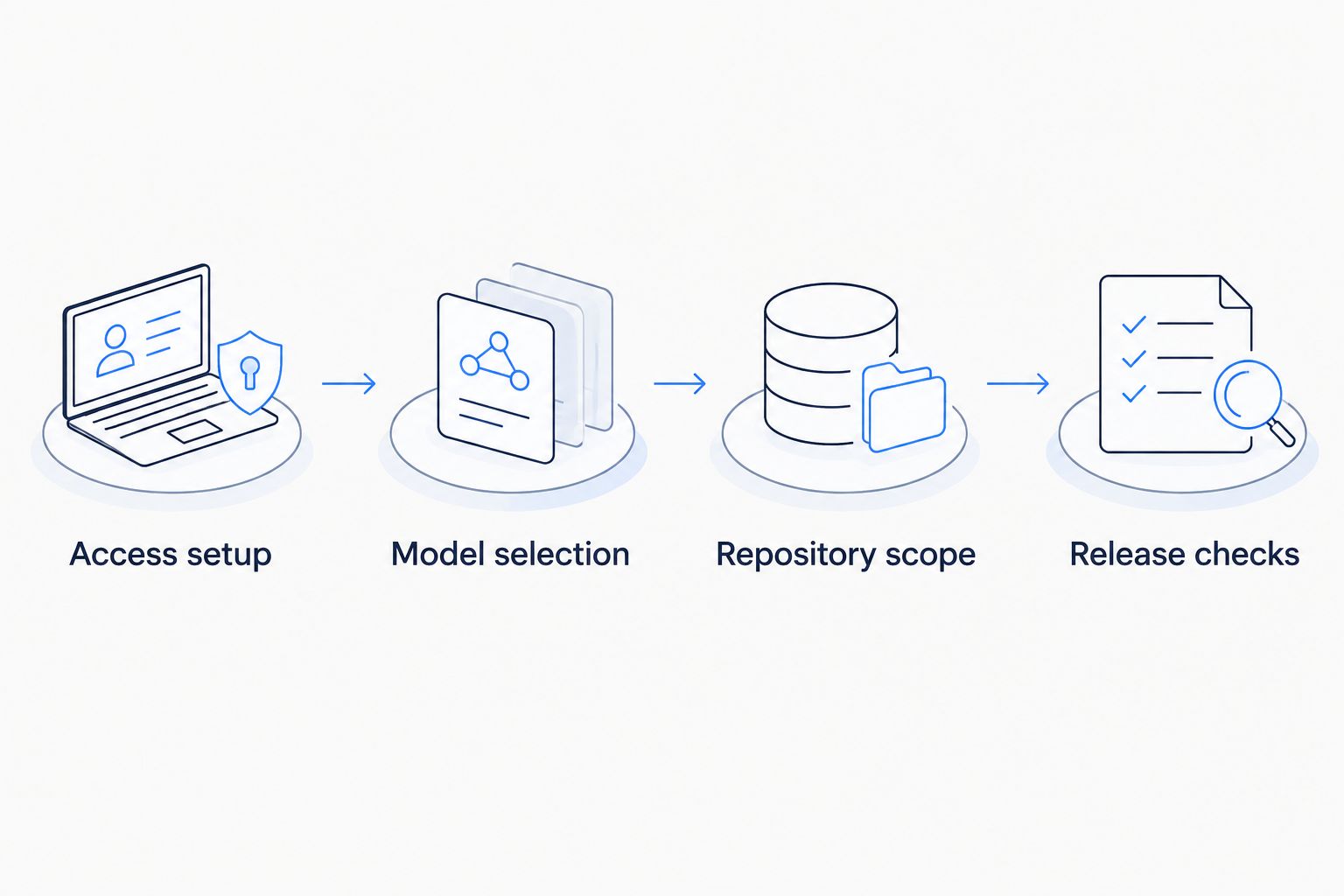
Model access and production approval remain separate controls.
A useful release record includes the accepted task, reviewed diff, test results, and relevant client configuration. Capture credential-free configuration details. Do not attach raw request logs without checking their contents and your retention policy.
Run bounded tasks noninteractively
An adjacent workflow uses aider for a predefined task rather than a live conversation. This fits repeatable maintenance work with explicit acceptance criteria. It does not justify giving an unattended job permission to merge or deploy.
Workflow | Best for | Advantage | Limitation |
|---|---|---|---|
Interactive session | Exploratory fixes requiring clarification | You inspect edits and adjust scope during the session | An engineer must supervise the conversation |
Noninteractive task | Predefined changes with clear acceptance checks | The task can be supplied as a repeatable command | Ambiguous requirements receive no live clarification |
- Prepare the same gateway environment and model identifier used for the validated interactive session.
- Check out an isolated task branch or disposable working copy. Identify the existing file the task is allowed to modify.
- Supply the task and file explicitly:
1read -r -p 'Task description: ' TASK2read -r -p 'Repository file path: ' TARGET_FILE34aider --model "openai/${MODEL_ID}" \5 --no-auto-commits \6 --yes-always \7 --message "$TASK" \8 "$TARGET_FILE"
- Inspect the resulting diff and run the required checks before retaining the change.
Expected result: aider attempts the supplied task without an interactive conversation, while committing and release approval remain outside the command.
--yes-always accepts confirmation prompts; it is not a sandbox. Use it only where filesystem access and credentials are already constrained. In a 2026 automation rollout, keep deployment credentials out of the coding job and send its output to review rather than directly to production.
Troubleshooting
Authentication fails
Confirm that OPENAI_API_KEY is set in the same shell that launches aider. Check whether the credential is valid and authorized for the requested model. Replace an exposed key through your organization's credential process; do not paste it into an issue or chat transcript.
The endpoint returns an unexpected response
Recheck OPENAI_API_BASE against the documented API base. A website URL, duplicated path segment, or incorrect endpoint produces a different request destination. Fix the connection value before changing model parameters or repository content.
The model cannot be resolved
Use the exact gateway model identifier and keep aider's openai/ prefix separate from it. Confirm account access. Do not assume a provider's public model name is identical to the gateway's identifier.
Responses succeed but edits fail
Check the selected model's suitability for aider and inspect the error or rejected edit. Reduce the task scope and retry with the relevant files. If routing changed the model, validate the replacement's editing behavior rather than assuming API compatibility guarantees patch compatibility.
Tests pass but unrelated files changed
Inspect the entire diff, not only test output. Remove unrelated edits deliberately, then rerun checks on the retained patch. Avoid destructive reset commands when the working tree contains changes you need to preserve.
Customize your workflow
Start with a validated model and a narrow task. Then expand the controls around the workflow, not the assistant's authority.
- Routing: evaluate proposed primary and fallback models against the same representative repository tasks. Compare accepted patches and failed edits before changing the route.
- Governance: align gateway access with project ownership and the organization's credential policies. Verify the controls actually configured for your account.
- Observability: retain credential-free failure details and request metadata that your setup exposes. Investigate connection failures separately from incorrect code.
- Delivery: preserve existing review and deployment gates. For automation, make failed checks block the job's acceptance path.
Fastrouter's unified gateway supports centralized model access and usage governance; your team still owns task quality, repository permissions, and release safety. Evaluate gateway behavior and coding outcomes separately so a connectivity improvement is not mistaken for a better patch.
FAQ
How do I set up an aider fastrouter integration?
Configure OPENAI_API_BASE and OPENAI_API_KEY with your gateway connection values, then run aider with openai/ followed by the exact gateway model identifier. Verify a request before adding repository files.
Do I need to change application code to connect aider?
The connection configuration belongs to aider, not your application's runtime code. Set the gateway environment variables in the shell or approved execution environment used to launch the coding assistant.
Does OpenAI compatibility mean every model works equally well with aider?
No. OpenAI-compatible transport does not guarantee equivalent editing behavior, response formatting, or task quality. Validate the selected model and any fallback against representative repository tasks.
Can aider deploy the generated change directly to production?
Keep deployment outside the coding session in this workflow. Require repository checks, human review, and the existing release process before a generated patch reaches production.
Should I use interactive or noninteractive aider tasks?
Use interactive sessions for tasks that need clarification and noninteractive commands for predefined changes with clear acceptance checks. Both workflows require diff review and repository tests.
How do I prevent aider from committing changes automatically?
Launch aider with --no-auto-commits. Inspect the working tree and create a manual commit only after accepting the patch and checking its scope.
What should I check when gateway requests fail?
Check the API base, credential, exact model identifier, and account permissions first. Keep secrets out of diagnostic output and investigate connection errors before changing repository files.
One last thing
A clean completion message is not a release signal. For your 2026 rollout, require the reviewer to explain the patch's behavioral change without quoting the assistant's summary. If the explanation depends on trusting the conversation rather than reading the diff and checks, the change is not ready to ship.
Related Articles

LlamaIndex to production RAG pipelines: 2026 workflow
Build a llamaindex fastrouter integration for production RAG. Separate retrieval from routing, configure the compatible client, and test failover before release.
How to connect Windsurf to FastRouter for automatic fallback
Connect Windsurf to FastRouter through a supported endpoint or terminal workflow. Verify client compatibility, configure fallback, and test routing safely.

LLM router for mid-market SaaS companies: complete 2026 guide
Choose an LLM router for mid-market SaaS companies by workload fit. Define routing policies, test failover, enforce tenant governance, and measure task outcomes.