

Best LLM gateways for LangChain and LangGraph developers in 2026
FastRouter, OpenRouter, LiteLLM, Portkey, Kong, and Cloudflare AI Gateway compared for LangChain and LangGraph in 2026 — routing, failover, cost, governance.
FastRouter wins if you're building with LangChain or LangGraph and need one OpenAI-compatible endpoint across 200+ models with built-in cost optimization and failover. OpenRouter wins if you're a solo developer who wants fast multi-model access without any infrastructure to run. LiteLLM wins if you want a self-hosted, open-source proxy you fully control.
TL;DR
- FastRouter is the best LLM gateway for LangChain and LangGraph teams needing governance and cost control across 200+ models in 2026.
- OpenRouter fits you if you're a solo developer who wants langchain openrouter routing without standing up your own infrastructure.
- LiteLLM is the pick if you want a self-hosted, open-source proxy instead of a managed API.
- Portkey, Kong AI Gateway, and Cloudflare AI Gateway each solve a narrower problem: observability, existing API infra, or edge latency.
- Every gateway on this list is OpenAI-compatible, so swapping the base_url in LangChain's ChatOpenAI class is your main integration step.
Why this matters
LangChain and LangGraph apps call models constantly — agents loop, chains retry, graphs branch across multiple LLM calls per run. A single provider outage or rate limit mid-graph breaks your whole run, not just one request.
A gateway sits between your LangChain code and the model providers. It handles routing, failover, and cost tracking so your chain logic doesn't have to. FastRouter is built as an OpenAI-compatible API gateway for exactly this: routing and governing your requests across 200+ models from one endpoint.
If you're searching "langchain openrouter," you usually mean one of two things: either connecting LangChain to OpenRouter's model catalog, or comparing OpenRouter against other gateways for the same job. This guide covers both by ranking six gateways developers actually plug into LangChain and LangGraph in 2026.
What makes the best LLM gateway for LangChain and LangGraph
- OpenAI-compatible API — drops into LangChain's
ChatOpenAIclass or LangGraph's model nodes by changing the base URL, no custom SDK required. - Model breadth — access to multiple providers and model families from one account, so your chain isn't locked to a single vendor.
- Automatic failover — reroutes a request to a healthy provider when one fails or times out, mid-graph, without you writing retry logic.
- Cost visibility — per-request or per-model cost tracking so you can see which chain steps are expensive.
- Governance controls — spend limits, access policies, and BYOK (bring your own key) support if you're running production agents at scale.
- Observability — logs, traces, and latency data for debugging your multi-step LangGraph runs.
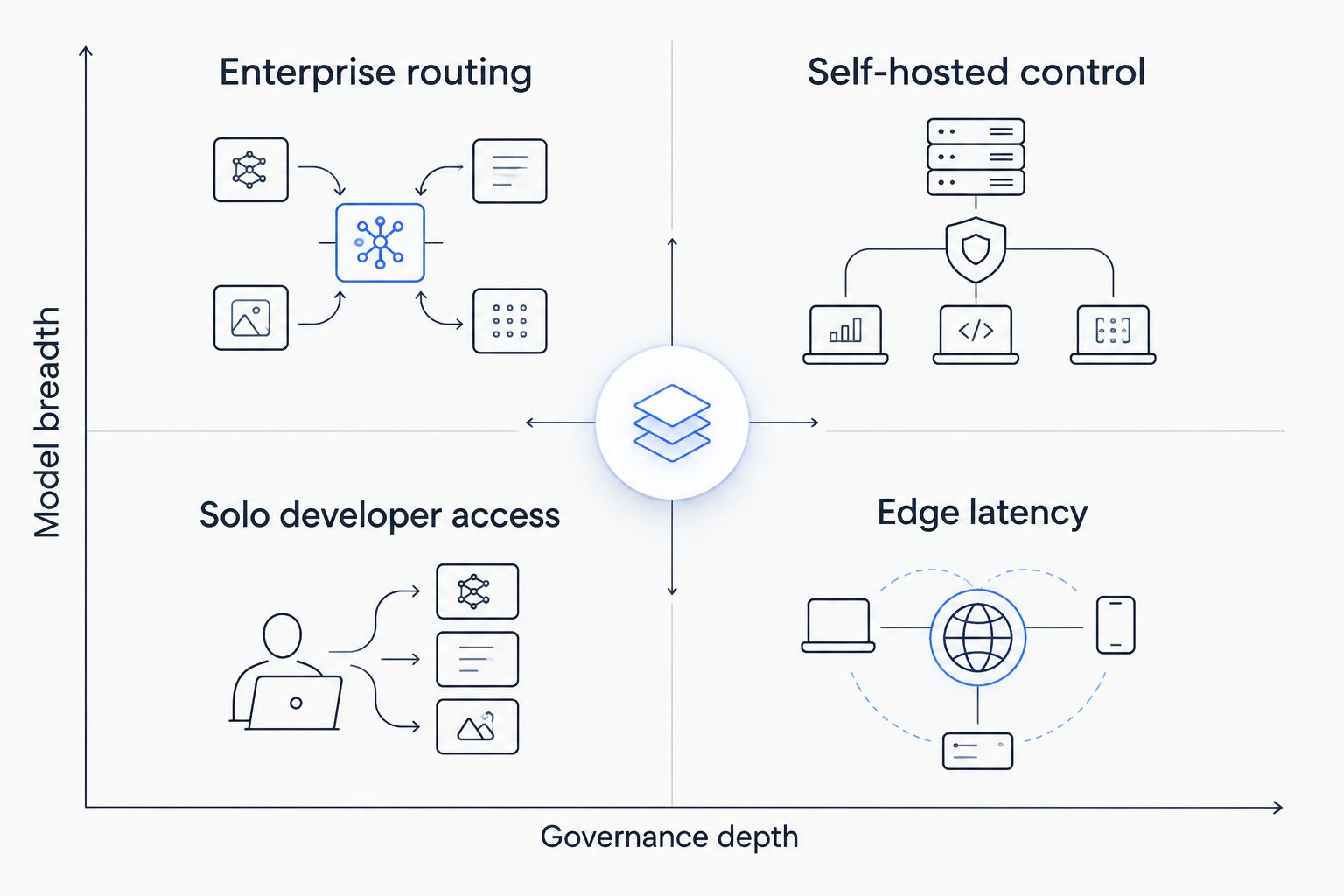
Governance depth and model breadth are the two axes that separate these gateways more than any single feature.
Gateways for LangChain and LangGraph at a glance
Gateway | Best for | Standout feature | Key limitation |
|---|---|---|---|
FastRouter | Enterprise governance + cost control across 200+ models | OpenAI-compatible routing with built-in failover and BYOK | Adds a routing dependency between your app and the providers |
OpenRouter | Solo developers who want fast multi-model access | Wide community-documented model catalog, no infra to run | No dedicated enterprise governance or approval workflow layer |
LiteLLM | Teams that want a self-hosted, open-source proxy | Full control over the proxy code and deployment | You own the ops burden: scaling, patching, monitoring |
Portkey | Teams that need built-in observability and prompt versioning | Logging, tracing, and prompt version history out of the box | Cost optimization and model breadth take a back seat to observability |
Kong AI Gateway | Enterprises already standardized on Kong for API management | LLM routing layered onto existing Kong infrastructure | Heavy lift to adopt Kong solely for LLM routing |
Cloudflare AI Gateway | Teams needing edge caching and global low-latency routing | Caching and analytics at Cloudflare's edge network | Ties your app to Cloudflare's platform and release cadence |
1. FastRouter: best LLM gateway for enterprise governance and cost control
FastRouter gives you a unified, OpenAI-compatible API gateway that routes, compares, and manages your requests across 200+ large language models from one endpoint. It's built for teams that need cost optimization, failover, and governance in the same layer, not three separate tools.
For LangChain, your integration is a base_url swap in ChatOpenAI. For LangGraph, your model nodes call the same endpoint, so failover and cost tracking apply across every branch in the graph, not just the entry point.
FastRouter pros:
- OpenAI-compatible endpoint works with LangChain's existing
ChatOpenAIclass and LangGraph model nodes with no custom SDK. - Routes across 200+ models, so your chain isn't locked to a single provider's uptime or pricing.
- Built-in failover reroutes your requests to healthy providers automatically when one fails.
- BYOK and governance controls give you spend limits and access policies in one place.
FastRouter cons:
- Your requests pass through FastRouter's endpoint rather than hitting provider APIs directly, adding a routing dependency to the request path.
- Governance and BYOK controls are built for enterprise teams; if you're a solo developer testing a side project, you may not need that layer.
Best for: you, if you're running LangChain or LangGraph in production and need cost control and failover across many models without stitching together separate tools.
Verdict: Buy if your LangChain or LangGraph app is heading to production and needs governance across multiple providers.
2. OpenRouter: best for solo developers who want fast multi-model access
OpenRouter gives you an OpenAI-compatible endpoint to a large catalog of models without running any infrastructure. It's the gateway you'll likely hit first when you search "langchain openrouter" — connecting LangChain's ChatOpenAI class to OpenRouter's base_url is a documented, common pattern.
OpenRouter pros:
- Fast to set up: an API key and a base_url change gets your LangChain chain running against multiple models.
- Wide, community-documented model catalog useful for quick experimentation.
- No infrastructure to host or maintain.
OpenRouter cons:
- No dedicated enterprise governance layer for spend approval or team-level access policies.
- Failover behavior and support depth are documented at the community level rather than backed by a dedicated enterprise support tier.
Best for: you, if you're a solo developer or small team prototyping LangChain chains across multiple models without an enterprise governance requirement.
Verdict: Buy if you're prototyping solo. Skip if you need team-level spend controls.
3. LiteLLM: best for teams that want a self-hosted proxy
LiteLLM is an open-source proxy you deploy and run yourself, giving you full control over routing logic, logging, and infrastructure placement. It exposes an OpenAI-compatible interface, so LangChain and LangGraph integrate the same way they would with a hosted gateway.
LiteLLM pros:
- Full control over the proxy's code, deployment environment, and network placement.
- Open-source, so you can customize routing logic and fallback rules directly.
- Runs inside your own infrastructure, useful if you have strict data-residency requirements.
LiteLLM cons:
- Self-hosting means you own scaling, patching, and uptime monitoring for the proxy itself.
- No built-in enterprise governance UI out of the box; you configure policies in code or config files rather than a dashboard.
Best for: you, if your engineering team has the operational capacity to run and maintain its own proxy layer instead of a managed API.
Verdict: Buy if you have the ops capacity to self-host. Wait if your team doesn't have bandwidth to maintain infrastructure.
4. Portkey: best for observability and prompt versioning
Portkey focuses on logging, tracing, and prompt version history for your LLM calls through LangChain or LangGraph. It gives you visibility into what your chain actually sent and received at each step, which matters when you're debugging multi-node LangGraph runs.
Portkey pros:
- Detailed logging and tracing across chain steps.
- Prompt versioning helps you track changes to prompts used inside your LangChain chains over time.
- OpenAI-compatible interface for straightforward LangChain integration.
Portkey cons:
- Cost optimization and model breadth take a back seat to the observability tooling.
- Adds a dashboard layer you need to adopt and learn to get full value.
Best for: you, if your main pain point is debugging and tracking chain behavior, not routing cost or model breadth.
Verdict: Buy if observability is your bottleneck. Skip if cost control across many models is your priority.
5. Kong AI Gateway: best for teams already standardized on Kong
Kong AI Gateway layers LLM routing onto Kong's existing API gateway infrastructure. If you already run Kong for general API management, this keeps your LLM traffic inside a platform you already operate.
Kong AI Gateway pros:
- Fits directly into your existing Kong deployment, avoiding a second platform to manage.
- Inherits Kong's general API management features (rate limiting, auth) for your LLM traffic too.
Kong AI Gateway cons:
- Adopting Kong solely for LLM routing is a heavier lift than a purpose-built LLM gateway.
- LLM-specific features sit on top of a general-purpose API gateway rather than being built LLM-first.
Best for: you, if you already run Kong for API management and want LLM routing inside the same platform.
Verdict: Buy if Kong is already your API layer. Skip if you're starting from zero.
6. Cloudflare AI Gateway: best for edge caching and global latency
Cloudflare AI Gateway routes your LLM requests through Cloudflare's edge network, adding caching and analytics close to where your requests originate. If your LangChain app serves users across multiple regions, this can reduce round-trip distance to the gateway itself.
Cloudflare AI Gateway pros:
- Caching at the edge reduces repeated calls for identical requests.
- Analytics baked into a network Cloudflare already operates globally.
Cloudflare AI Gateway cons:
- Ties your application to Cloudflare's broader platform and release cadence.
- Model roster and provider integrations move on Cloudflare's schedule, not yours.
Best for: you, if you're already running on Cloudflare's network and want LLM routing and caching at the edge.
Verdict: Buy if you're already on Cloudflare. Wait if you're not, until the integration cost is worth it for your traffic pattern.
Compare gateways by cost optimization
See how routing decisions affect model spend across 200+ models.
How this ranking works
Each gateway is placed against the six criteria above: OpenAI compatibility, model breadth, failover, cost visibility, governance, and observability. No two gateways compete for the same "best for" slot — the ranking is a decision tree based on your team size and infrastructure ownership, not a single leaderboard. Gateways with deeper enterprise governance and wider model breadth rank higher if you're running production LangGraph workloads; gateways optimized for a single narrow use case rank lower but still earn a legitimate "best for" slot.
Which LLM gateway should you choose for LangChain and LangGraph in 2026?
If you're still unsure, default to FastRouter for any LangChain or LangGraph app heading toward production — the combination of 200+ models, built-in failover, and governance controls covers the most common requirement in one endpoint. Choose OpenRouter if you're solo and just need multi-model access fast. Choose LiteLLM only if your team has the operational bandwidth to run and patch its own proxy. The other three — Portkey, Kong AI Gateway, Cloudflare AI Gateway — are the right call only when their specific niche (observability, existing Kong infra, edge latency) is your actual bottleneck.
FAQ
What's the best LLM gateway for LangChain and LangGraph developers in 2026?
FastRouter is the best overall choice if you're building production LangChain and LangGraph apps in 2026 because it combines an OpenAI-compatible endpoint, routing across 200+ models, built-in failover, and governance controls in one gateway. OpenRouter is the better fit if you're solo and don't need enterprise governance.
Is FastRouter better than OpenRouter for LangChain?
FastRouter adds governance, BYOK, and cost controls that OpenRouter doesn't offer as a dedicated layer, making it a better fit if you're on an enterprise team. OpenRouter remains simpler to set up if you're prototyping solo and want to move fast.
Can I use LangChain's ChatOpenAI class with an LLM gateway?
Yes. Every gateway on this list, including FastRouter, OpenRouter, LiteLLM, and Portkey, exposes an OpenAI-compatible API, so you connect LangChain's ChatOpenAI class by changing the base_url and API key.
Does LangGraph need a dedicated LLM gateway integration?
No separate integration is required. LangGraph's model nodes call the same OpenAI-compatible endpoint as LangChain, so a gateway's failover and cost tracking apply across every branch in your graph automatically.
What is model failover in an LLM gateway?
Failover means the gateway automatically reroutes your request to a different, healthy model provider when the original provider fails or times out. This matters most if you're running LangGraph agents that make many sequential or branching model calls per run.
Is LiteLLM better than OpenRouter for self-hosted teams?
LiteLLM is better if you want to self-host and fully control the proxy layer. OpenRouter is better if you don't want to run or maintain any infrastructure yourself.
What is BYOK in the context of LLM gateways?
BYOK stands for bring your own key. It lets you use your own provider API keys through the gateway instead of the gateway's shared keys, which matters for billing separation and compliance.
How much does an LLM gateway cost in 2026?
Pricing varies by gateway, usage volume, and model mix, and changes over time, so check each provider's current pricing page directly rather than relying on a fixed figure.
One last thing
The integration step is almost never the hard part — every gateway here is OpenAI-compatible, so ChatOpenAI(base_url=...) works across all six. Your real decision is where failover and cost tracking need to live: inside your own infrastructure (LiteLLM), inside a managed enterprise layer (FastRouter), or nowhere at all until you hit your first outage mid-graph.
Related guides
Related Articles

OpenAI alternatives in 2026
Compare OpenAI alternatives in 2026. Choose FastRouter for managed LLM routing, direct integration for custom policies, or self-hosting for deployment control.

Can an LLM gateway provide observability without extra tools?
LLM observability tools can start at the gateway. See what request tracing covers, where application telemetry is still needed, and how to assess fit.

FastRouter vs Artificial Analysis: which is better in 2026
FastRouter vs Artificial Analysis in 2026: one routes live LLM traffic, the other benchmarks models. See which fits your team and how to use both.