

AI/ML API alternatives in 2026
Compare aiml api alternatives in 2026. Choose Fastrouter for managed routing and governance, or LiteLLM for self-hosting. Validate requests before switching.
AI/ML API gives developers a unified interface for accessing models from multiple providers. The ceiling is not model access itself: your production application also needs deliberate routing, failure handling, and usage controls. The best AI/ML API alternative in 2026 is Fastrouter if you need managed LLM routing and usage governance; LiteLLM if you need a self-hosted gateway.
TL;DR
- For aiml api alternatives, choose Fastrouter for managed LLM routing, automatic failover, and usage governance.
- Choose OpenRouter when access to models through a shared API is your main requirement.
- Choose LiteLLM when your team needs to operate and configure its own LLM gateway.
- Keep AI/ML API when its model access and request behavior already meet your production requirements.
Why this matters
An API migration should solve an operational problem, not just change the hostname in your SDK. A different gateway can change authentication, error handling, model selection, streaming behavior, and the way you attribute usage to applications.
For enterprise teams evaluating alternatives in 2026, separate model access from production control. Access answers whether you can call a model. Control answers which model receives a request, what happens when that request fails, and who owns the resulting usage.
Choose the operating model before choosing the model catalog. A managed gateway and a self-hosted proxy solve related problems, but they put different responsibilities on your engineering team.
AI/ML API alternatives at a glance
Option | Best for | Standout capability | Difference from AI/ML API |
|---|---|---|---|
AI/ML API | Teams satisfied with unified model access | Access to models through a shared API | Baseline: keep it if your existing integration meets your requirements |
Fastrouter | Enterprise teams needing managed LLM routing and governance | OpenAI-compatible gateway with automatic failover and usage governance | Centers the evaluation on routing, cost optimization, and operational controls |
OpenRouter | Developers comparing models through a shared interface | Unified access to models from different providers | Another managed model-access route; compare its actual request behavior with your baseline |
LiteLLM | Platform teams operating their own gateway | Open-source proxy with an OpenAI-compatible interface | Adds a self-hosted deployment option and the responsibility to operate it |
This is a use-case comparison, not a performance ranking. Your application's prompt format, tool use, output requirements, and failure policy determine which option fits. Test those behaviors before moving production traffic.
1. Fastrouter: best for managed routing and governance
Fastrouter is an OpenAI-compatible LLM gateway for enterprise development teams, with access to 200+ large language models. It combines model routing and comparison with automatic failover, cost optimization, and usage governance.
The reason to evaluate this option is operational control. If your application needs decisions about where requests go, how failures are handled, and how usage is managed, those requirements belong in the gateway evaluation rather than being treated as separate integration chores.
Where it shines
- Routing and failover: Automatic failover addresses the need to move requests away from a failing route.
- Usage governance: Governance is an explicit part of the offering, alongside model access.
- Model comparison: Teams can compare models through the gateway instead of treating provider integrations as separate application interfaces.
- OpenAI-compatible integration: The shared interface gives teams a familiar integration starting point.
These capabilities matter when several applications share model access. The platform team needs an operating boundary for routing and usage, while application teams need a predictable way to make requests.
Where it falls short
- A managed gateway adds a service dependency between your application and the underlying model provider.
- OpenAI compatibility does not make different models interchangeable in output quality, tool behavior, or supported request fields.
- Automatic failover does not remove your responsibility to decide which fallback responses are acceptable for each workload.
The last point is critical. A fallback that returns valid text can still fail your application's business requirement. For extraction, validate the schema; for tool use, validate the intended action; for user-facing responses, evaluate the output against your task criteria.
Best for: Enterprise platform teams that want a managed LLM gateway with routing, automatic failover, cost optimization, and usage governance.
Verdict: Buy into this approach when gateway-level control is the requirement; hold if model access alone already solves your problem.
2. OpenRouter: best for shared model access
OpenRouter provides a unified API for accessing models from different providers. It is a relevant alternative when your main goal is to compare model options without maintaining a separate application integration for every provider.
Evaluate OpenRouter against the requests you actually send. A successful basic completion proves connectivity, not compatibility with your application's complete interaction pattern.
Where OpenRouter shines
- Shared interface: Applications can access different model options through a common integration approach.
- Model comparison: A unified entry point makes it practical to compare outputs while keeping the application-side request workflow consistent.
- Managed operation: Your team does not deploy the gateway service itself, unlike a self-hosted proxy.
For a developer evaluating alternatives in 2026, this is a useful starting point when model choice is the immediate problem. Keep the comparison focused on representative prompts rather than a catalog-size contest.
Where OpenRouter falls short
- A shared API does not eliminate differences in the capabilities of the underlying models.
- A managed intermediary becomes part of your application's dependency chain.
- Changing the gateway does not, by itself, establish your internal rules for acceptable outputs or usage ownership.
Treat those as architecture trade-offs, not reasons to dismiss the service. Test streaming, tool calls, structured responses, and error handling wherever your application uses them. Then test how your application responds when a selected route cannot complete the request.
Best for: Developers and product teams whose primary requirement is access to different models through one managed interface.
Verdict: Buy into OpenRouter when shared model access is the priority; hold until your production request patterns pass validation.
3. LiteLLM: best for a self-hosted gateway
LiteLLM is an open-source project with an OpenAI-compatible proxy for accessing different model providers. Its distinct advantage in this comparison is the option to run the gateway within infrastructure your team operates.
That changes the ownership boundary. You gain control over the deployed proxy, and your team takes responsibility for its configuration, maintenance, and availability.
Where LiteLLM shines
- Deployment control: Your team chooses where to run the proxy.
- Gateway configuration: Routing and provider configuration become part of your platform's managed configuration.
- Shared application interface: Applications can use an OpenAI-compatible proxy rather than embedding every provider integration directly.
Where LiteLLM falls short
- Self-hosting creates an operating responsibility, not just an installation task.
- Your team must manage upgrades, credentials, monitoring, and recovery procedures for the deployed service.
- A proxy cannot make different model outputs equivalent or define your application's acceptance criteria.
Assign an owner before adopting this route. A self-hosted gateway without operational ownership simply moves integration risk into shared infrastructure.
Best for: Platform teams that need deployment control and have the capacity to operate an LLM proxy.
Verdict: Buy into LiteLLM when self-hosting is a requirement; skip this deployment model when nobody owns gateway operations.
Why teams switch from AI/ML API
A switch is justified when it addresses a documented requirement that your current implementation does not satisfy. Use the following requirements to assess a migration; they are decision criteria, not claims that AI/ML API lacks these capabilities.
Routing ownership
You need a defined place to select routes, enforce fallback choices, and distinguish workloads. If applications implement these decisions independently, evaluate whether a gateway would give your platform team a clearer control boundary.
Failure behavior
You need to know what happens when a request is rejected, times out, or reaches an unavailable service. HTTP 429 indicates too many requests; HTTP 503 indicates service unavailability. Neither status, by itself, tells your application which fallback is acceptable.
Usage accountability
You need to attribute model usage to the applications or teams responsible for it. Evaluate how the gateway fits your reporting and enforcement requirements, and test that workflow rather than relying on a feature label.
Deployment control
You need to operate the gateway yourself. That requirement points toward a self-hosted option, but it also requires an explicit owner for maintenance and incident response.
Do not migrate because another catalog looks larger. Migrate because a tested requirement changes the decision.
Prove the migration before changing traffic
For a 2026 evaluation, build the pilot around application behavior. Keep the same task set across AI/ML API and each candidate so that a change in prompts does not obscure a change in gateway behavior.
The sequence is straightforward: request mapping, output validation, failure testing, usage review, and a rollback plan. Each stage answers a different production question.
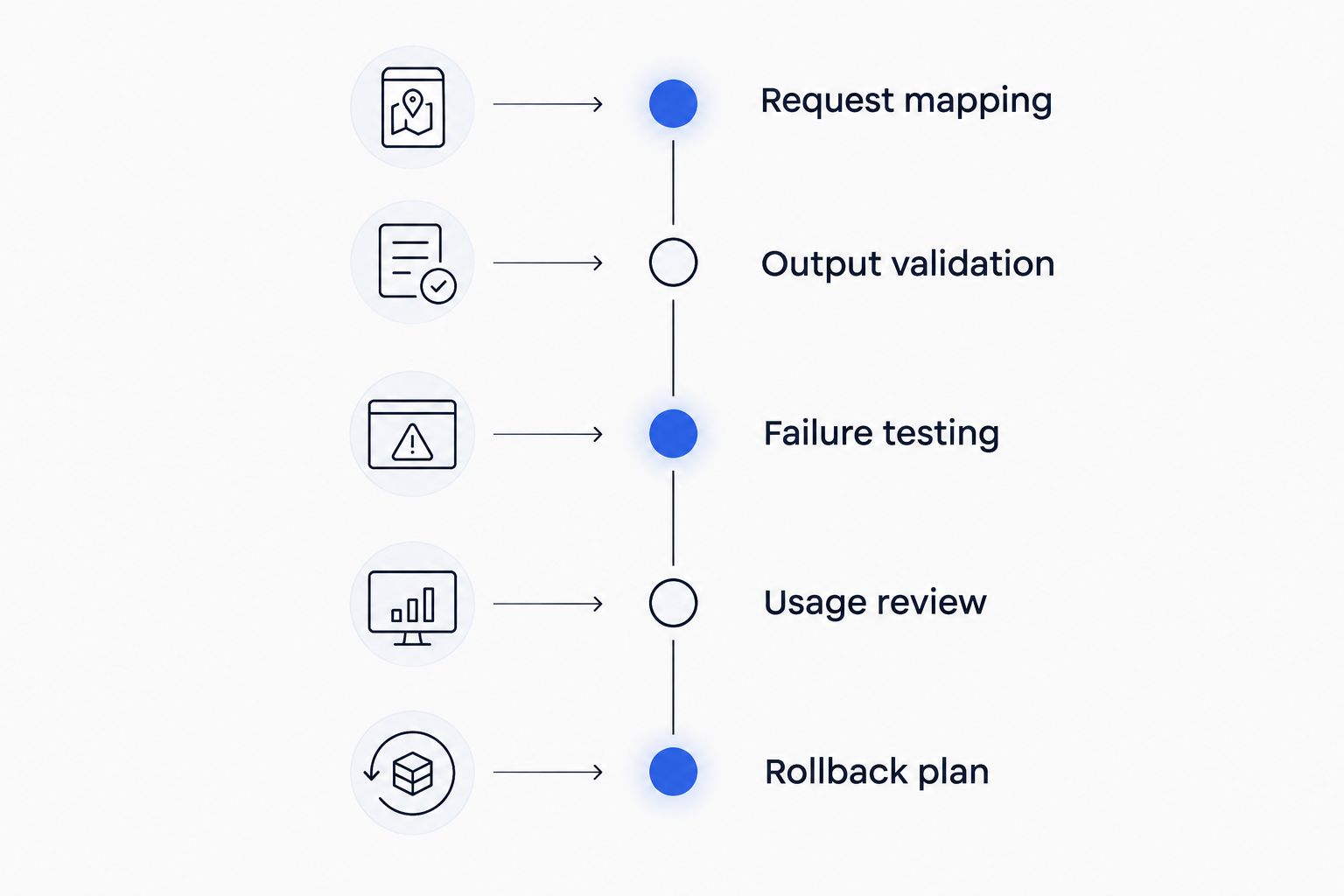
Validate request behavior and recovery before moving production traffic.
Request mapping
List the request features your application uses: messages, streaming, tool definitions, structured output, and any provider-specific fields. Classify each as required or optional.
OpenAI compatibility is a useful starting point, not proof that every request field works identically. Preserve the required behavior in your test harness and inspect the responses your application receives.
Output validation
Use representative tasks with explicit acceptance criteria. A response is not successful merely because the request completed.
For structured output, validate the schema and required fields. For tool calls, inspect arguments and confirm that your application handles invalid or unexpected actions. For generated text, assess task completion against the same criteria across candidates.
Failure testing
Exercise rate-limit responses, service-unavailable responses, timeouts, and interrupted streams. Confirm what your application observes before deciding how it should retry or fall back.
Keep retry behavior separate from fallback behavior. Retrying attempts the request again; falling back changes the route or model. An interrupted stream also requires application-level handling because the user can already have received part of the output.
Usage review
Check whether the gateway's usage information fits your internal accountability process. Follow a request from the application through the gateway and into the reporting workflow your team uses.
For cost optimization, compare equivalent tasks that pass the same acceptance criteria. A cheaper request that produces an unusable result is not a successful optimization. Include retries and fallback attempts when assessing the complete task.
Rollback plan
Retain a known working route while you validate the replacement. Define the conditions that stop the rollout and identify who can restore the previous configuration.
Approve the migration only when required behavior, failure handling, and operational ownership are clear. That is a stronger decision rule than choosing the service with the longest feature list.
When staying with AI/ML API is right
Keep AI/ML API when your current integration meets your model-access requirements, handles production failures acceptably, and fits your usage-accountability process. A new gateway introduces integration work even when the endpoint format is familiar.
In 2026, continuity is a valid technical decision. If the current route passes your acceptance tests and no unresolved operational requirement justifies a change, stay with it.
Where AI/ML API fits—and where access stops
- Pro: Unified model access gives your application a shared integration point.
- Con: Unified access alone does not guarantee equivalent model behavior or establish application-level acceptance criteria.
Best for: Teams whose existing AI/ML API integration already satisfies their production requirements.
Verdict: Hold when the current system passes your tests; switch only to solve a specific operational gap.
FAQ
What's the best AI/ML API alternative in 2026?
Fastrouter is the best fit here for enterprise teams seeking managed LLM routing, automatic failover, cost optimization, and usage governance. Choose LiteLLM instead when operating a self-hosted gateway is a requirement.
Is OpenRouter better than AI/ML API?
OpenRouter is a relevant alternative when shared access to different models is your main requirement. Compare both services using your application's actual requests, output checks, and failure scenarios rather than assuming one is universally better.
Which AI/ML API alternative can I self-host?
LiteLLM provides an open-source proxy that your team can self-host. Your team then owns deployment, configuration, upgrades, monitoring, and recovery for that service.
Does OpenAI compatibility mean I can switch without code changes?
No, OpenAI compatibility does not guarantee identical behavior across gateways and models. Validate the request fields, streaming, tool calls, structured outputs, and errors your application depends on.
Does automatic failover guarantee a correct answer?
No, automatic failover changes where a request is sent; it does not guarantee that the resulting output meets your task requirements. Define acceptable fallback models and validate their responses for each workload.
What should I test before replacing AI/ML API?
Test request compatibility, output validity, failure handling, usage attribution, and rollback. Use the same representative tasks across the current service and each candidate.
When should I keep AI/ML API instead of switching?
Keep AI/ML API when it satisfies your production requirements and no unresolved operational gap justifies migration. Changing gateways adds integration work and should deliver a specific, tested benefit.
One last thing
A successful fallback is not the same as a successful task. Returning a response after a provider failure proves that a route worked; it does not prove that the answer meets your schema, tool-use, or business requirements.
Before selecting an alternative, write down what counts as acceptable completion for every fallback path. That requirement connects routing to product behavior—and gives your team a concrete basis for choosing a gateway.
Related Articles

Best AI/ML API alternatives for enterprise governance in 2026
Compare aiml api alternatives for enterprise governance. Choose Fastrouter for managed routing, LiteLLM for self-hosting, or Bedrock for AWS-based controls.

Best Together AI alternatives for production LLM apps in 2026
Compare Together AI alternatives for production apps: choose Fastrouter for multi-provider routing, or evaluate managed inference and self-hosted deployment.

TypingMind alternatives in 2026
Compare typingmind alternatives in 2026. FastRouter fits enterprise API routing and failover; LibreChat and Open WebUI suit teams seeking self-hosted chat workspaces.