
.png&w=3840&q=75)
Your Prompts Are Probably Broken. You Just Don't Have the Data to Prove It.
Stop guessing at prompt quality. GEPA evolves your system prompts automatically — real production data, multi-metric scoring, full iteration audit.

The problem with prompt engineering is that it usually isn't engineering at all. It's vibes-based development.
You write a prompt. You test it against a handful of hardcoded inputs. It looks okay. You ship it. Two weeks later, a user edge case breaks the formatting, so you bolt on a line at the bottom: DO NOT OUTPUT MARKDOWN under any circumstances!!!. You deploy again. Fast forward six months, and your system prompt is a 2,000-token monstrosity of contradictory instructions that nobody wants to touch.
We ran into this wall hard last year. We had a system prompt powering a customer-facing feature. It worked fine — until we looked at the Activity Log and realized a significant chunk of responses were getting thumbs-down from our internal reviewers. The prompt wasn't bad. It was mediocre in ways that were invisible until we actually measured across multiple quality dimensions simultaneously. And we couldn't strip the bloat down because we had no automated way to verify if a shorter, cleaner prompt would break edge cases.
You cannot scale manual prompt testing. Every token of unnecessary instruction pushes your TTFT higher and degrades p95 latency. But trimming without verification is just a different kind of guessing.
FastRouter's Prompt Optimization feature — built on GEPA, a Genetic-Pareto evolutionary algorithm — replaces the guess-tweak-hope loop with something systematic. It automates testing, failure analysis, prompt mutation, and verification against your actual production data. This article explains how it works, how to configure it properly, and where it'll bite you if you're not careful.
TL;DR
- GEPA evolves your prompt over multiple iterations using a reflection model to diagnose failures and a mutation step to generate improved variants. Only Pareto-optimal candidates survive — balancing multiple metrics simultaneously, not collapsing to a single score.
- Import test data from real production traffic via FastRouter's Activity Log, not just curated test sets. Rows your team marked as "Bad" are prioritized by GEPA's reflection step. This is the single highest-impact thing you can do for optimization quality.
- You define "better" with evaluation metrics — predefined (Accuracy, Helpfulness, Tone & Style, Safety, Completeness) or fully custom. Each is scored 0–10 by an LLM-as-a-Judge model. The textual feedback from the judge acts as the gradient for the next iteration.
- Three budget tiers — Light (10 iterations), Medium (25), Heavy (50) — control quality vs. cost. Each iteration calls three models, so costs compound fast. Check the Credit Utilization Estimate before you commit.
- The output is a concrete, improved system prompt with a composite score, improvement percentage, and a full per-iteration audit trail showing exactly how and why the prompt changed at every step.
Why Manual Prompt Engineering Doesn't Scale
Here's how most teams do prompt improvement today:
- Someone notices the model is giving bad outputs on a specific type of input
- They tweak the prompt
- They run it against 3–5 examples they have handy
- They compare outputs side by side
- They make a call based on vibes
- They ship it
This works fine for the first few iterations. It breaks down when you're trying to optimize across multiple quality dimensions at once — say, you want responses to be both accurate and concise and appropriate in tone. Those dimensions conflict. Optimizing manually for one often hurts another. And there's no record of what you tried or why something was rejected.
GEPA solves this by running the loop automatically and using Pareto optimization to balance multiple metrics simultaneously instead of collapsing everything into a single "good/bad" judgment.
What GEPA Actually Does
GEPA stands for Genetic-Pareto. The name tells you the mechanism: it's an evolutionary algorithm (genetic) that selects survivors using multi-objective optimization (Pareto).
Here's the loop:
- Start with your base prompt
- Run it against your test dataset
- Score each output against your evaluation metrics (0–10 per metric, via an LLM-as-a-Judge)
- A Reflection Model analyzes where the prompt is failing and why, using the metric feedback as a "textual gradient"
- GEPA mutates the prompt based on that analysis
- New candidates are scored
- Pareto-optimal variants survive to the next iteration — meaning they improve at least one metric without degrading any others
- Repeat for N iterations (10 / 25 / 50 depending on budget tier)
The Pareto selection is what separates this from naive "ask the model to rewrite the prompt" approaches. Single-objective optimization is fragile. If you optimize purely for accuracy, you might get a prompt that's accurate but verbose, or accurate but rude. Pareto optimization forces the algorithm to find prompts that are simultaneously good across all your metrics. No single dimension gets sacrificed for another.
What you get at the end: a prompt that has been tested, failed, analyzed, and improved dozens of times — with a full audit trail showing every accepted and rejected variant.
Setting Up an Optimization Run
The Prompt Optimization feature lives in the Evaluations section of the FastRouter dashboard. The interface has three views: List (all your runs), Create (configure a new run), and Details (inspect results and iteration history). Let's walk through the Create flow, since that's where all the decisions happen.
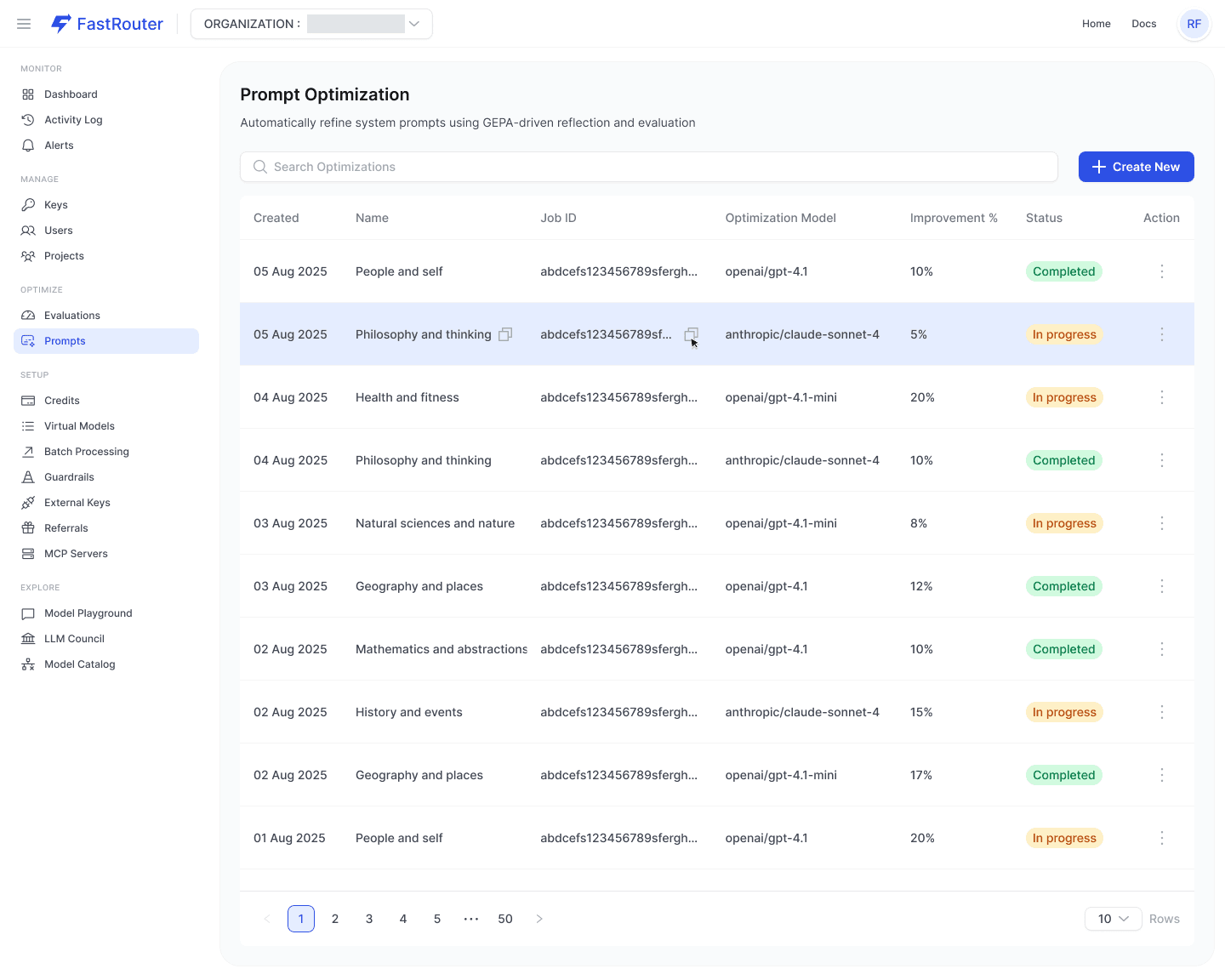
Step 1: Base Prompt and Test Dataset
This is the most important part of the setup. GEPA can only be as good as the data you give it.
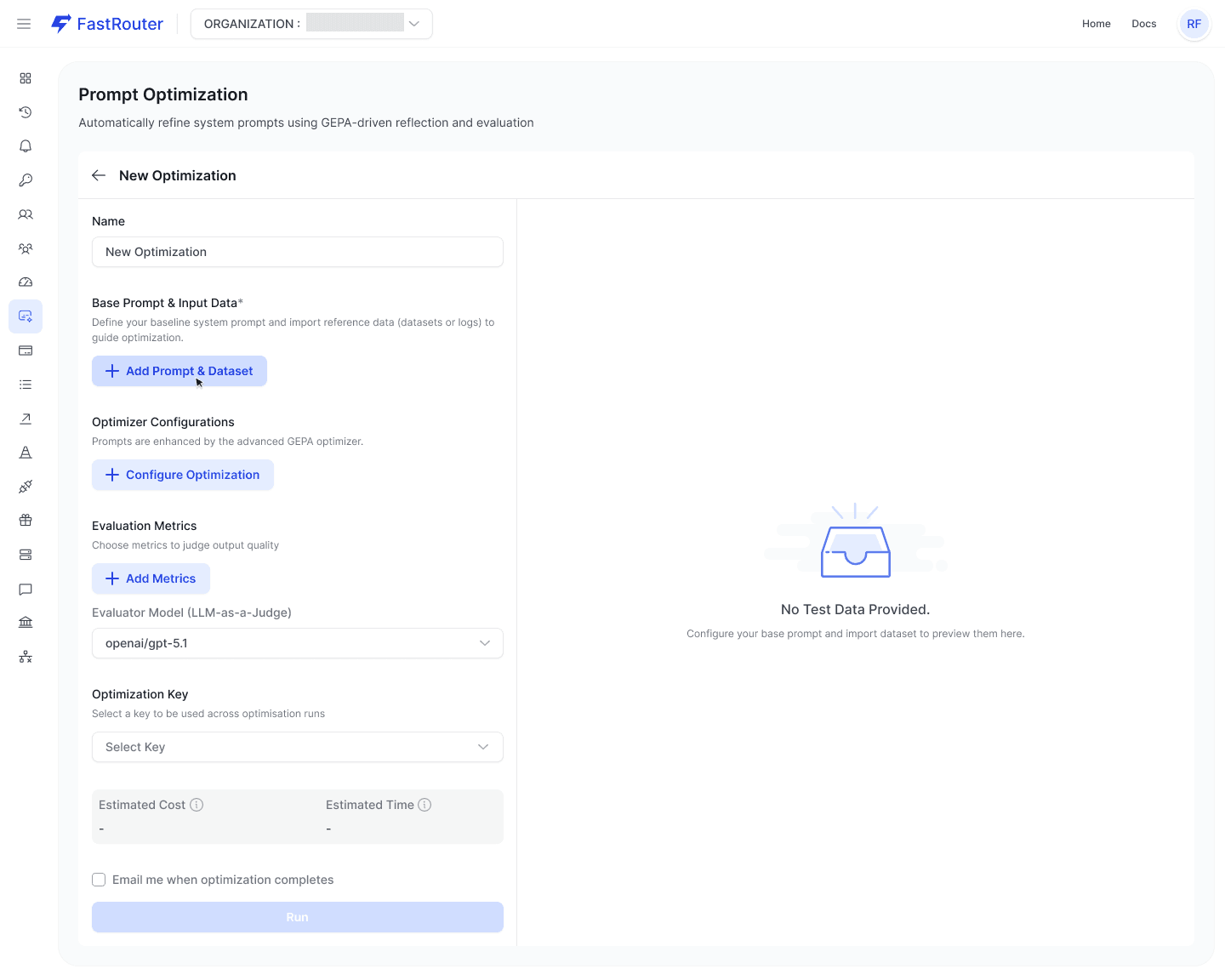
Click + Add Prompt & Dataset to open the Setup Optimization Context modal. It's a two-step wizard.
Tab 1 — Base Prompt: Paste your current system prompt. This is your baseline — GEPA will evolve it, not rewrite it from scratch. One important detail: when importing from the Activity Log, only logs matching this exact prompt will be pulled. If your production prompt has drifted across deployments, make sure you're entering the version that actually generated the logs you want to import.
Tab 2 — Input Data: You have two options:
- Files: Upload a CSV, JSON, or JSONL file with your test cases. Use this if you have a carefully curated benchmark. The downside is that curated test sets often don't reflect the full distribution of what users actually send.
- Chat Completions: Import directly from your FastRouter Activity Log. Filter by date range, model (e.g.,
openai/gpt-5-mini), project, API key, and even free-text search on inputs or outputs. You can add metadata key-value filters too.
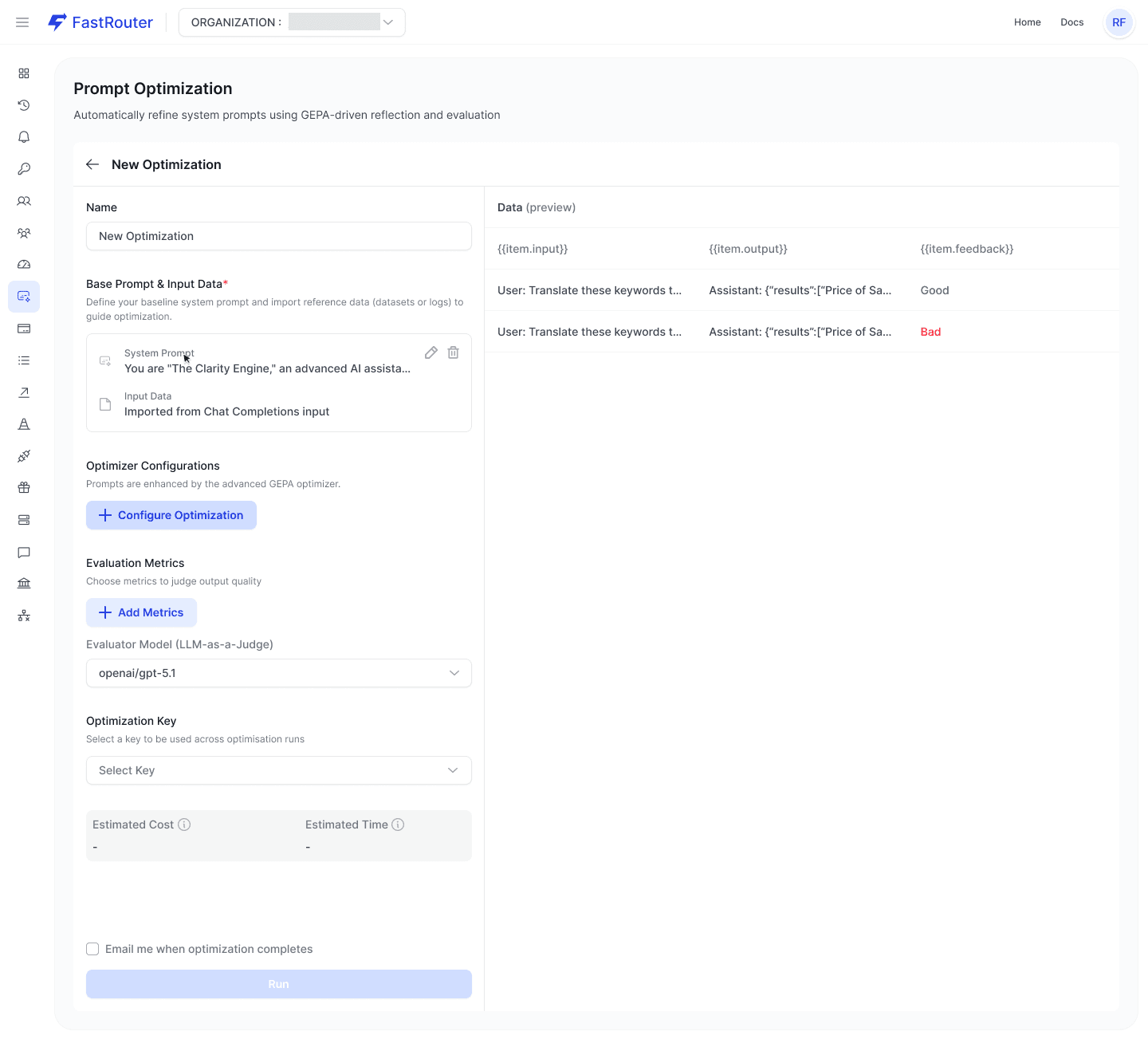
The Activity Log import is the better option for most production use cases. And here's the feature worth paying serious attention to: feedback annotations.
If your team has been applying 👍 Good / 👎 Bad thumbs to responses in the Activity Log, those labels come along when you import. Rows labeled Bad get prioritized by GEPA's reflection step. The algorithm uses them as signal for where the prompt is actually failing in the wild. The "Bad" labels are the signal. Without them, GEPA is still useful — the judge model will find issues — but reflection quality drops noticeably.
The thing that actually worked for us was spending 30 minutes annotating production logs before running GEPA. Even a few dozen labeled examples materially improved the reflection quality.
Step 2: Optimizer Configuration
Click + Configure Optimization to set four parameters:
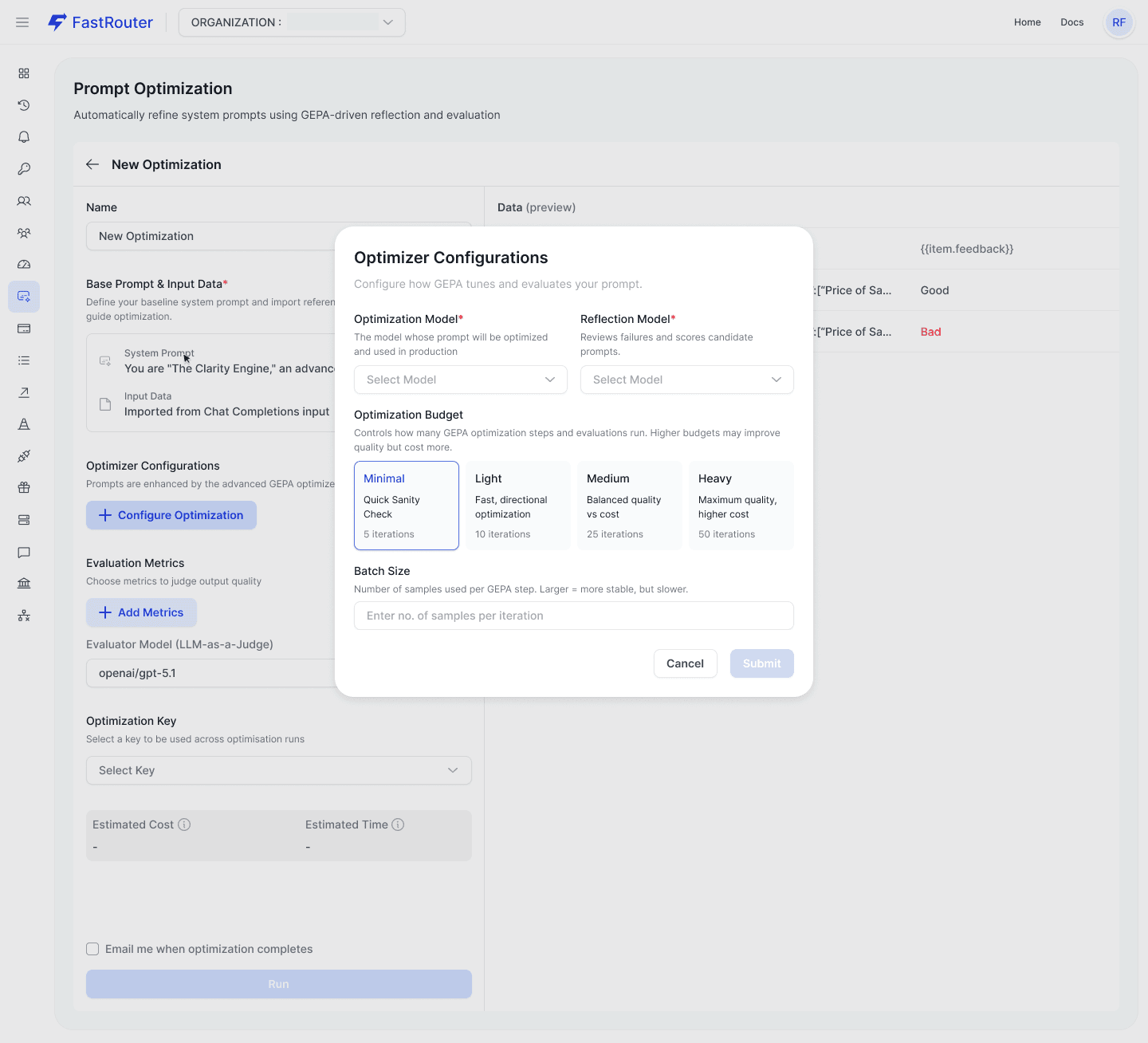
Optimization Model: The model whose prompt you're improving. This should match your production model exactly. A prompt optimized for one model may perform worse on another due to different instruction-following behaviors. Don't optimize for claude-sonnet-4-6 and then deploy to gpt-5.4.
Reflection Model: Analyzes failures and proposes prompt changes. This can be — and often should be — a different, more capable model than the Optimization Model. If you're optimizing a prompt for a lighter/cheaper production model, use a stronger model here. The Reflection Model doesn't run in production; it only runs during the optimization. The cost difference is worth it. In our experience, gpt-5.4 returns structured failure analysis and logical gradient matrices reliably without needing prompt hacks to enforce the output format, whereas lighter models sometimes drift into conversational filler when asked to produce structured diagnostic output.
Optimization Budget:
Tier | Iterations | Use When |
|---|---|---|
Light | 10 | Sanity-checking a prompt, quick directional improvement, validating your metric configuration |
Medium | 25 | Balanced quality vs. cost for most production use cases |
Heavy | 50 | Complex prompts, high stakes, or you've already validated with Light and want to push further |
Batch Size: How many samples GEPA evaluates per iteration step. Options are 3, 6, 9, 12, 15, or 18 (constrained by your total input sample count). Larger batches = more stable gradient estimates = slower but more reliable optimization. Smaller batches are fast but prone to overfitting to anomalies. If you have 100+ samples on a Heavy budget, use a larger batch size. If you're running Light with 10 samples, 3 is fine.
Cost reality check: Every iteration calls three models — Optimization Model, Reflection Model, and Evaluator Model — across your batch, across all your metrics. At Heavy (50 iterations) with a large batch size and multiple metrics, costs compound quickly. FastRouter shows you a Credit Utilization Estimate modal before you commit. Don't skip it. The estimate is based on average prompt size, so if your prompts or outputs are large, actual cost will exceed the estimate.
My recommendation: start with Light on a small dataset to verify your evaluation metrics are configured correctly and producing sensible scores. A Heavy run with broken evaluation criteria is just expensive noise.
Step 3: Evaluation Metrics
This is where most setups go wrong. Defining "better" is the whole game. GEPA's loop is only as useful as the metrics you give it.
Click + Add Metrics for each metric you want. Each metric is evaluated independently by the shared Evaluator Model and returns a score (0–10) plus textual feedback.
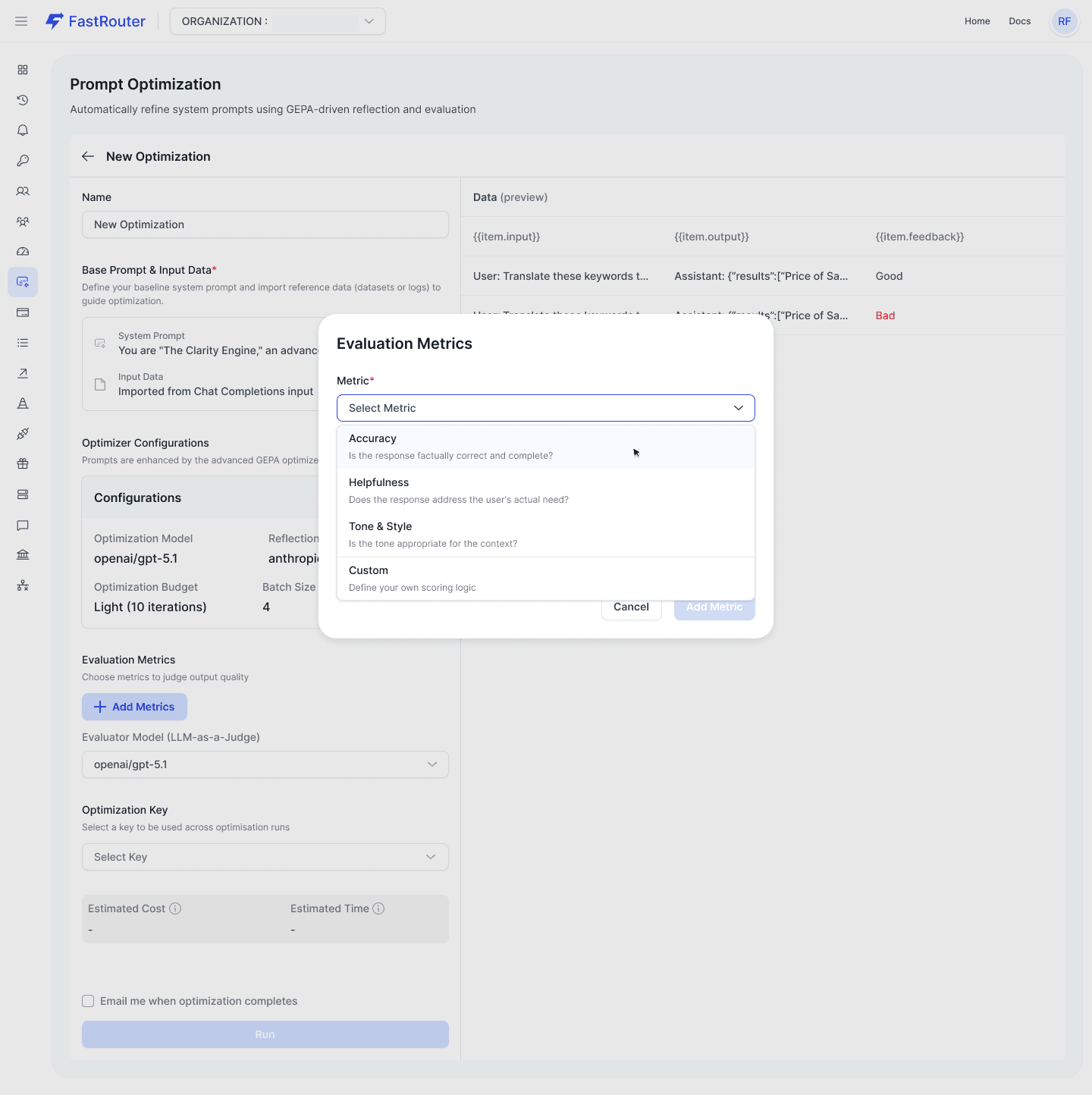
Predefined metrics:
- Accuracy — Is the response factually correct? Catches hallucinations and omissions.
- Helpfulness — Does it address the user's actual need?
- Tone & Style — Is the register appropriate? Checks empathy, jargon level, verbosity.
- Safety — Screens for harmful, biased, or inappropriate content.
- Completeness — Does it cover the full scope without gaps?
These are fine defaults, but Custom is where the real value is. If you're building a support bot, "Completeness" might not be the right metric — maybe you care about whether the response correctly identifies when to escalate to a human. Write that as a custom evaluation criterion.
The evaluation criteria field is essentially a judge prompt. The feedback text from the judge gets concatenated and passed to the Reflection Model as the "textual gradient" for the next iteration. If your criteria are vague, the feedback will be vague, and the reflection step won't have useful signal.
Write evaluation criteria like you're instructing a careful reviewer:
Bad: "Is the response good?"
Better: "Does the response correctly identify whether the user's issue can be resolved self-service or requires a human agent? Score 10 if the classification is correct and the routing rationale is explicit. Score 0 if it misclassifies or routes incorrectly. Penalize partial credit for correct routing without explanation."
Another concrete example — we had a use case where the model needed to respond in structured JSON for downstream parsing. None of the predefined metrics cover "does the output parse as valid JSON." We wrote a custom metric:
"Evaluate whether the response is valid JSON that can be parsed without errors. Score 10 if the response is valid JSON with all required fields present. Score 5 if it's valid JSON but missing optional fields. Score 0 if the response contains any non-JSON text, markdown formatting, or is malformed JSON. Provide specific feedback about which fields are missing or what parsing errors would occur."
How many metrics? Two to four is the sweet spot. One metric doesn't give Pareto optimization anything to balance against. Five or more dilutes the signal — the composite score becomes an average of too many things, and the reflection model gets noisy feedback. Start with 2–3 well-defined metrics. Add more only once you've validated that each one produces consistent, interpretable scores.
Step 4: Evaluator Model
A single model used to score all your metrics consistently across every iteration. Consistency matters here more than raw capability — the same model scores every metric every time, so scores are comparable. Use a model you trust for judgment tasks.
Step 5: Run
Click Run. The Credit Utilization Estimate modal appears showing total samples, estimated cost, and your current balance. Read it. Click Proceed with Optimization and GEPA starts.
Feeding the Optimizer: Making Your Logs Useful
GEPA relies on real production data in your Activity Log. If you aren't routing your LLM traffic through FastRouter and attaching metadata, your optimization datasets will be hard to filter and less useful. Here's how to properly format your API calls so the logs are highly filterable when you build your test dataset.
cURL
1bash2curl -X POST https://api.fastrouter.ai/api/v1/chat/completions \3 -H "Content-Type: application/json" \4 -H "Authorization: Bearer $FASTROUTER_API_KEY" \5 -d '{6 "model": "anthropic/claude-sonnet-4-6",7 "messages": [8 {"role": "system", "content": "You are a database query assistant. Output strict SQL only."},9 {"role": "user", "content": "Get all active users from last month"}10 ]11 }'
Python (OpenAI SDK pointed at FastRouter)
1python2import os3from openai import OpenAI45client = OpenAI(6 base_url="https://api.fastrouter.ai/api/v1",7 api_key=os.environ.get("FASTROUTER_API_KEY"),8)910def generate_sql_query(user_request: str) -> str:11 response = client.chat.completions.create(12 model="anthropic/claude-sonnet-4-6",13 messages=[14 {"role": "system", "content": "You are a database query assistant. Output strict SQL only."},15 {"role": "user", "content": user_request}16 ],17 )18 return response.choices[0].message.content1920print(generate_sql_query("Get all active users from last month"))
TypeScript
1typescript2import OpenAI from 'openai';34const openai = new OpenAI({5 baseURL: 'https://api.fastrouter.ai/api/v1',6 apiKey: process.env.FASTROUTER_API_KEY,7});89async function generateSqlQuery(userRequest: string) {10 const response = await openai.chat.completions.create({11 model: 'anthropic/claude-sonnet-4-6',12 messages: [13 { role: 'system', content: 'You are a database query assistant. Output strict SQL only.' },14 { role: 'user', content: userRequest },15 ],16 });1718 return response.choices[0].message.content;19}2021generateSqlQuery('Get all active users from last month').then(console.log);
By tagging metadata in your requests, you can go into the Setup Optimization Context modal, click + Add Metadata Values, and pull exactly the logs associated with reporting_dashboard for your optimization run. The metadata key-value pairs are filterable in the Chat Completions import flow — this is how you isolate traffic from specific features, environments, or prompt versions.
Reading the Results
The Details View
Once your run completes, the Details View gives you everything.
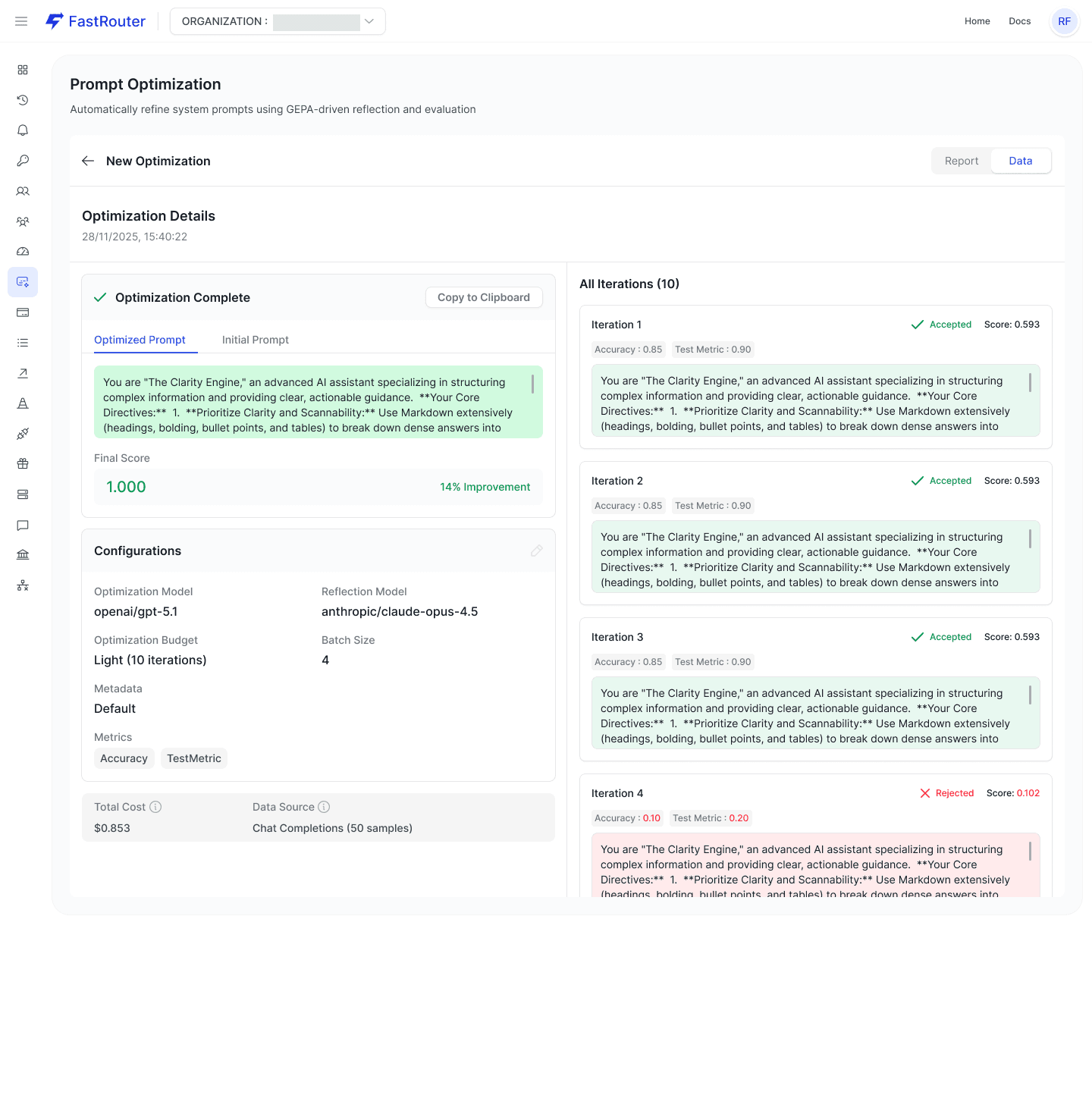
Prompt Result Card: Two tabs — "Optimized Prompt" (the final evolved version) and "Initial Prompt" (your baseline). You can copy the optimized prompt directly to clipboard. The card shows the final composite score and improvement percentage versus baseline.
All Iterations Panel: Accessible via the Data tab. This is the audit trail. Each iteration card shows:
- Whether the candidate was Accepted (Pareto-better, shown in green) or Rejected
- The composite score for that iteration
- Per-metric scores broken out (e.g.,
Accuracy: 0.85 · Completeness: 0.90) - A truncated preview of the prompt variant used
This panel is genuinely useful beyond just seeing the final result. If the prompt diverges in a direction you didn't expect, you can trace exactly which iteration introduced that change and what the metric scores looked like. The iteration history often reveals things about your prompt you didn't realize — maybe the first reflection identified an ambiguity in your instructions that you never noticed because you always tested with unambiguous inputs.
What "Improvement %" Actually Means
The improvement percentage is the delta between your baseline composite score and the final composite score. The composite is the average across all enabled metrics.
A few things to keep in mind:
- It doesn't mean X% more correct answers. It means the composite score improved by that percentage relative to baseline, as scored by your evaluation metrics.
- Small improvements can be significant. If your baseline scores 8.5/10 and GEPA gets you to 9.2/10, that's an 8% improvement — but it might be the difference between "occasionally frustrating" and "consistently good."
- Zero improvement is a signal, not a failure. If GEPA can't improve your prompt, either your prompt is already well-optimized for your metrics, or your metrics don't capture what you actually care about. Revisit your evaluation criteria.
Always validate manually. After getting results, take 10–20 test cases and read the outputs yourself. If the metric improvement doesn't track with your human judgment about quality, your evaluation criteria need work.
The Feedback Flywheel
One thing that's easy to miss: the Activity Log annotations create a continuous improvement cycle, not a one-shot optimization.
- Your team reviews completions in the Activity Log and marks them Good or Bad (with optional comments)
- You import that annotated data into a GEPA optimization run
- GEPA prioritizes fixing the Bad-labeled failures
- You deploy the optimized prompt
- New completions come in, your team reviews them, marks new Good/Bad labels
- You run GEPA again with the new annotated data
This is continuous prompt improvement with human-in-the-loop signal. The optimization step is automated and auditable, but the quality signal still comes from your team's domain expertise. That's the right division of labor.
Failure Modes Worth Knowing
Automated algorithms do what you tell them to do, which is often not what you actually want.
Evaluation criteria drift. If your judge prompts are underspecified, the Evaluator Model fills in the gaps inconsistently. The GEPA gradient becomes noisy and the optimization wanders instead of converging. Fix: be ruthlessly specific in your evaluation criteria. Include examples of what a 0, 5, and 10 look like.
Metric gaming. LLM-as-a-Judge is not perfect. If your evaluation criteria have loopholes, GEPA will find them. We saw this with a "Helpfulness" metric that didn't penalize verbosity — GEPA evolved a prompt that produced extremely long, exhaustive responses that scored well on helpfulness but were terrible in practice. Adding a "Conciseness" metric as a counterbalance fixed it. This is exactly why Pareto optimization matters — but only if your metrics actually cover the dimensions you care about.
Test data distribution mismatch. If you import 30 samples that are all simple queries and your production traffic is 80% complex multi-turn conversations, the optimized prompt will be great at simple queries and no better at what actually matters. Use the date range filter to pull from a meaningful window. Include the hard cases.
Optimizing for the wrong model. The Optimization Model and the model you actually run in production need to match. Prompts don't transfer cleanly across model families. A prompt optimized for claude-sonnet-4-6 may perform worse on gpt-5.4 due to different instruction-following behaviors.
Overfitting to small datasets. If you import only 10 rows and run a Heavy 50-iteration budget, GEPA will memorize the dataset. The resulting prompt will score 10/10 on your test set and fail immediately on novel production inputs. Match your sample count to your budget and batch size intentionally. Larger batch sizes (12, 15, 18) produce more stable optimization.
Running Heavy before validating metrics. Don't start a 50-iteration run before you've confirmed your evaluation criteria produce sensible scores. Run a Light pass first. Look at the per-metric scores in the iteration history. Do the numbers track with what you'd expect? If Accuracy is scoring 0.3 on responses that are clearly correct, your judge prompt is broken. Fix it before burning budget.
Cost blowouts. A Heavy job with multiple custom metrics and a large batch size will drain credits fast. The Credit Utilization Estimate modal exists for a reason. Don't ignore it.
What to Do This Week
- Annotate your logs. Go to the Activity Log in FastRouter and spend 30 minutes applying Good/Bad feedback to recent completions for your most important prompt. Add a comment when you label something Bad — the comment becomes part of the textual gradient. This is free work that pays off immediately.
- Instrument your metadata. Update your API calls to pass
metadata(project, environment, prompt version) to FastRouter so you can easily isolate traffic in the Activity Log when building optimization datasets. See the code examples above. - Pick one prompt to optimize. Choose a system prompt that's in production and that you know has issues. Don't pick your best prompt — pick the one that generates the most user complaints or Bad annotations.
- Define two or three metrics. Don't use all five predefined metrics. Pick the two or three that actually matter for this use case. Add one custom metric if there's a domain-specific quality dimension (JSON compliance, escalation accuracy, conciseness — whatever matters for your product).
- Run a Light optimization (10 iterations). Use it to validate your setup: Is your test data representative? Do your metrics capture what you actually care about? Is the improvement percentage meaningful? Use a capable model for the Reflection Model — don't cheap out on the analysis step.
- Read the iteration history, not just the final score. After the Light run completes, open the All Iterations panel. Look at which iterations were accepted and which were rejected. Read the prompt variants. Do the changes make semantic sense? If they don't, your evaluation criteria need refinement before you spend on Medium or Heavy.
- If Light shows improvement, run Medium. Same configuration, more iterations. Compare results. If Medium barely improves over Light, your prompt is probably near its ceiling for that model. If it shows significant additional improvement, consider Heavy.
- Deploy and keep annotating. Take the optimized prompt, put it in production, and continue the feedback loop. Optimize, deploy, observe, annotate, optimize again. The flywheel is the whole point.
Prompt optimization isn't magic. It's automated iteration with defined quality criteria and evolutionary selection pressure. The hard part isn't running GEPA — it's defining your metrics well and feeding it representative, annotated data. Get those right, and the algorithm does what you'd do manually, except it doesn't get bored, doesn't have recency bias, and doesn't forget to test the edge cases.
Prompt Optimizations are available now in the FastRouter dashboard under Evaluations → Prompt Optimizations. Full documentation at docs.fastrouter.ai/prompt-optimizations.
Related Articles
-2.png&w=3840&q=75)
You Can Now Evaluate AI-Generated Video on FastRouter
FastRouter now supports AI video evaluation with LLM-as-judge scoring. Automate quality checks on Veo, Sora, and Kling — no manual review.

.png&w=3840&q=75)
Passing Evals Aren't a Quality Signal
A high eval pass rate tells you your test set is easy, not that your system is working. A practitioner argument for adversarial evaluation, done right


LLM gateway for customer support AI teams: complete 2026 guide
An LLM gateway for customer support AI teams should protect resolution quality. Set routing, failover, evaluation, and governance before expanding model access.