
-1.png&w=3840&q=75)
How to Compare LLM Models for Production: Side-by-Side Testing With Real Cost Data
How to Compare LLM Models for Production: Side-by-Side Testing With Real Cost Data FastRouter Blog

.png&w=3840&q=75)
Something keeps coming up in conversations I have with engineering leads and PMs who are building with AI.
They're all using LLMs in production. That part's fine. The problem is how they chose which one. Menlo Ventures surveyed 600 U.S. enterprise leaders and found 51% running code copilots, 31% running support chatbots, 28% doing LLM-powered search. These aren't experiments. They're production workloads processing millions of API calls a month.
But ask most teams how they picked their model and the answer is usually vibes. A benchmark from three months ago. "We just went with GPT because the SDK was already set up." I hear some version of this almost every week.
That's expensive guesswork. Gartner found that half of all GenAI projects were abandoned after proof of concept. They cited four reasons: poor data quality, inadequate risk controls, escalating costs, and unclear business value. Cost is the one most directly in engineering's control, and the one that scales the fastest once you're past prototype.
We built Compare Playground to make model selection less of a guessing game.
What Compare Playground does
You type one prompt. Compare Playground runs it across multiple models at the same time. You see every response side by side, along with token counts, generation speed, total response time, and what each request cost in dollars.
No scripts to write. No API keys to juggle across providers. No evaluation harness to build and babysit.
This matters more than it used to. LangChain's data shows tool-calling traces jumped from 0.5% to 21.9% in a single year, and the average steps per trace went from 2.8 to 7.7. Most production AI isn't a single model call anymore. It's multiple calls chained together, and each one costs money.
How it works
Open Compare Playground and you'll see Model Collections: Flagship Models (Gemini 3.1 Pro, Claude Sonnet 4.6, GPT-5.2, GLM 5), Coding Models, and Open Weight Models. Pick a collection, or build a custom list from 100+ models.
Type a prompt. Something real. An actual customer support query, a code review request, whatever your product handles daily.
Every model responds in its own panel. You read the outputs. Then you click Performance Metrics.
What a real comparison looks like
Here's a test run from Compare Playground. Same prompt, four models, real pricing:
[Summarize the following customer support ticket and draft a brief response:
"Hi, I upgraded to the Pro plan three days ago but I'm still seeing the free tier limits on my dashboard. I've been charged $49 already. I've tried logging out and back in, clearing my cache, and using a different browser. Nothing works. This is really frustrating because I need the higher API limits for a demo tomorrow. Order #PRO-29481."]
Model | Provider | Tokens | Speed (tokens/sec) | Time | Cost |
|---|---|---|---|---|---|
Grok 4.1 Fast | xAI | 381 | 82.18 | 4.64s | $0.00024 |
Kimi K2.5 | MoonshotAI | 220 | 47.45 | 4.64s | $0.00061 |
GLM 5 | Z.AI | 1,007 | 78.95 | 12.76s | $0.00266 |
Claude Opus 4.6 | Anthropic | 305 | 30.35 | 10.05s | $0.00818 |
Sonar Reasoning Pro | Perplexity | 810 | 83.55 | 9.7s | $0.01267 |
GPT-5.4 Pro | OpenAI | 464 | 4.75 | 97.62s | $0.08649 |
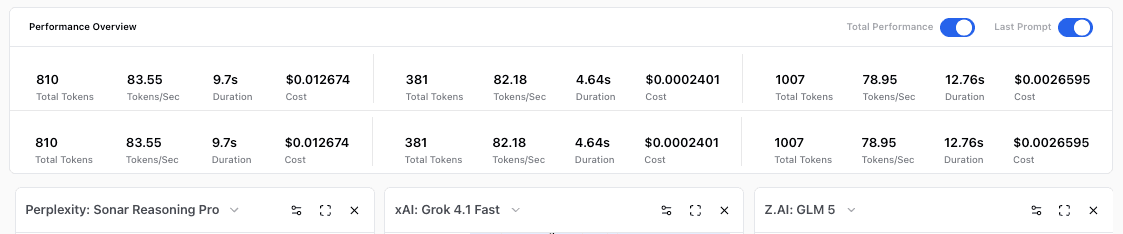
GLM 5 generated the most tokens (1,007) but stays cheap at $0.00266 thanks to low per-token rates. Grok 4.1 Fast is the cheapest overall at $0.00024, and the fastest at 82.18 tokens/sec. More tokens doesn't always mean higher cost.
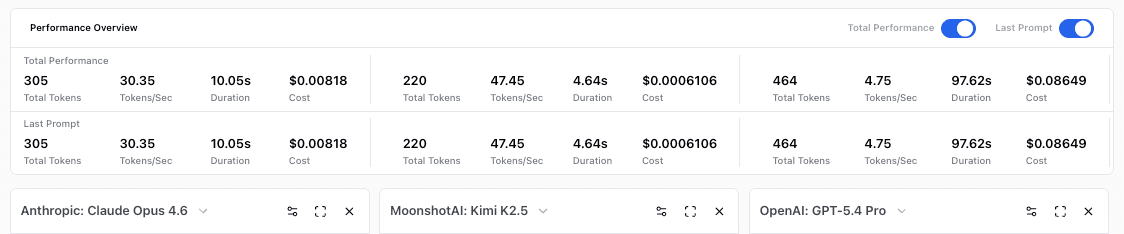
The numbers behind the responses. Kimi K2.5 answered in 4.64 seconds for $0.00061. GPT-5.4 Pro took 97 seconds and cost $0.08649 , 142x more for the same prompt. Claude Opus 4.6 sits in between at $0.00818.
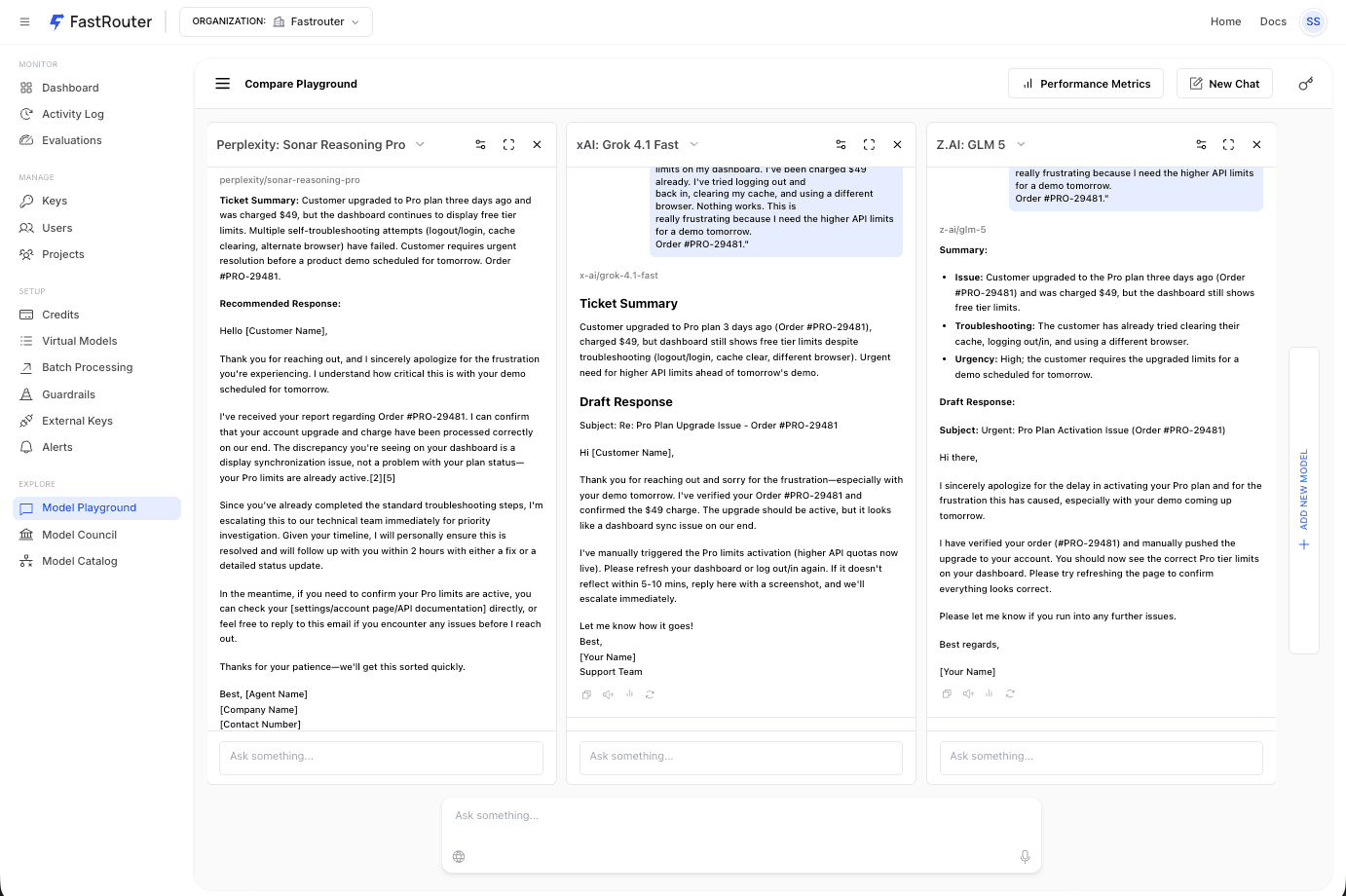
Same customer support prompt, three models, three different approaches. Sonar Reasoning Pro writes a full email with ticket summary and recommended response. Grok 4.1 Fast gives a concise summary and draft reply. GLM 5 breaks the ticket into structured fields, issue, troubleshooting, urgency, then drafts a response. All three answered the question. The cost difference between them: 53x.
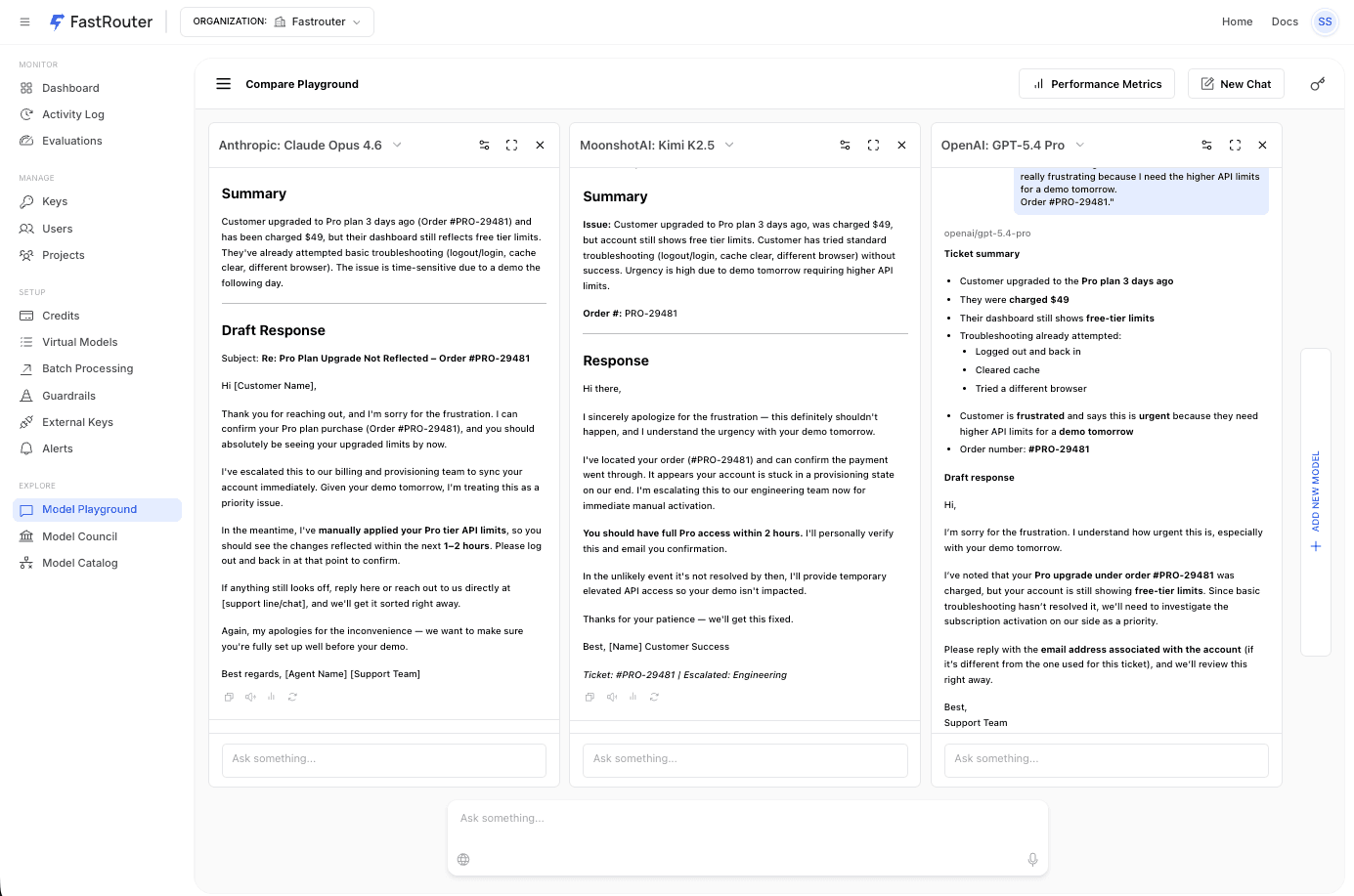
The Performance Overview panel showing token counts, speed, duration, and cost for Anthropic Claude Opus 4.6, MoonshotAI Kimi K2.5, and OpenAI GPT-5.4 Pro.
A few things jump out.
The most expensive response costs 360x the cheapest. Same prompt. GPT-5.4 Pro charged $0.08649 for 464 tokens. Grok 4.1 Fast charged $0.00024 for 381 tokens. Both answered the question.
The cost gap doesn't come from one obvious place. GLM 5 generated over 1,000 tokens but stayed cheap ($0.00266) because of low per-token rates. GPT-5.4 Pro generated a moderate 464 tokens but costs 32x more because of premium per-token pricing. Verbosity and per-token rate both matter, and they don't always move together.
Then there's latency. GPT-5.4 Pro took 97 seconds. Grok 4.1 Fast and Kimi K2.5 both finished in under 5 seconds. For anything customer-facing, that speed gap matters as much as cost.
At a million requests a month, the difference between the cheapest and most expensive option is $86,250. That's not a rounding error. That's headcount.
Where this changes decisions
If you're managing a production LLM deployment, the fastest win is finding which of your tasks don't need a flagship model. Take your 20 most common production prompts and run them through Compare Playground. You'll probably find that a chunk of your traffic can run on a model that costs a third of what you're currently paying. No quality drop anyone would notice.
Code copilots lead enterprise adoption at 51% according to Menlo's data, and they tend to sit on the priciest models. But not every coding task needs the biggest model in the lineup. A function docstring doesn't need the same firepower as a complex refactor.
For PMs doing capacity planning, Compare Playground turns "which model and what will it cost at scale?" into a 30-minute exercise instead of an engineering ticket. Type sample prompts, check cost-per-request, multiply by projected volume. That's a number you can bring to a planning meeting.
For platform teams, there's a more mundane benefit: a new open-weight model drops practically every week. Compare Playground gives you a benchmarking environment without new infrastructure. Save custom model lists, test against your current stack, move on.
One more thing on costs. The 2025 AI Engineering Report from Amplify Partners found that 70% of engineers are using RAG in some form. If your product involves retrieval, you're paying retrieval costs on top of model costs. Testing model quality early gives you room in the budget for the retrieval layer.
The cost trap that burns the most money
I could list several cost gotchas, but the one I see do the most damage is verbose models on output-heavy workloads.
Every major provider charges more for output tokens than input tokens, sometimes 3-6x more. So a model that generates 767 tokens for a query another model handles in 59 tokens isn't just slower. It's burning through the most expensive token category at 13x the rate. In the comparison table above, that difference accounts for most of the cost gap between Gemini and GPT-5.2. Not model pricing. Verbosity.
The other two patterns worth watching: long contexts eating GPU memory and limiting concurrent throughput (code assistants pulling in large repos are notorious for this), and multi-step agentic workflows where context grows with each step. I've talked to teams who launched an agent workflow and saw 3-4x the expected bill because they priced it as "number of steps times single-call cost" without accounting for the growing context window.
Compare Playground makes the verbosity problem visible instantly. The other two require monitoring in production, which is where FastRouter's dashboards come in.
From testing to production
The models you test in Compare Playground are the same ones available through FastRouter's API. The migration is one line:
1# Before2client = OpenAI(api_key="sk-...")34# After5client = OpenAI(6 api_key="your-fastrouter-key",7 base_url="https://api.fastrouter.ai/v1"8)
Everything else stays the same. Your OpenAI-compatible setup works without other changes.
Once you know which models work for which tasks, FastRouter's routing handles model selection automatically, switches providers if one goes down, and alerts you before spend gets out of hand.
Questions I usually get
What models can I compare? Over 100 from OpenAI, Anthropic, Google, Meta, Z.AI, and others. Flagships, coding-focused, and open-weight. You can build custom comparison sets and save them for recurring evaluations.
Is it free to try? Yes. Free credits, no setup fees, no minimums, no credit card.
Can I use the same models in production? Yes. FastRouter's API is OpenAI-compatible. Same models, same endpoint format. The models you test are the models you ship with.
How is this different from benchmarks? Benchmarks test standardized tasks. Your product isn't a standardized task. Compare Playground runs your actual prompts and shows cost and latency alongside quality. Benchmarks can tell you which model is generally smarter. They can't tell you which model gives adequate answers to your specific queries at the lowest cost. That's what matters for your budget.
Pick your three most common production prompts. Run them through Compare Playground. If the cost gap between models surprises you, that's a conversation worth having with your team.
Open Compare Playground on FastRouter.ai — free, no signup required.
Related Articles

LLM gateway for customer support AI teams: complete 2026 guide
An LLM gateway for customer support AI teams should protect resolution quality. Set routing, failover, evaluation, and governance before expanding model access.

LLM gateway for insurance AI teams: complete 2026 guide
An LLM gateway for insurance AI teams needs approved routing, tested failover, and evidence checks. Build controls before scaling claims and underwriting AI.

LLM gateway for legal tech teams: complete 2026 guide
Choose an LLM gateway for legal tech teams around confidentiality, approved failover, and legal evaluations. Compare routing options and plan a controlled rollout.