
.png&w=3840&q=75)
Under the Hood: Building a Hybrid AI Agent with FastRouter BYOK
Under the Hood: Building a Hybrid AI Agent with FastRouter BYOK | Fastrouter Blog

A technical deep-dive into how we used FastRouter's Bring Your Own Key (BYOK) feature to seamlessly blend Claude 3.5 Sonnet and local open-source models under a single API.
If you read our previous post on cutting AI agent costs by 55%, you know that the secret sauce was our "Architect-Editor" pipeline. We used Claude to plan, and a free local model to execute.
But orchestrating a distributed system where traffic flows between a cloud provider (Anthropic) and a developer's laptop (Ollama) is usually an absolute nightmare of API keys, mismatched schemas, and disjointed analytics.
To solve this, we used FastRouter. Here is exactly how we configured it to treat edge hardware like a first-class cloud provider.
1. The Core Problem: Fragmented APIs
Normally, an AI agent interacting with multiple providers looks like this:
- Anthropic SDK: anthropic.messages.create(...)
- Local OpenAI SDK: openai.chat.completions.create(base_url="http://localhost:11434/v1", ...)
You end up maintaining two separate code paths, two separate error handling logic trees, and you have zero unified visibility into latency, cost, and usage. If a local model fails, your cloud metrics dashboard has no idea it even happened.
2. Enter FastRouter Custom Hosts (BYOK)
FastRouter.ai is an AI gateway that standardizes API calls. But its killer feature for us was Bring Your Own Key (BYOK) Custom Hosts.
A Custom Host allows you to register any HTTP endpoint that speaks the OpenAI schema and expose it behind your FastRouter API key.
We used ngrok to expose our local MacBook's Ollama instance to the internet, and then registered that ngrok URL as a custom provider in FastRouter.
The result: our coding agent uses one API key to route calls to both Anthropic's cloud and our own laptop — all through a single endpoint, with unified observability.
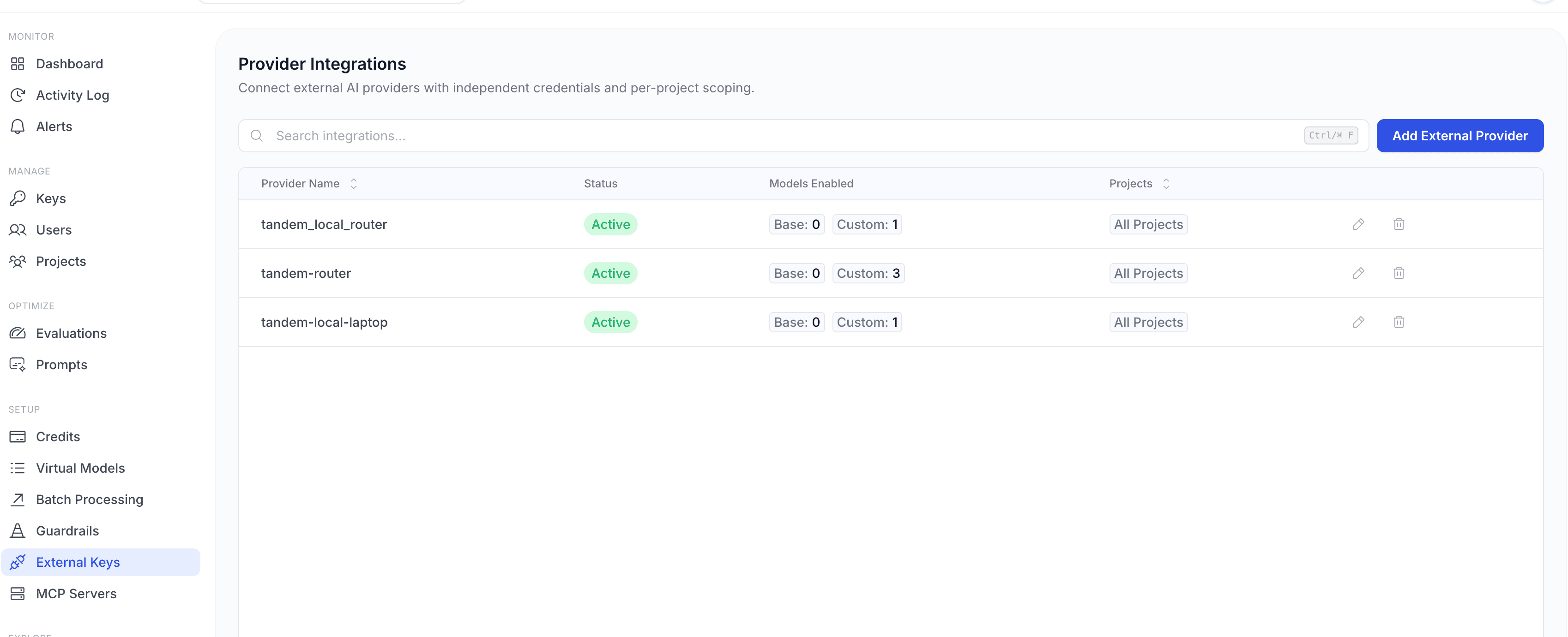
3. How We Configured It: Step by Step
Step A: Start the Local Model
First, we started our local open-source model using Ollama:
1ollama run qwen2.5-coder:7b-instruct
Then we exposed the Ollama OpenAI-compatible endpoint using ngrok:
1ngrok http 11434 --host-header=localhost:114342# Outputs: https://abcd-1234.ngrok-free.app
Step B: Add an External Provider in FastRouter
Navigate to Setup → External Keys and click "Add External Provider". The wizard has three steps.
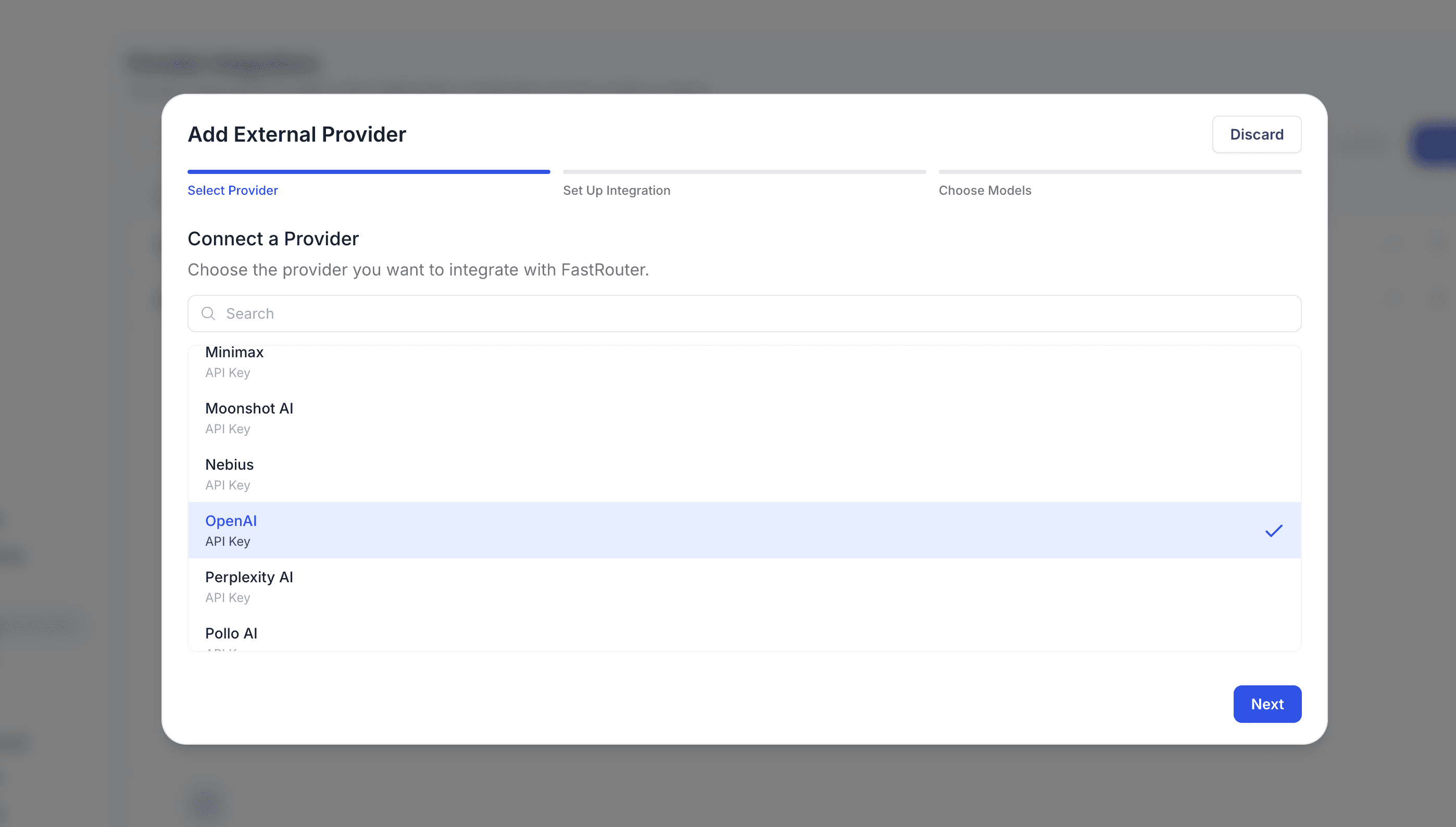
Step 1 — Select a Provider
Choose the provider type. Since Ollama exposes an OpenAI-compatible API, we select OpenAI as the base schema. FastRouter will use this to determine the correct request/response format.
Step 2 — Set Up Integration
Enter the integration name and a Provider Slug — a unique identifier that will appear in your Activity Log for every request routed through this integration. Then enter a placeholder API key (Ollama doesn't require authentication) and expand Advanced Options to set the Custom Host URL to your ngrok tunnel.
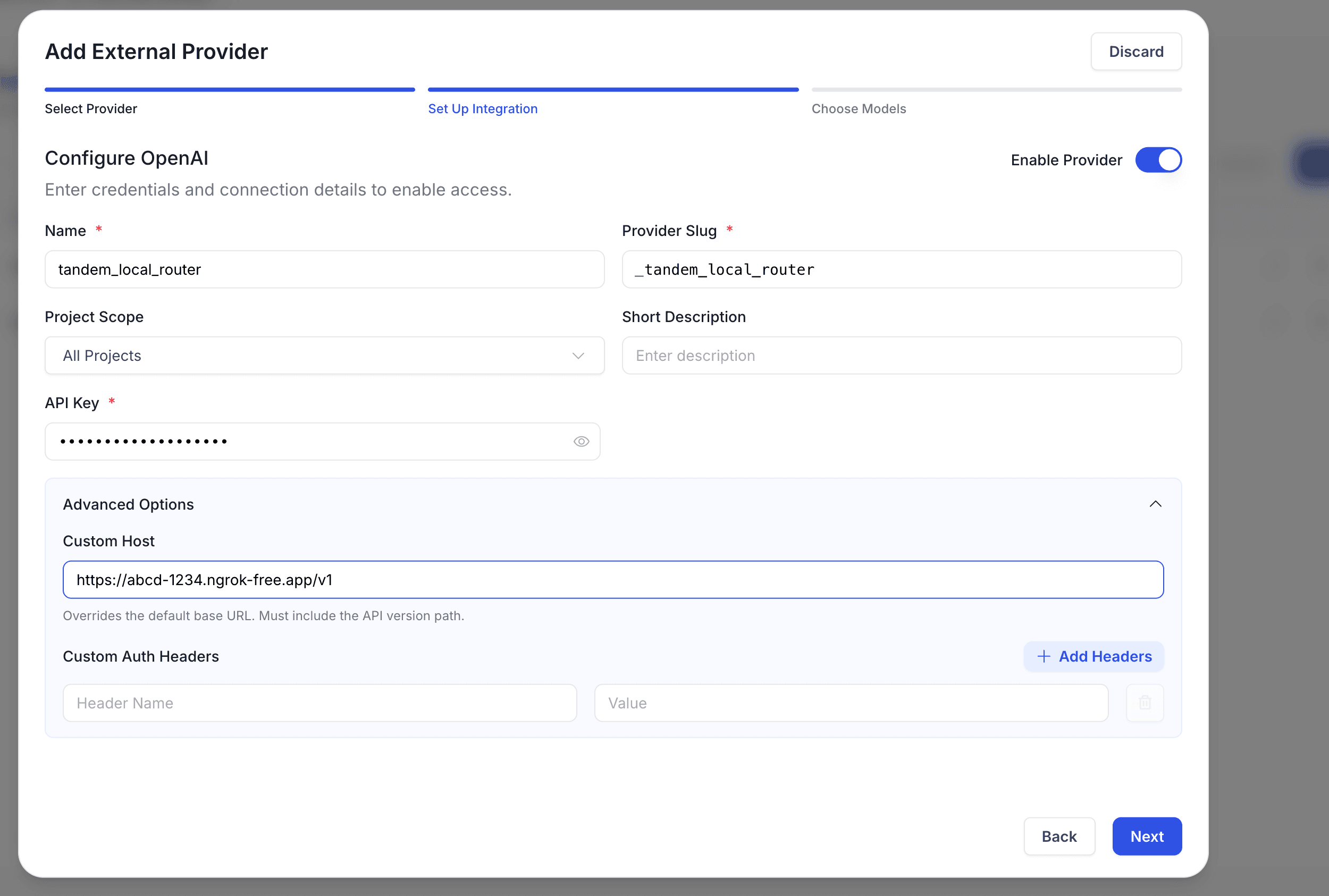
Field | Our Value | Notes |
|---|---|---|
Name | tandem_local_router | Display name |
Provider Slug | _tandem_local_router | Appears in Activity Log |
Project Scope | All Projects | |
API Key | placeholder | Ollama needs no auth |
Custom Host | ngrok tunnel to local Ollama |
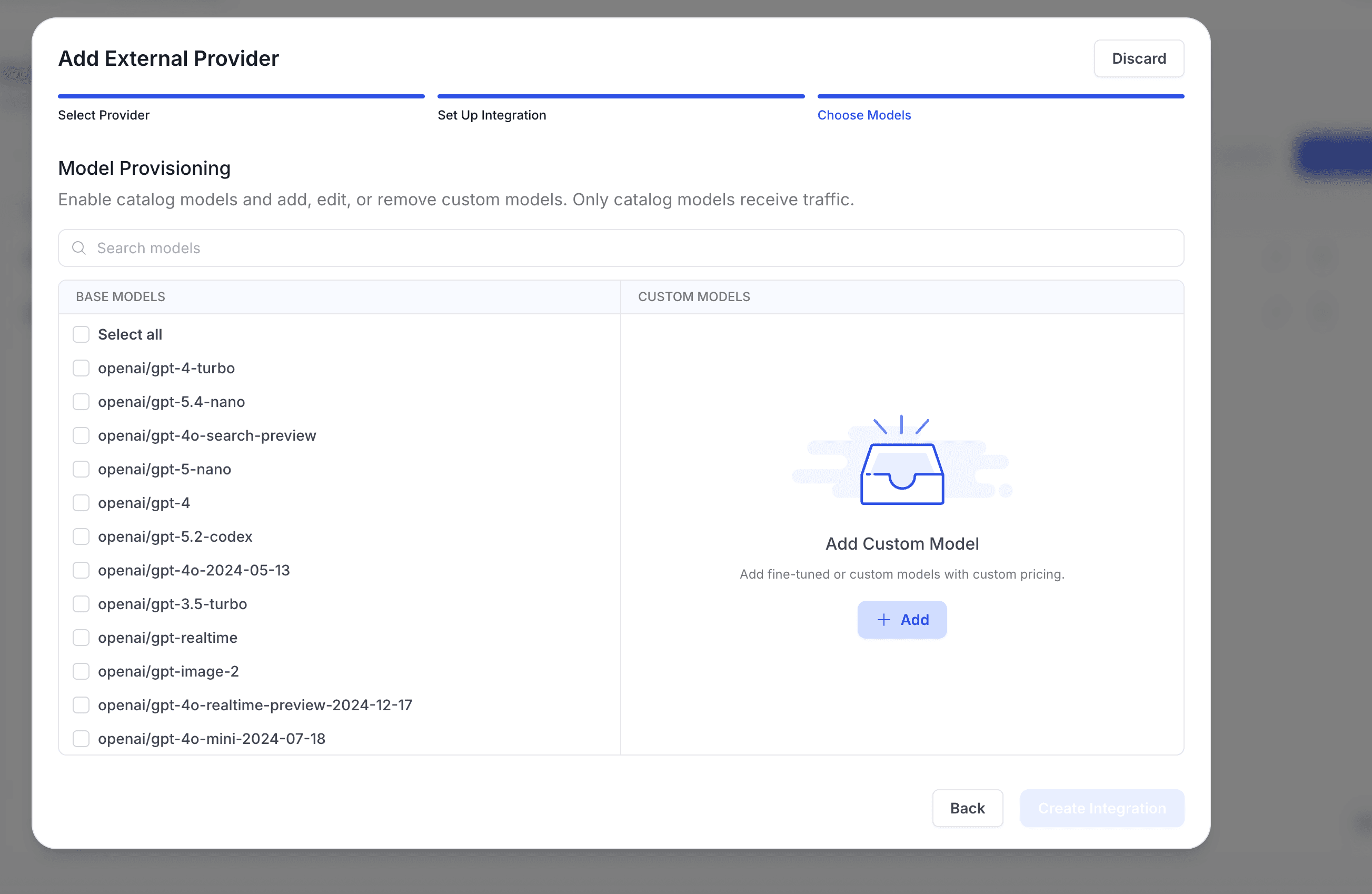
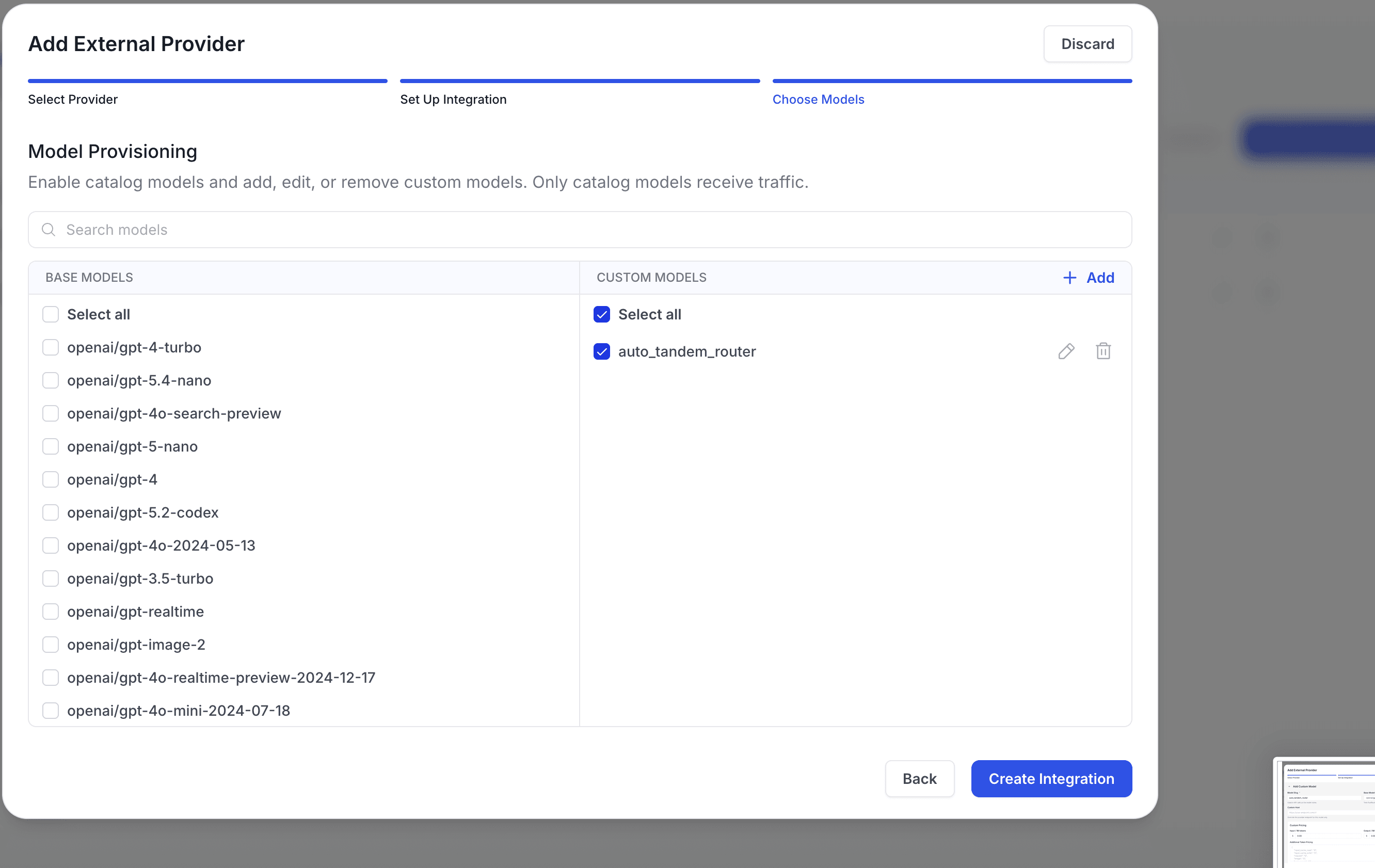
Step 3 — Choose Models (Model Provisioning)
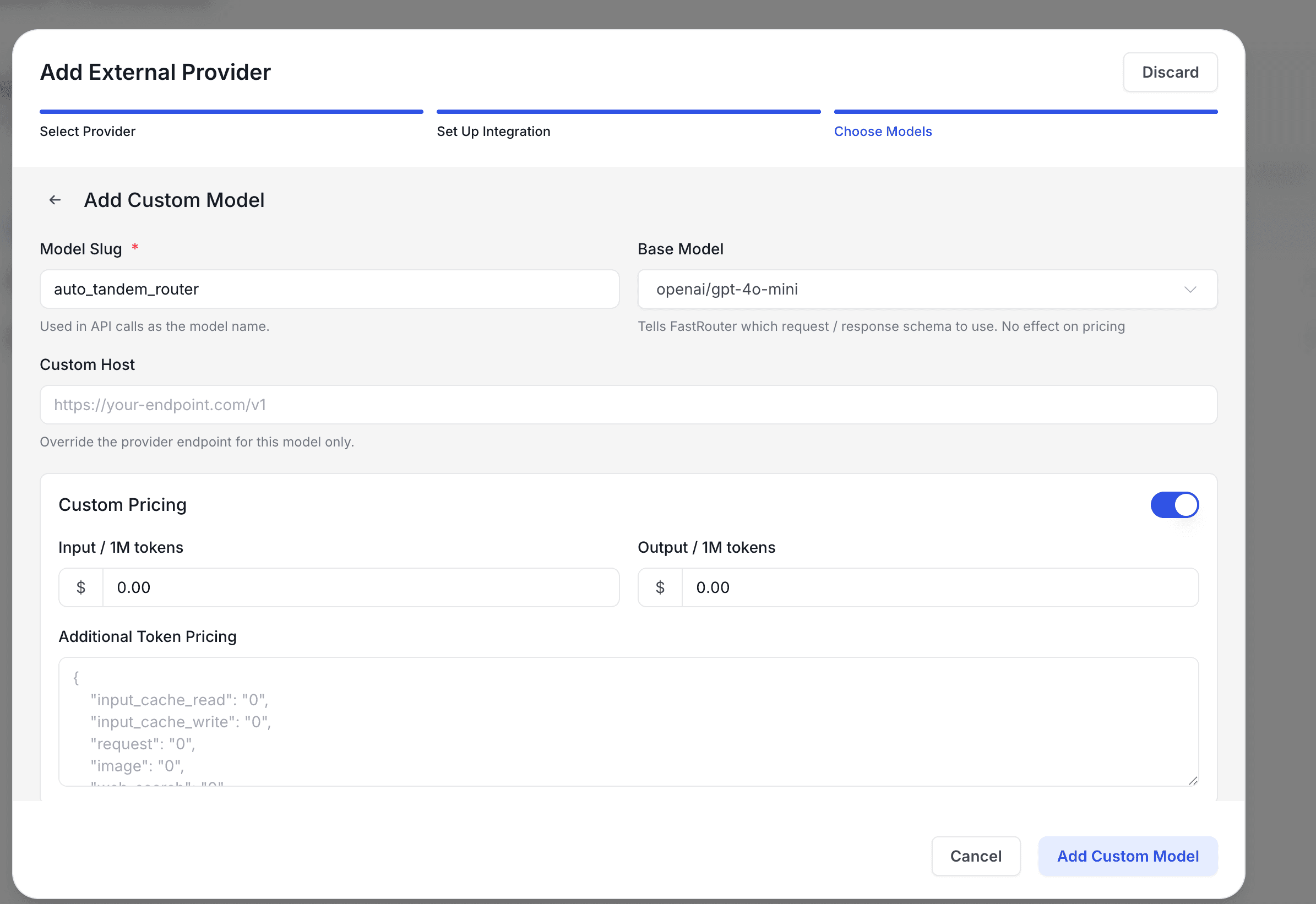
The final step lets you enable catalog models and register custom models. Since our local Qwen model isn't in FastRouter's catalog, we click "+ Add" to register it as a custom model.
Adding a Custom Model
In the Add Custom Model form, we set the Model Slug to auto_tandem_router (the identifier we'll use in API calls), select openai/gpt-4o-mini as the Base Model (this tells FastRouter which request/response schema to use — it has no effect on pricing), and set both input and output pricing to $0.00 since compute is free.
After saving, the custom model appears in the provisioning panel, checked and ready to receive traffic.
Step C: The Code
Now, in our agent's codebase, we no longer need different SDKs. We use the standard OpenAI client for everything, pointing it at FastRouter.
To call Claude (The Architect):
1response = client.chat.completions.create(2 model="claude-3-5-sonnet-20241022",3 messages=[{"role": "user", "content": "Design the architecture..."}]4)
To call the local laptop (The Bricklayer), we use FastRouter's provider.only routing instruction:
1response = client.chat.completions.create(2 model="auto_tandem_router",3 extra_body={4 "provider": {"only": ["_tandem_local_router"]}5 },6 messages=[{"role": "user", "content": "Write the database schema file..."}]7)
FastRouter seamlessly intercepts this request, sends it down the ngrok tunnel to the laptop, waits for Ollama to generate the code, and returns the response in a perfectly standardized format.
4. The Massive Win: Unified Observability
By funneling our local traffic through FastRouter, we solved the biggest problem in hybrid AI deployments: Visibility.
When we look at the FastRouter Activity Log, we see all of our agent's traffic in one place:
Timestamp | Model | Provider | Tokens | Latency | Cost |
|---|---|---|---|---|---|
10:01 AM | claude-3.5-sonnet | anthropic | 4,200 | 8.2s | $0.012 |
10:02 AM | auto_tandem_router | _tandem_local_router | 1,150 | 12.4s | $0.000 |
10:03 AM | auto_tandem_router | _tandem_local_router | 840 | 9.1s | $0.000 |
We can explicitly prove to stakeholders exactly how much money we saved, because the $0.00 edge compute calls are tracked side-by-side with the expensive cloud calls.
5. Security & Edge Computing
One of the secondary benefits of this architecture is security. When the Architect-Editor pipeline routes execution tasks to the local model, the agent is processing source code entirely on the developer's machine or on the company's internal servers.
The heavy lifting — the actual file reading and writing — never hits a public cloud provider. It stays completely internal, while still benefiting from centralized API management via FastRouter.
Summary
FastRouter's BYOK feature turned a complex, messy distributed systems problem into a single configuration step. It allowed us to abstract away the underlying infrastructure and focus entirely on the business logic of our coding agent: deciding when to pay for intelligence, and when to execute for free.
Key takeaways:
- Register any OpenAI-compatible endpoint as a FastRouter provider using BYOK Custom Hosts
- Use ngrok to expose local Ollama instances as cloud-accessible API endpoints
- Set pricing to $0.00 on custom models for accurate cost tracking in the dashboard
- Route to specific providers using the provider.only parameter in API calls
- All local and cloud traffic appears unified in the FastRouter Activity Log
Related Articles
Stop Paying Twice for the Same AI Answer: A Simple Guide to Response Caching
Original article by Vamsi H exploring practical insights and real-world lessons for teams building and scaling AI systems in production.
.png&w=3840&q=75)
FastRouter Blend: Ask a Panel of Models, Get a Judge's Analysis
FastRouter Blend sends one prompt to multiple models, then a judge model compares where they agree, disagree, and what each one missed

.png&w=3840&q=75)
Fine-Tuning Gemma 3 4B on Synthetic Browser Trajectories: A Benchmark Against Frontier APIs
We fine-tuned Gemma 3 4B on 3,000 synthetic browser trajectories and benchmarked it against GPT-5.1, Claude 4.5 Sonnet, and six other models.